
AI Background Remover for Product Photography: Boost E | Cliptics

Your product photos look amateur. And it's costing you sales.
I know that sounds harsh, but here's the reality. When someone lands on your product page, they make a judgment in about three seconds. Are you professional? Can they trust you? Does this product look worth the price you're asking?
And nothing screams amateur louder than messy backgrounds. Products photographed on your kitchen table. Distracting shadows. Inconsistent lighting from image to image. Buyers see that and bounce.
The frustration is real. You can't afford professional product photography for every item. Studio time is expensive. Hiring a photographer for hundreds of SKUs is out of the question for most small shops. So you're stuck with whatever photos you can manage yourself.
But AI background removal changed the equation. Now you can take okay photos and turn them into professional-looking product shots in seconds. Clean white backgrounds. Perfect isolation. Consistent look across your entire catalog.
Let me show you exactly how this works and why it matters more than you probably think.
Why Background Matters More Than You'd Expect
Before we get into the how, let's talk about the why.
There's actual data on this. Products photographed on clean white backgrounds convert better than products on messy or distracting backgrounds. The difference isn't small either. We're talking 20 to 40 percent higher conversion rates in many cases.
Think about what a buyer's eye does when they look at a product photo. If the background is cluttered, their attention splits. They're processing the product and the environment. If the background is clean, all focus goes to what you're selling.
Amazon figured this out years ago. That's why their product image requirements specifically call for pure white backgrounds. They know it works. Shopify sellers who follow the same standard see similar results.
Beyond conversion, there's the trust factor. Clean, professional product photos signal that you're a legitimate business. Messy photos suggest you might be dropshipping from your bedroom or selling knockoffs.
Fair or not, buyers make those judgments. Your photos are doing brand work whether you intend them to or not.
How AI Actually Removes Backgrounds
The technology here is pretty remarkable when you think about it.
Old school background removal required manual selection. You'd use Photoshop's pen tool or magic wand, painstakingly outlining your product, trying to get clean edges. Hair and fur were nightmares. Complex shapes took forever.
AI approaches it completely differently. These models were trained on millions of images where the foreground and background were already labeled. The AI learned to recognize what's a product versus what's background based on edges, textures, lighting, context.
When you upload a photo, the AI analyzes every pixel and makes predictions about what belongs to your product and what doesn't. It handles tricky cases like transparent glass, reflective metal, fine hair, all the stuff that used to break traditional selection tools.
The process takes seconds. Upload image, AI segments it, you download a clean cutout with transparent background or your choice of solid color.
The Real-World Impact on Sales
Let me give you some actual numbers from sellers who made this switch.
One Shopify store selling home decor was using their own photos taken in their warehouse. Mixed lighting, concrete floors visible, general messiness. They ran every product image through background removal, replaced with clean white.
Their conversion rate went from 1.8% to 2.6%. That's a 44% improvement. Same products, same prices, same descriptions. The only variable was cleaner product photography.
An Etsy seller making jewelry saw similar results. They'd been photographing pieces on fabric backgrounds. Pretty, but inconsistent from listing to listing. After switching to uniform white backgrounds across all products, average order value increased because buyers felt more confident in the quality.
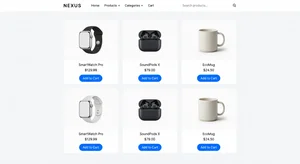
The pattern repeats. Cleaner photos lead to more trust. More trust leads to higher conversion. Higher conversion means more revenue from the same traffic.
Step-by-Step: Fixing Your Product Photos
Alright, let's actually do this. Here's how you take your existing product photos and transform them.
Step 1: Gather your current images
Pull together all your product photos. Even the ones you're embarrassed about. We're going to fix them.
Make sure you're working with the highest quality versions you have. If you shot them yourself, use the original files from your camera or phone, not compressed versions you already uploaded somewhere.
Step 2: Remove the backgrounds
Upload your images to an AI background removal tool. Most handle this automatically. You just upload, the AI processes it, you download the result.
You'll get images with transparent backgrounds. That's your starting point.
For some products, the AI nails it perfectly on the first try. For others, especially complex items with fine details, you might need to touch up edges manually. Most tools have basic editing features for fixing small issues.
Step 3: Add clean backgrounds
Now you choose what goes behind your product. For most e-commerce use, pure white works best. It's what marketplaces expect and what buyers are used to seeing.
Some categories benefit from subtle colored backgrounds. Fashion sometimes uses light grays. Home goods might use soft pastels. But when in doubt, white is safe.
Keep it consistent across your catalog. If you use white for some products and gray for others, it looks disjointed and unprofessional.
Step 4: Standardize sizing and spacing
This is the detail people skip that makes a huge difference.
Make sure your products are sized consistently relative to the frame. A small item shouldn't fill the entire image while a large item is tiny in the corner. Maintain proportional relationships.
Center your products or use consistent alignment. Left-aligned for some, centered for others looks sloppy when browsing your store.
Add consistent padding around products. Give them room to breathe in the frame.
Step 5: Batch process your catalog
If you've got hundreds of products, doing this one at a time will take forever.
Most background removal tools support batch processing. Upload a folder, the AI processes everything, you review and download the set.
This turns a multi-week project into an afternoon. Sure, you'll still need to review each image and fix any issues, but the heavy lifting is automated.
Going Beyond Basic Removal
Once you've got clean cutouts, there are creative things you can do.
Lifestyle backgrounds: You can drop your products into lifestyle scenes. Show that lamp in a living room. Display that shirt on a model. Create context without needing to shoot in those environments.
Creative compositions: With transparent backgrounds, you can create hero images with multiple products arranged together. Build collections that shoppers can browse visually.
Seasonal variations: Change backgrounds for different campaigns. Summer pastels, fall earth tones, holiday colors. Same product photos, different presentation.
Tools like the AI image editor let you add or modify backgrounds after removal. You're not limited to white forever.
And if you need to remove specific objects rather than backgrounds, object remover tools handle that too. Clean up unwanted elements while keeping your background intact.
Common Mistakes That Kill Results
Here's what I see people mess up when they start doing this.
Inconsistent quality: They fix their top 10 sellers but leave the rest looking rough. The catalog feels disjointed. Fix everything or buyers wonder why some products got better treatment.
Over-editing: They go too far trying to make products look perfect and end up in unrealistic territory. Buyers want to see what they're actually getting. Clean photos, yes. Misleading photos, no.
Ignoring mobile: They optimize for desktop viewing and forget that most shoppers browse on phones. Test how your cleaned-up photos look on small screens.
Skipping shadows: Natural drop shadows help products feel grounded rather than floating. Most removal tools can add subtle shadows back in. Use them.
Not updating everywhere: They fix photos in their Shopify store but forget about their Amazon listings, social media, email campaigns. Update everywhere for consistent brand presentation.
The Time Investment
Let me be realistic about what this takes.
If you're doing a few dozen products, you can knock this out in a day. Upload, review, fix any issues, download, update your store.
If you're dealing with hundreds or thousands of SKUs, it's more involved. But even then, we're talking days, not weeks or months.
Compare that to the alternative of hiring a professional photographer to reshoot everything. That's weeks of scheduling, thousands of dollars, and you still need reshoots whenever you add new products.
With AI background removal, you fix what you have, establish a workflow for new products, and maintain consistency going forward without ongoing costs.
Looking at ROI
The math here is straightforward.
Let's say you're doing $10,000 a month in sales with a 2% conversion rate. That's 500 visitors converting out of 25,000.
You improve your product photos. Conversion goes to 2.5%. That same 25,000 visitors now generates $12,500 in sales. You just made an extra $2,500 monthly from the same traffic.
Most background removal tools cost anywhere from free to maybe $30 a month for higher volumes. Even at the high end, you recoup that investment in a day.
And the benefits compound. Better-looking products get shared more on social media. They perform better in ads. They increase brand perception. The conversion lift is just the start.
Beyond Just White Backgrounds
The principle extends beyond basic removal.
Clean product presentation builds trust. That can mean white backgrounds, or it can mean consistent lifestyle settings, or creative compositions. The key is professionalism and consistency.
Some categories benefit from showing products in context. Furniture in rooms, clothes on models, tools being used. AI lets you composite products into those scenes without expensive photo shoots.
The technical capability is there. What matters is understanding what presentation style serves your products and customers best, then executing consistently.
Making This Your New Standard
Here's the thing. Once you see the difference clean product photos make, you can't unsee it.
Going forward, make background removal part of your workflow. When you photograph new products, you know you'll clean them up before listing. It becomes as automatic as writing descriptions or setting prices.
For existing inventory, chip away at it. Fix your best sellers first. Then your next tier. Eventually, your entire catalog looks professional.
And when you're competing with sellers who are still using messy photos, you have an immediate visual advantage that translates to real dollars.
Your products haven't changed. Your photos just finally show them the way they deserve to be seen. That's what makes the difference.