
AI Code Review Tools That Catch Bugs First | Cliptics
Your team shipped a null pointer exception to production last Tuesday. The PR had three approvals. Nobody caught it. And honestly, that's not a people problem. It's a process problem.
Human reviewers are great at architecture decisions, naming conventions, and design patterns. They're terrible at spotting off by one errors buried in line 847 of a 1200 line diff. That's where AI code review tools come in. They don't get tired. They don't skim. They don't approve a PR just because it's Friday afternoon and they want to go home.
I've spent the last several months testing every major AI code review tool on real codebases. Not toy examples. Real production code with real bugs. Here's what actually works.
What AI Code Review Tools Actually Catch
Let's get specific. These aren't vague promises. Here are real categories of bugs I've watched AI tools flag that humans missed consistently.
Race conditions. A teammate wrote a function that read from a shared cache, modified the value, then wrote it back. No locking. Three human reviewers approved it. The AI flagged it in seconds with a clear explanation of the concurrency risk.
SQL injection vectors. String concatenation in database queries is one of the oldest mistakes in the book. Developers still do it. AI tools catch every single instance because they never assume "oh, that input is probably sanitized upstream."
Memory leaks in event listeners. This one is sneaky. You add an event listener in a React useEffect but forget the cleanup function. The component mounts, unmounts, mounts again, and suddenly you've got three listeners doing the same thing. AI tools pattern match on this constantly.
Type coercion bugs. In JavaScript, "5" + 3 gives you "53" not 8. Humans glaze over these. AI tools don't.
Unhandled promise rejections. An async function without a catch block. It works fine in testing. Then one API call fails in production and your entire Node process crashes. AI catches the missing error handling every time.
The pattern here is clear. AI excels at repetitive, pattern based analysis. The stuff that's boring to check manually. The stuff humans skip because they're focused on the bigger picture.
The Best Tools Right Now
After testing extensively, here's my honest breakdown. No affiliate deals. No sponsored rankings. Just what works.
Claude Code Review is the tool that surprised me most. If you've used Claude for code review, you know it understands context unusually well. It doesn't just flag syntax issues. It catches logical errors, suggests better approaches, and explains why something is problematic. It handles large diffs without losing track of what the code is actually trying to do. For teams that want depth over speed, this is the one.
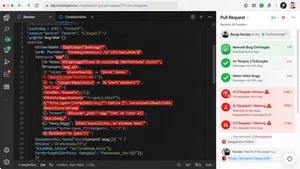
CodeRabbit runs automatically on every pull request. It posts comments directly in your GitHub or GitLab PR, so your workflow barely changes. It catches security issues, performance problems, and style violations. The incremental review feature is smart. When you push a fix, it only re-reviews the changed parts instead of the whole PR again.
SonarQube has been around longer than most. The AI features they've added recently are solid. It tracks code quality over time, which matters for tech leads managing technical debt. The dashboard showing bug density trends across sprints is genuinely useful for planning. It's heavier to set up than newer tools, but the depth of analysis justifies it for larger teams.
Snyk focuses specifically on security vulnerabilities. It scans your dependencies, your container images, and your infrastructure as code. If you've got a package.json with 200 dependencies and three of them have known CVEs, Snyk tells you which ones and what to upgrade to. For DevOps engineers managing supply chain security, this is non negotiable.
You can explore and compare many of these through the AI code reviewer directory to find the right fit for your stack.
Integrating AI Review Into Your CI/CD Pipeline
Here's where most teams get it wrong. They add an AI review tool, get flooded with 200 warnings on their first PR, and immediately disable it.
Don't do that. Start with a narrow scope.
Configure the tool to only flag high severity issues for the first two weeks. Let your team get comfortable with the feedback format. Then gradually widen the rules. This ramp up period is the difference between adoption and abandonment.
The best setup I've seen works like this. AI runs first as a check on every PR. It posts comments inline. Human reviewers see those comments alongside the code. They can agree, dismiss, or discuss. The AI isn't replacing the human review. It's doing the tedious pre scan so humans can focus on what they're actually good at: asking "should we even be building this?" and "is this the right abstraction?"
Block merges on critical security findings. Make everything else advisory. Your developers won't resent the tool if it's catching real problems without slowing them down on style nitpicks.
Most tools support GitHub Actions, GitLab CI, and Bitbucket Pipelines natively. Setup is usually a YAML file and an API key. You can be running in under an hour.
The Limitations Nobody Talks About
AI code review tools have blind spots. Big ones. Pretending otherwise would be dishonest.
They struggle with business logic. An AI can tell you that a function might throw an exception. It cannot tell you that the discount calculation is wrong because the product team changed the pricing model last week and nobody updated the requirements doc. Context that lives outside the code is invisible to these tools.
They generate false positives. Not constantly, but enough that you need a human to triage. A function that looks like it has a race condition might be fine because it's only ever called from a single threaded context. The AI doesn't know that.
They can miss novel bugs. AI tools work by pattern matching against known vulnerability types. A truly new category of bug, something nobody's seen before, won't match any pattern. This is rare but worth acknowledging.
And they absolutely cannot replace architectural review. Whether your service boundaries make sense, whether you're building the right thing, whether the data model will scale. Those are human judgment calls.
Making the Decision
If you're a tech lead or engineering manager, here's the practical framework. Pick one tool. Start with security focused scanning because the ROI is clearest. Run it in advisory mode for a month. Measure how many issues it catches that humans missed. Then decide whether to expand.
The AI code review tools listed on Cliptics give you a solid starting point to compare features, pricing, and integration options across the major players.
For small teams under ten developers, CodeRabbit or Claude Code Review will cover most of your needs without heavy infrastructure. For enterprise teams with compliance requirements, SonarQube plus Snyk gives you the audit trail and security depth you need.
The bottom line is simple. Your best developers shouldn't be spending their review time hunting for null checks and missing error handlers. Let the AI do that. Let your humans do what humans are actually good at. That's how you ship better code without burning out your senior engineers.
The tools are good enough now. The question isn't whether to use AI code review. It's which tool fits your team and how fast you can get it running.