
Professional AI Headshots: LinkedIn Profile Pictures That | Cliptics
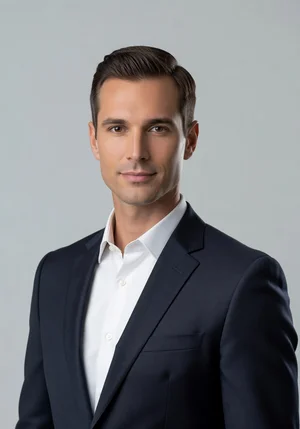
Your LinkedIn photo is costing you opportunities. And you probably don't even realize it.
Maybe it's a cropped wedding photo. Maybe it's that casual shot from vacation. Maybe you're wearing sunglasses or have someone else in the frame. Maybe the lighting is terrible or the background is distracting.
Here's what happens when a recruiter or potential client lands on your profile. They make a snap judgment about your professionalism in seconds. Your photo either signals "credible business professional" or it doesn't. There's not much middle ground.
And if it doesn't, they move on. They've got fifty other candidates to look at. Why waste time on someone who couldn't even bother with a proper headshot?
The traditional fix costs money. Professional headshot photography runs $200 to $500 minimum. More in major cities. Plus scheduling, traveling to a studio, hoping the photographer nails it. It's a whole production.
AI headshot generators changed this completely. Upload a few casual photos. Get back professional-quality headshots that look like they came from an actual photo shoot. No studio, no photographer, no hassle.
Let me show you how this actually works and what separates great AI headshots from obvious fakes.
Why Your LinkedIn Photo Actually Matters
Before we get into the how, let's talk about why this is worth caring about.
Profiles with professional photos get viewed significantly more than those without. LinkedIn's own data shows profiles with photos receive 21 times more views and 36 times more messages.
But it's not just having any photo. It's having the right kind of photo. One that signals competence, approachability, and professionalism in your specific field.
For job seekers, your headshot is often the first impression. Before they read your experience or skills, they're looking at your face. You want that first impression to be "this person looks like they belong in this role."
For entrepreneurs and freelancers, your headshot is part of your brand. It shows up everywhere. LinkedIn, your website, email signatures, speaking bios. Consistency and quality matter.
For corporate professionals climbing the ladder, looking the part becomes increasingly important. Senior roles expect a certain level of polish. Your LinkedIn photo is part of that package.
The stakes are higher than a simple social media profile pic. This is your professional presence. It deserves more than a random snapshot.
How AI Actually Creates Professional Headshots
The technology behind AI headshot generation is doing some impressive work.
You start by uploading several photos of yourself. Different angles, different lighting, different expressions. The AI needs to learn what you actually look like from multiple perspectives.
Then the AI builds a model of your face. Not just a flat representation, but an understanding of your facial structure, features, proportions, skin tone, all the details that make you you.
Next, it generates new images using that model. It can place you in professional settings you were never photographed in. Change lighting to match studio conditions. Adjust wardrobe digitally. Create variations you never actually posed for.
The output looks like professional headshots because the AI learned what professional headshots look like from training on thousands of actual studio photos. It knows the lighting patterns, the composition rules, the styling norms.
Good AI headshot tools produce results that are genuinely hard to distinguish from real studio photography. Not perfect, but close enough that most viewers would never question them.
What Makes a LinkedIn Headshot Actually Work
Not all headshots are created equal. Here's what separates ones that help from ones that hurt.
Clean background: Your face should be the focus. Solid colors or subtle gradients work best. Office settings are fine if not distracting. Avoid busy backgrounds that pull attention.
Appropriate attire: Dress for the role you want or the industry you're in. Tech might be business casual. Finance is probably formal. Creative fields can be more expressive. Match expectations.
Genuine expression: Slight smile, natural look. Not forcing it, not stone-faced. You want approachable but professional. Think "confident and pleasant to work with."
Proper lighting: Face should be evenly lit. No harsh shadows. No weird color casts. Studio lighting or natural window light quality.
Good framing: Head and shoulders, properly cropped. Not too close, not too far. Your face should take up most of the frame without being uncomfortably tight.
High resolution: Crisp, clear, professional quality. Not grainy or pixelated. LinkedIn displays photos fairly large, especially on desktop.
AI headshot generators can nail all these elements. The trick is choosing the right output from the options generated and tweaking settings if needed.
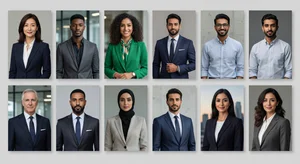
Step-by-Step: Creating Your AI Headshot
Let's actually do this. Here's how you go from casual photos to a professional LinkedIn headshot.
Step 1: Gather your source photos
You need good quality casual photos of yourself. Not professionally shot, just clear pictures where your face is visible.
Aim for at least 10 to 15 photos. Different angles, different expressions, different lighting. The more variety, the better the AI can learn your actual appearance.
Avoid sunglasses, hats, or anything covering your face. Photos should be recent so they actually look like current you. And decent resolution, not tiny thumbnails.
Step 2: Upload and process
Most AI headshot tools walk you through uploading your photos. The AI trains on your specific face, which usually takes anywhere from 30 minutes to a few hours depending on the service.
You're not doing anything during this time. The processing happens server-side. You'll get notified when results are ready.
Step 3: Review generated options
The tool typically generates dozens of headshot options. Different backgrounds, different outfits, different lighting, different expressions.
Look through all of them. Some will nail it. Some will look slightly off. Some might have weird AI artifacts like strange hand positions or odd clothing details.
You're looking for the ones that look genuinely professional and actually like you. Not idealized you. Real you in professional photography.
Step 4: Fine-tune if possible
Some tools let you adjust parameters and regenerate. If the backgrounds are too bland, ask for something with more visual interest. If the expressions feel stiff, adjust toward more natural.
This iteration gets you from good to great. The first batch might have solid options. Refinement gives you perfect options.
Step 5: Download and use
Pick your favorite. Download the high-resolution version. Upload it to LinkedIn and any other professional profiles.
Consider getting a few variations. Maybe one for LinkedIn, one for your company website, one for speaking engagements. Slight differences in formality or background can suit different contexts.
Common Mistakes That Ruin AI Headshots
Here's where people go wrong and end up with obvious AI photos instead of professional results.
Over-retouching: Some AI tools smooth skin to unrealistic perfection. You end up looking plastic. Real professional headshots have texture and character. Don't sacrifice authenticity for artificial perfection.
Wrong context for industry: A creative director can pull off a more stylized headshot than a financial analyst. Know your field's norms and generate accordingly.
Uncanny valley issues: Sometimes the AI gets eyes slightly wrong or generates weird reflections in glasses. Always inspect closely before using. Trust your gut if something feels off.
Inconsistent identity: If your AI headshot looks noticeably different from how you actually appear in person, that creates confusion when you meet people. The photo should enhance your professional presence, not create a disconnect.
Ignoring diversity of options: Don't just grab the first decent result. Review all the generated options. Sometimes number 47 is way better than number 3, but you wouldn't know unless you looked.
When AI Headshots Make Sense
Not everyone needs an AI-generated headshot. Let me be practical about when this is the right move.
If you're job hunting and don't have a recent professional photo, AI headshots get you polished quickly without spending hundreds on photography.
If you're building personal brand across multiple platforms and need consistent professional imagery, AI can generate cohesive looks.
If you're remote or traveling and can't easily get to a photographer, AI headshots remove the logistics barrier.
If you need multiple looks for different purposes (corporate board bio versus startup founder vibe), generating variations costs way less than multiple photo shoots.
If budget is tight, obviously. Free or $30 AI headshot versus $300 studio session is an easy math problem.
On the flip side, if you're at executive level in a traditional industry, a real photographer might still be worth it. The absolute best AI headshots are great, but the absolute best studio photography is still slightly better. For C-suite positioning, that difference might matter.
Quality Differences Between Tools
Not all AI headshot generators produce equal results. Here's what to look for.
Photorealism: Do faces look like real people in real photographs? Or is there a slight digital sheen that screams AI?
Variety: Does it generate truly different options? Or just slight variations on the same pose and background?
Clothing accuracy: Can you specify outfits? Or does the AI make weird guesses about what you're wearing?
Background options: Do you get professional studio backgrounds? Office settings? Or just generic blurs?
Resolution: Are outputs high enough quality for large display and print use? Or only suitable for small profile pics?
The best tools nail all these factors. Mid-tier ones get most of it right. Low-quality ones produce obviously artificial results that hurt more than help.
Beyond LinkedIn
Once you've got great AI headshots, the uses extend beyond your LinkedIn profile.
Company website: Team pages, about pages, leadership bios. Professional headshots make the whole organization look more credible.
Email signatures: Adding a small headshot makes emails feel more personal and helps recipients remember who you are.
Speaking engagements: Conference organizers always want speaker photos. Having a professional headshot ready simplifies submissions.
Media and PR: Journalists need photos for articles and features. Professional headshots give them publication-quality images.
Business cards: If you're in an industry where photos on cards make sense, AI headshots provide the imagery.
Social media: Beyond LinkedIn, your Twitter, Instagram, and other platforms can benefit from professional options mixed in with casual content.
The initial effort of generating headshots pays ongoing dividends across your entire professional presence.
Updating Over Time
Your headshot shouldn't stay the same forever.
As you age, change hairstyles, or shift industries, your professional photo should update to match. AI makes this easy since you're not locked into photos from a single expensive shoot.
Every year or two, generate new headshots with current photos of yourself. Keep your professional image accurate and current.
And if you're making a significant career move, refreshing your headshot can signal the shift. Moving from corporate to startup? New headshot that matches the vibe change.
The low cost and ease of AI generation removes the friction that used to keep people stuck with outdated professional photos.
The Authenticity Question
Some people worry that using AI headshots is somehow dishonest. Let me address that directly.
You're not pretending to be someone you're not. The AI is generating professional photos of your actual face. It's still you, just professionally lit and composed.
Think of it like professional makeup and styling. A photographer's studio has makeup artists and stylists to make you look your best. AI does the same thing digitally.
The end goal is the same: presenting yourself professionally in visual form. The method is just more accessible and affordable.
That said, don't generate headshots that don't look like you. If someone meets you in person and doesn't recognize you from your photo, you've gone too far. The point is polish, not deception.
Making the Investment
Most AI headshot generators charge somewhere between $20 to $50 for a package of generated photos. Some are free with limitations.
Compare that to $200 minimum for traditional photography, and the value proposition is obvious.
Even if you only use one generated headshot and never touch the others, you've saved significant money while getting professional results.
And because the cost is low, you can afford to regenerate whenever you want variety or updates. You're not locked into making a single expensive photo session last for years.
For anyone building or maintaining professional presence online, AI headshots are one of the highest ROI tools available. The difference between an amateur LinkedIn photo and a professional one is measurable in opportunities gained and perception shifted.
Your face is your brand. Make sure it's showing up the way you want to be seen.