
"AI Image Extender: Outpainting Beyond Borders | Cliptics"
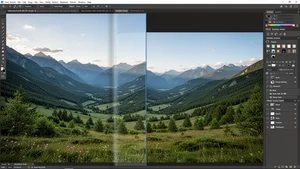
Have you ever taken a photo and thought, if only I had a wider lens? Maybe the sunset was breathtaking but you cropped too tight. Maybe a group shot cut off someone standing at the edge. Or maybe an otherwise perfect portrait left no breathing room for a design layout. That frustration used to mean reshooting or giving up. Not anymore.
AI outpainting has quietly become one of the most fascinating tools in creative editing. It lets you expand an image beyond its original borders, generating new content that blends smoothly with what already exists. And the technology behind it has gotten remarkably good.
I have been exploring this space obsessively, and what I have found changes how I think about photography and design entirely.
What Outpainting Actually Does
Traditional image editing gives you tools to work within the pixels you already have. Cropping, color adjusting, retouching. Outpainting flips that idea on its head. Instead of working inside the frame, you push the frame outward.
The AI analyzes your existing image, understands the context of lighting, texture, color palette, perspective, and depth, then generates entirely new visual content that extends the scene naturally. A beach photo can grow wider to reveal more coastline. A tight headshot can expand downward to show shoulders and background. A landscape can stretch vertically to include more sky.
What makes modern outpainting genuinely impressive is the coherence. Early attempts at this kind of expansion looked obviously artificial. Repeating patterns, mismatched lighting, weird seams where old met new. Current models have largely solved those problems. The extended areas look like they were always part of the original shot.
Why Creators Are Paying Attention
The practical applications here are enormous, and they go well beyond fixing a bad crop.
Social media managers deal with this constantly. You have one great product photo but need it in square format for Instagram, wide format for Twitter headers, and vertical for Stories. Traditionally that meant separate shoots or awkward cropping that butchered the composition. With AI image extending, you generate the missing context and adapt one image across every platform without losing what made it compelling.
Graphic designers face a similar challenge. Client sends over a photo for a website banner but it is too narrow. The designer needs space on the left for text overlay. Outpainting creates that space with content that feels intentional, not forced.
E-commerce teams use it to standardize product images. Different photographers, different framing, different backgrounds. Outpainting lets you extend and normalize compositions so everything looks cohesive on the page.
And for personal use? That vacation photo where you accidentally cropped out the Eiffel Tower's tip? Fixed. The family portrait where Grandma got cut off at the elbow? Extended. It feels almost magical when you see it work on your own photos.
How the Technology Works Under the Hood
Outpainting builds on the same diffusion model architecture that powers AI image generation. Tools like DALL-E popularized the concept, but the technique has evolved significantly since those early demonstrations.
The process starts with your original image as an anchor. The model receives both the existing pixels and a mask indicating where new content should be generated. It then runs a conditioned generation process, using the visual context of the original as a strong guide for what the new pixels should contain.
The key innovation is contextual understanding. The model does not just look at the pixels along the edge of your image. It comprehends the entire scene. It understands that a grassy field should continue with similar texture and color gradients. It recognizes that architectural lines need to maintain perspective. It knows that shadows should remain consistent with the light source.
This is why results have improved so dramatically. Earlier models treated the border as a simple pattern to extend. Modern approaches understand the scene semantically, which makes the generated content feel genuinely natural.
Getting Started With AI Image Extension
If you want to try outpainting without installing anything or wrestling with complex software, the Cliptics AI Image Extender is built exactly for this. Upload your photo, choose which direction to expand, and the AI handles the rest. No accounts, no complicated settings, no waiting in queues.
For those who want more control, here is how to get the best results regardless of which tool you use.
Start with a high quality source. The better your original image, the more context the AI has to work with. Blurry or heavily compressed photos give the model less information, which means less convincing extensions.
Extend in stages rather than all at once. Asking the AI to double the width of an image in one pass is harder than extending it by 25% four times. Each pass gives the model a larger context window to reference, and the results compound in quality.
Pay attention to lighting direction. If your photo has strong directional light from the left, make sure the extended areas maintain that same lighting logic. Most modern tools handle this automatically, but reviewing the output catches edge cases.
Use it alongside other AI editing tools. Outpainting works beautifully in combination with the Cliptics AI Image Editor for post-expansion touch ups, or with an AI image generator when you want to create entirely new scenes and then selectively expand the best results.
Creative Possibilities That Surprise People
Beyond the obvious fix-my-crop use case, outpainting opens up genuinely creative territory that most people have not considered.
Panoramic creation from a single shot. Take any standard photo and extend it horizontally in both directions. You end up with a wide panoramic image generated from a single frame. The AI fills in what might plausibly exist beyond the edges, creating scenes that feel expansive and cinematic.
Aspect ratio freedom. Shoot everything in whatever format feels natural. Know that you can adapt any image to any aspect ratio afterward without cropping away important content. This is liberating for photographers who no longer need to "shoot for the crop."
Storytelling through expansion. This one is my favorite. Start with a close up of a face. Extend outward to gradually reveal the environment around the person. Each expansion adds narrative context. Where are they? What surrounds them? The image becomes a story told in layers.
Art direction on existing photos. Need more sky for a dramatic text overlay? Extend upward. Want a subject to feel smaller and more isolated? Extend the environment in every direction. Outpainting gives you art direction control that was previously only possible at the time of shooting.
The Limits Worth Knowing
No technology is perfect, and outpainting has real limitations worth being honest about.
Complex scenes with many specific objects are harder to extend convincingly. A busy city street with recognizable storefronts will challenge even the best models, because the AI has to invent specific details that feel plausible within a very particular context.
Human anatomy remains tricky at the borders. If a person is partially visible at the edge of your photo, extending to reveal the rest of their body can produce awkward results. The AI is guessing what a specific individual looks like based on limited information.
And there is a philosophical question about authenticity. When you extend a photo, the new content never actually existed. For creative and commercial work, that is fine. For photojournalism or documentary purposes, the ethical considerations are real and worth thinking about.
Where This Is Heading
What excites me most is how fast outpainting is improving. A year ago, extended areas were often slightly softer or subtly different in style from the original. Today, the seams are nearly invisible. The consistency in texture, color science, and lighting has reached a point where even trained eyes struggle to identify where original content ends and generated content begins.
The future likely brings real time outpainting during the editing process, video outpainting that extends moving frames, and increasingly precise control over what the AI generates in the extended regions.
For now, the technology is already practical and genuinely useful. If you work with images in any capacity, outpainting is worth adding to your toolkit. It solves real problems, opens creative doors, and fundamentally changes the relationship between the photographer's frame and the final image.
Try extending one of your own photos. You will immediately understand why this technology has people so excited.