
AI Image Extender: Expand Photos Beyond Their Borders with | Cliptics
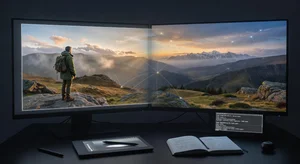
You cropped too tight. Or the original shot just didn't capture enough of the scene. Maybe you need a different aspect ratio for a platform requirement. Whatever the reason, you need more image than you actually have.
Traditional solutions were limited. You could try content-aware fill in Photoshop, but results were hit or miss. You could fake it with blur or stretch, but it always looked artificial. Or you just lived with the crop you had.
AI image extension, also called outpainting, solves this properly. It generates new content beyond your image borders that actually looks like it belongs there. Not stretched pixels or cloned patterns, but believable continuation of your scene.
How Outpainting Actually Works
The AI approach is fundamentally different from traditional extension methods.
When you extend an image with AI, the model analyzes what's in your existing photo. It understands the scene context, lighting direction, perspective, and visual elements. Then it predicts what would logically exist beyond the current borders.
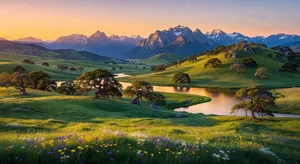
If you're extending a landscape with mountains, the AI generates more mountain range following the same lighting and atmospheric conditions. If it's a portrait with background, it continues that background coherently.
The technology uses the same type of models that power AI image generation, but working in reverse. Instead of creating a full image from a text prompt, it's creating partial image from visual context.
When Image Extension Makes Sense
Not every photo needs extending, but certain use cases benefit significantly.
Social media format requirements are a huge one. You shot vertical for Instagram Stories but now need horizontal for YouTube thumbnails. Extending the sides gives you that flexibility without reshooting.
Uncropping mistakes happens to everyone. You cropped someone's hand off, or cut a crucial element at the edge. Extending recovers what you lost.
Aspect ratio changes for different platforms. That square Instagram post needs to be 16:9 for a blog hero image. Extension fills the gaps.
Adding breathing room to compositions. Sometimes an image feels cramped. Extending the borders gives subjects space to breathe visually.
Print format adjustments when the original doesn't match your target print dimensions. Extend to fit rather than awkwardly crop or letterbox.
Step-by-Step Extension Process
Here's how you actually extend an image using AI.
Step 1: Assess your image
Look at what you're working with. What's in the frame currently? What logically exists beyond the borders? The AI will make educated guesses, but understanding the scene helps you guide the process.
Step 2: Choose extension direction and amount
Most tools let you extend in any direction or all directions at once. Decide how much new content you need. Extending too far asks the AI to invent more than it can reasonably predict from context.
Step 3: Generate the extension
Upload your image, set your parameters, and run the generation. Processing time depends on how much you're extending and the tool you're using.
Step 4: Review the result
Check the seams where original meets generated. In good results, the transition is invisible. Look for consistency in lighting, perspective, and detail level.
Watch for common AI artifacts like weird patterns, inconsistent objects, or lighting that doesn't match. These are fixable but need to be spotted.
Step 5: Refine if needed
If something looks off, try regenerating with adjusted settings. Some tools let you mask areas to preserve or guide what gets generated. Iteration often improves results.
What Produces Great Results
Certain types of images extend beautifully while others prove challenging.
Clear context helps enormously. If your image has obvious patterns or structures the AI can continue, results tend to be excellent. Architecture, landscapes, repeating elements all extend well.
Good lighting information allows the AI to match illumination correctly. Flat lighting is easier to extend than dramatic or complex lighting setups.
Simple backgrounds beat complex ones. Extending blue sky or ocean is straightforward. Extending a crowded street scene with lots of details is harder.
Adequate resolution in your source image matters. The AI generates detail matching what exists. Low-res sources get low-res extensions.
Consistent elements that clearly continue beyond frame edges work better than elements that might or might not be there.
Common Extension Mistakes
Here's what trips people up.
Extending too far beyond what the image context supports. The AI starts guessing wildly when there's not enough information.
Ignoring perspective when extending architectural or geometric scenes. The AI needs clear perspective cues to maintain proper vanishing points.
Mismatched lighting expectations. If your original has dramatic side lighting, the extension will try to match that. Don't expect the AI to somehow change the lighting direction.
Not checking edges carefully where original meets generated. This is where artifacts show up most obviously.
Using heavily processed images as sources. If you've already applied heavy filters or effects, the AI might struggle to extend coherently.
Creative Applications
Beyond just fixing crop problems, extension enables creative possibilities.
Panorama creation from single images. Take a regular photo and extend it horizontally to create wide vistas.
Background expansion for composite work. Generate more background space, then drop in additional elements.
Format experiments where you try the same image in multiple aspect ratios by extending different directions.
Story variations by extending images to include different amounts of context, changing the narrative feel.
Artistic exploration of what might exist beyond the frame. Sometimes the AI's interpretation creates interesting unexpected results.
Tools and Platforms
Several approaches exist for image extension.
AI image editors like AI image editor often include outpainting features built in. These integrate extension into your normal editing workflow.
Standalone extension tools focus specifically on this use case with optimized interfaces and parameters.
Some platforms offer API access for batch processing or custom integration if you're extending images at scale.
Desktop software versus cloud services present the usual tradeoff between control and convenience.
Quality Expectations
Let me set realistic expectations about what you'll actually get.
Extension in obvious directions with clear context often looks perfect. You'd be hard-pressed to identify where original ends and generation begins.
More complex extensions with less clear context produce good results that might need minor touch-ups. Usable but not flawless.
Extremely ambitious extensions asking the AI to invent significant amounts of complex content will show their AI origins. Still potentially useful but clearly generated.
The key is matching the extension complexity to what your image context supports. Work within the technology's strengths.
Integration with Workflows
Image extension fits into various production pipelines.
For social media managers, it's a format adaptation tool. One photo shoot becomes content for every platform dimension.
For designers, it's a composition tool. Add space where needed without hunting for replacement images.
For photographers, it's a rescue tool. Save shots that would otherwise be unusable due to crop issues.
For marketers, it's a variation tool. Create multiple versions of the same image for different placements.
The common thread is flexibility. Extension removes the constraint of working only within original image boundaries.
Looking Ahead
The technology trajectory is clear.
We're seeing better handling of complex scenes and lighting. Extensions that would have looked artificial six months ago now blend smoothly.
Higher resolution outputs mean extensions work for large format and print use, not just web.
Faster processing makes iteration practical. Try multiple variations quickly rather than waiting for each generation.
And improved coherence over large extensions means you can expand images further while maintaining quality.
For anyone working with images regularly, knowing how to extend them with AI is becoming a fundamental skill. The barrier is low, results keep improving, and the flexibility it provides solves real creative and practical problems.
Your next perfect image might just need a little more room to breathe.