
AI Image Extender for Social Media: Repurpose One Photo | Cliptics

You shoot one great photo. Maybe it's a product shot, a portrait, a branded lifestyle image. It's square, because that's what Instagram asked for, or because that's what your camera defaulted to. And then you need it as a LinkedIn banner, a YouTube thumbnail, and an Instagram story, all with completely different aspect ratios. All requiring information in parts of the frame that don't exist yet.
The old solution was to crop aggressively and lose content, or to extend with solid color bars that look unfinished. AI image extension changes this completely.
What AI Image Extension Actually Does
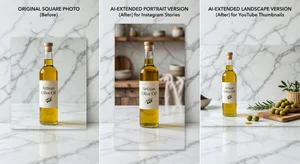
Traditional image extension just adds empty space or mirrors existing content. The result is obvious and unprofessional. AI-powered extension analyzes the content and context of your existing image and generates plausible, coherent visual content to fill the extended areas.
The extended pixels aren't real captured data. They're synthesized based on what makes visual sense given what's already in the frame. A product shot on a clean surface gets a coherent extended surface. A portrait against a sky background gets extended sky and horizon. An office environment gets extended walls, floors, and the kinds of furniture and elements that belong in that setting.
The quality of this synthesis is what makes Cliptics AI Image Extender genuinely useful rather than just functional. Extended areas that look generated defeat the purpose. Extensions that read as natural additions to the original frame make format repurposing viable.
Instagram to YouTube: The Horizontal Extension
Starting format: 1:1 (1080x1080 square) Instagram post. Target format: 16:9 (1920x1080) YouTube thumbnail.
The challenge here is adding roughly 35% of new visual content on each side of the original square frame. For product photography on clean backgrounds, this extension typically looks smooth. The AI reads the background color and texture and extends it naturally.
For lifestyle photography with people in it, the result depends on how close the subjects are to the frame edges. If your subject is centered in the square with generous margins, the extension fills with background context that reads naturally. If the subject is edge-positioned, the extension may need to generate partial visual content (arms, clothing edges) that can look inconsistent.
In practice, the best results for horizontal extension come from photos shot with the subject centered and with deliberate negative space built in. If you know you'll need landscape format, compose the original shot slightly wide.
Instagram Story: The Vertical Challenge
Starting format: 1:1 (1080x1080). Target: 9:16 (1080x1920) Instagram story.
Vertical extension requires generating significant content above and below the original frame: the full height of the extended canvas is nearly double the original. This is the most demanding format conversion and produces the most variable results.
For product shots on solid or simple backgrounds, the extension works well. The AI generates background that matches the original, leaving your product clearly visible in the now-vertically-centered composition.
For complex backgrounds (outdoor scenes, interior environments), the results are more interesting. The AI generates plausible sky extension above, ground or floor continuation below. The generation quality has improved substantially, but this is the format conversion most likely to produce an artifact worth reviewing before publishing.
The practical strategy: when creating vertical extensions, always leave 10-15% of the target canvas empty at the extreme top and bottom before finalizing. These outer edges are where artifacts most commonly appear.
LinkedIn Banner: The Wide Panoramic Extension
Starting format: 1:1 (1080x1080). Target: LinkedIn profile banner at approximately 8:1 (1584x396).
LinkedIn banners require extreme horizontal extension: the banner is roughly 8 times as wide as it is tall. Starting from a square means you're generating significant new visual content on both sides.
For this conversion, simple backgrounds genuinely shine. A branded photo with a solid color gradient background extends beautifully, because the AI has minimal complexity to extrapolate and the result is visually clean.
For photographic backgrounds, LinkedIn banners work best with a strategic content approach: position your core visual element (logo, product, portrait) on the left third of the final banner, with the right two-thirds as background. Upload your square photo, extend left, and use the extended version as your background canvas. This uses the AI's strength (background extension) while keeping your key content in the original high-fidelity zone.
Step-by-Step Workflow in Cliptics
Upload your source image to the AI Image Extender. Select your target aspect ratio from the preset options (Instagram Story, YouTube, LinkedIn, or custom dimensions).
Review the extension preview before downloading. The tool shows you the synthesized extension with your original content marked, so you can see exactly what's been generated versus what was in the original frame.
If the extension looks natural, download and deploy. If specific areas have visible artifacts, use the selective regeneration option to request a new synthesis for that zone only.
Total time for three format variations of one source image: 4-6 minutes.
What to Shoot Knowing You'll Extend
The most efficient workflow is to shoot with extension in mind, especially for product and lifestyle photography.
Shoot slightly wide. A subject that fills 60% of the frame is much easier to extend than one that fills 90%. The margins give the AI more original context to work from when generating extensions.
Use simple or cohesive backgrounds. Complex, busy backgrounds are harder to extend plausibly. Clean surfaces, studio backgrounds, and open natural environments give the best extension results.
Avoid hard horizontal or vertical objects at frame edges. A table edge that cuts across the bottom third of a square frame becomes a table edge that needs to continue plausibly into extended territory. Center-frame subjects with background space are inherently more extensible.
The Content Calendar Implication
The practical value of AI image extension for content creators is a reduction in photo production requirements. Instead of needing a landscape version, square version, and portrait version of every piece of brand content, you shoot one great version and extend as needed.
For a small ecommerce brand with 20 products, this means product photography that costs a fraction of traditional format-matched shooting. For a content creator with a weekly posting schedule, it means every photo you already have becomes deployable across all platforms rather than just the one it was sized for.

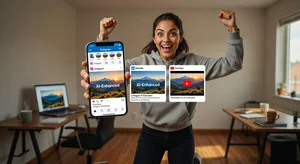
The 5-minute repurposing workflow isn't just about efficiency. It's about changing the relationship between your photo library and your content calendar. Everything you've shot is now potentially deployable anywhere. That's a significant shift in how you can think about your visual content resources.