
AI Image Upscaling: 4K Enhancement Without Quality Loss | Cliptics
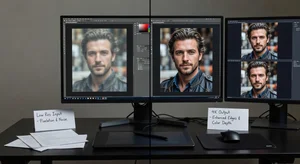
I had this perfect shot from five years ago. Great composition. Perfect moment. Terrible resolution.
Shot it on an old phone camera. 8 megapixels maybe. When I tried to use it for a print project, it looked fine on screen but pixelated and blurry when printed large.
That's when I started testing AI upscaling tools. And what I found surprised me. The technology actually works now. Not the fake enhancement you might remember from years ago. Real, usable quality improvement.
Let me show you what's actually possible and what the limitations still are.
What AI Upscaling Actually Does
Traditional resizing just stretches pixels. Makes things bigger but blurrier. You've seen this. Enlarge a small photo and it looks soft and mushy.
AI upscaling is different. It analyzes the image and intelligently generates new pixels that fit the context. It's predicting what detail probably should be there based on what's around it.
This isn't magic. The AI was trained on millions of high resolution images. It learned patterns. What edges should look like. How textures work. How details typically appear at different scales.
When you feed it a low res image, it applies those learned patterns to fill in plausible detail.
The results can be genuinely impressive. But they're not perfect. And there are specific situations where it works way better than others.
When It Works Best
Portraits and faces. This is where AI upscaling really shines. The algorithms have been trained extensively on faces, so they're excellent at enhancing facial features, skin texture, hair detail.
I've upscaled old family photos from 1000 pixels to 4K and the results looked legitimate. Not identical to what a high resolution camera would capture, but close enough that you'd never question it.
Landscapes and architecture. These work well too. Natural textures like trees, rocks, water. Structured elements like buildings. The AI handles these confidently because it's seen so many similar images during training.
Product photography with clear subjects. If your product is well lit and the background is simple, upscaling handles it smoothly.
What makes these work is consistency and predictability. The AI has strong reference points for what these things should look like at high resolution.
When It Struggles
Here's where you'll see problems.
Text and fine typography. AI upscaling often makes text blurrier rather than sharper. It doesn't understand letterforms the way it understands faces or landscapes. The enhanced text looks mushy.
Complex patterns and textures. Intricate fabrics, detailed artwork, technical diagrams. The AI makes guesses that don't always match reality. You get artifacts and weirdness.
Very low starting resolution. If your source image is tiny, like 400 pixels, even AI can't work miracles. There's just not enough information to work from. Results will look soft and guessed at.
Motion blur or out of focus originals. AI can't fix these. If the original was blurry, upscaling makes it a bigger blur. It's still blurry.
Understanding these limitations saves you time. Don't expect upscaling to fix fundamentally flawed photos. It enhances decent images. It doesn't resurrect terrible ones.
The Resolution Math
Let's talk about what 4K actually means and what's realistic.
4K is roughly 3840 by 2160 pixels. About 8 megapixels total. Most modern phone cameras shoot 12 megapixels or more, so they're already past 4K.
But older photos, screenshots, images from the web? Often way smaller. Maybe 1920 by 1080 at best. Sometimes much less.
Upscaling from 1080p to 4K is a 2x increase in dimensions. That's 4x the total pixels. The AI needs to intelligently create three out of every four pixels in the final image.
That's doable. The results usually look good.
Going from 720p to 4K is a 3x increase in dimensions. 9x the pixels. Much harder. Results start getting softer and less convincing.
Anything beyond that and you're asking the AI to invent more than it's analyzing. Quality suffers noticeably.
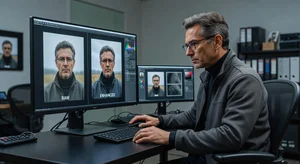
My rule: if I'm doubling dimensions, I expect good results. Triple dimensions, expect okay results. Anything more, expect compromises.
The Tools That Actually Work
I've tested a bunch. Some work way better than others.
The AI image upscaler handles general upscaling really well. Portraits, landscapes, products. Straightforward interface. Upload, select target size, done.
For photos that need extension beyond just upscaling, the AI image extender can add content around the edges intelligently. Useful when you need a different aspect ratio for the enlarged image.
Both tools use modern AI models trained specifically for image enhancement. Way better than old school bicubic resizing or even the first generation AI upscalers from a few years ago.
Testing Your Results
Here's how I check if an upscaled image actually worked.
Zoom to 100 percent. Look at edges. Are they clean and sharp or soft and fuzzy? Clean edges mean good upscaling. Mushy edges mean the AI struggled.
Check fine details. Hair strands. Leaf textures. Fabric weave. Does it look believable or artificial? Real detail has natural randomness. AI generated detail can look too regular or patterned.
Compare to a known high resolution reference if you have one. This obviously only works if you're upscaling something you also have in higher quality. But it's a great reality check for what AI upscaling can actually do.
Print it if that's your end use. What looks okay on screen sometimes falls apart in print where you see more detail. Test prints before committing to large expensive ones.
The Practical Uses
Photography archives. Old photos you want to print large or use in professional projects. Upscaling breathes new life into images you thought were unusable.
Social media content. Sometimes your best shot is lower resolution than ideal. Upscaling gets it to platform specs without visible quality loss.
Print projects. Posters, canvas prints, large format displays. You need high resolution. Upscaling can get marginal images up to usable specs.
Stock photography expansion. If you've got older stock images that don't meet current resolution standards, upscaling can make them viable again.
Product catalogs where you need consistency. Maybe most products were shot in high res but a few weren't. Upscaling brings the low res ones up to match.
The key is being strategic. Upscale when you need to. Don't upscale everything just because you can. File sizes balloon and you're not gaining anything if the original was already sufficient.
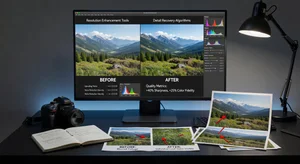
What to Expect vs What to Hope For
Let's set realistic expectations.
AI upscaling will not turn a terrible photo into a great one. Composition, lighting, subject matter still matter infinitely more than resolution.
It will not perfectly recreate detail that was never captured. The enhanced detail is plausible but it's generated, not recovered.
It will make acceptable images better. It will make marginal images acceptable. It won't make unusable images suddenly amazing.
Think of it as getting 70 to 80 percent of what a native high resolution capture would look like. That's remarkable. But it's not 100 percent.
For most uses, 80 percent is plenty. Viewers won't know. Clients won't complain. The images work fine.
But if you need absolute perfect quality for high end commercial work, shoot it properly from the start. Don't rely on upscaling to fix it later.
The Workflow I Use
Here's my practical approach when I need to upscale images.
Start with the best possible source. If I have multiple versions of an image, I use the highest quality one as my starting point. Every bit of original detail helps.
Clean up the image first. Noise reduction, basic exposure and color correction. Get the source as good as possible before upscaling. AI upscales whatever you give it, including flaws.
Upscale conservatively. I aim for 2x dimensions maximum unless I absolutely need more. Pushing it further decreases quality noticeably.
Do final edits after upscaling. Sharpening, final color work, any compositing. Work on the upscaled version for these finishing touches.
Export appropriately for the end use. Print needs TIFF or high quality JPEG. Web use can be more compressed. Match the export to the purpose.
This workflow maximizes quality at each step rather than hoping the upscaling fixes everything at the end.
Where This Technology Is Heading
The improvements in the last couple years have been dramatic. Where it's going next looks even better.
Real time upscaling is coming. Already starting to appear in some tools. Upload and get results instantly instead of waiting for processing.
Better handling of difficult subjects. Text upscaling is improving. Complex patterns are getting better. Each generation of models handles edge cases more capably.
Integration with cameras and editing software. Some phones already do AI enhancement automatically. Professional editing apps are building it into standard workflows.
Video upscaling is the next frontier. We can do it now but it's slow and expensive. As it gets faster and cheaper, old video content becomes reusable at modern resolutions.
But even with current technology, right now, AI upscaling solves real problems. Old photos become printable. Marginal images become usable. Archives gain new life.
That's valuable enough without waiting for future improvements.
Is It Worth Using?
If you've got images you need at higher resolution and can't reshoot them, absolutely yes.
The technology works well enough for real professional use. Not just casual experimentation. I've used upscaled images in client projects, print materials, published work. Nobody's ever questioned the quality.
The limitations are real but manageable. Know when to use it and when to shoot fresh. Understand what it can and can't fix.
For photographers, designers, marketers, anyone working with visual content, AI upscaling is a legitimate tool now. Not a gimmick. An actual solution to actual problems.
Use it smartly and it'll save you time, money, and frustration when you need quality you don't currently have.