
AI Interior Design: Redesign Any Room From a Photo | Cliptics
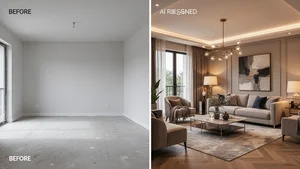
I redecorated my entire living room last week. Took about 45 seconds. No furniture stores, no paint swatches, no arguments with my partner about whether that accent wall should be sage green or dusty teal. Just a photo of my actual room, a few clicks, and suddenly I was staring at a version of my space that looked like it belonged in Architectural Digest.
That's the reality of AI interior design in 2026. You snap a picture of whatever room you want to change, upload it to one of several tools, pick a style, and the AI generates a photorealistic redesign. The furniture changes. The color palette shifts. Sometimes the lighting transforms too. And the whole thing happens faster than you can brew a cup of coffee.
I've been testing these tools obsessively for the past few months, and honestly? Some of them are shockingly good. Others, not so much. Here's what I've found.
How AI Room Redesign Actually Works
The concept is straightforward. These tools use AI models trained on millions of interior photos to understand spatial relationships, furniture placement, color theory, and design styles. When you upload your room photo, the AI identifies the walls, floor, windows, existing furniture, and overall structure. Then it generates a new version of that same space with different design elements while keeping the room's architecture intact.
What surprised me most is how well the best tools preserve things like natural light sources and window positions. Early AI design tools used to just slap a generic room design onto your photo. The 2026 generation actually understands your specific space and works within its constraints.
The Tools Worth Your Time
After testing more than a dozen options, these are the ones that consistently delivered results I'd actually show someone.
ReimagineHome stands out for one specific reason: shoppable designs. When it redesigns your room, many of the furniture pieces it suggests are real products you can actually buy. Their plans range from $14 to $99 per month, and you get 3 free designs to test it out. The "Structural Lock" feature is particularly clever because it preserves your walls, windows, and architectural elements while transforming everything else. Real estate agents love this for virtual staging, and I can see why.
HomeDesigns.AI gives you over 80 design styles to choose from, which is genuinely impressive. You can go from Scandinavian minimalism to Art Deco maximalism in seconds. They offer two redesign modes: "Beautiful Redesign" for subtle updates and "Creative Redesign" where the AI gets more freedom to rearrange everything. Plans start at $27 per month and they even have a sketch to render feature for people who want to draw their ideas first. It handles exteriors and gardens too, not just indoor spaces.
Spacely AI takes a different approach entirely. It's built for professionals who already work in tools like SketchUp or Revit. You can upload sketches, 3D designs, or room photos and get photorealistic renders in under 60 seconds. Over 580,000 users are on the platform, and it won awards at the Property Portal Watch Conference. If you're a working designer or architect, this is probably your best option.
Planner 5D has been around longer than most competitors, and that maturity shows. It's particularly strong for floor plans and full room layouts, not just style swaps. The free tier is generous enough to actually be useful, which isn't something I can say about every tool on this list. Their AI room design feature lets you upload photos and explore redesigns without committing to a subscription.
IKEA Kreativ deserves special mention because it solves a problem the others don't. You can scan your actual room using your phone's camera, and the AI creates an interactive 3D replica with accurate dimensions. Then you erase your existing furniture and drop in real IKEA products to see how they'd look and fit. It's not trying to be a general design tool. It's trying to help you buy furniture with confidence. And it's completely free.
What Nobody Tells You About These Tools
Here's the thing that most articles about AI interior design won't mention. The results vary wildly between runs. I uploaded the same living room photo to the same tool five times with the same style selected, and got five noticeably different results. Sometimes the fourth or fifth generation was dramatically better than the first.
So my biggest practical tip is this: never judge a tool by one output. Generate at least three to five versions before deciding if the tool works for your space. The AI isn't deterministic in the way you might expect. Think of it more like brainstorming with a very talented but slightly unpredictable design partner.
Another thing worth knowing is that most of these tools struggle with small or awkward spaces. Galley kitchens, tiny bathrooms, odd shaped rooms with lots of angles. The AI tends to default to spacious, well proportioned rooms when generating designs. If your space is unusual, you'll need to be more specific with style selections and may need to try more generations.
Is It Worth Paying For?
If you're a homeowner thinking about redecorating, a free tool like IKEA Kreativ or the free tiers of ReimagineHome and Planner 5D will probably give you enough to work with. You'll get inspiration, a sense of what styles you gravitate toward, and maybe even a shopping list.
If you're a real estate agent doing virtual staging, or a designer pitching concepts to clients, the paid tiers are genuinely worth the investment. The time savings alone justify the cost. What used to take hours of manual rendering or expensive professional staging now takes minutes.
For anyone curious about exploring AI powered creative tools beyond interior design, Cliptics offers a whole suite of AI tools for image editing, background removal, and other visual tasks that pair nicely with your design workflow.
Where This Is All Heading
The AI interior design market was valued at $3.28 billion in 2025 and projections put it at $15 billion by 2033. Those numbers make sense when you consider how many people want to visualize changes before spending money on renovations.
What excites me most isn't the current state of these tools. It's where they're heading. Imagine pointing your phone at a room and seeing the redesign overlaid in real time through AR. IKEA Kreativ is already moving in that direction, and the other players will follow.
For now, though, the simple act of photographing a room and seeing it transformed is already pretty remarkable. My living room still looks exactly the same as it did before I started testing all these tools. But at least now I know exactly what I want it to look like. And honestly, that clarity might be the most valuable thing AI interior design actually gives you.