
AI Logo Generator From Any Image | Cliptics
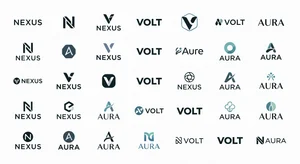
Every startup founder hits the same wall. You have the product. You have the vision. You even have customers waiting. But your brand looks like it was thrown together in fifteen minutes because, honestly, it was.
I know this because I lived it. Three years ago I launched a side project with a logo I made in PowerPoint. A blue circle with white text. That was it. And nobody took me seriously until I fixed the branding. The product was great. The logo told a different story.
The problem was never talent or taste. It was access. Professional logo design costs anywhere from $500 to $5,000. For a bootstrapped founder or freelancer, that is money you probably cannot spare in the early days. And hiring a designer means timelines, revisions, and creative differences that can stretch for weeks.
That is exactly the gap AI logo generators are filling right now. Not by replacing designers, but by giving people a starting point that actually looks professional. And the latest generation of these tools can do something that seemed impossible even two years ago: they can take an existing image, a product photo, a sketch on a napkin, even a screenshot of something you like, and turn it into a polished brand identity.
How Image to Logo AI Actually Works
The core technology behind image to logo conversion combines two things: computer vision and generative design. When you upload an image, the AI analyzes its visual elements. Color palette. Shapes. Composition. Texture. Typography style if any text is present. It breaks the image down into design DNA.
Then it rebuilds. Using that extracted information as a creative brief, the AI generates logo concepts that capture the essence of your source image while following professional design principles. Balance, proportion, negative space, scalability. Things that take designers years to master intuitively.
The result is not just a single logo. Most modern tools produce a complete brand identity system. Primary logo. Icon variant. Color palette with hex codes. Font pairings. Sometimes even business card mockups and social media templates. All derived from one image you uploaded.
Cliptics AI Logo Generator takes this approach and makes it accessible to anyone. You upload your reference image, describe your brand personality, and the AI produces multiple professional concepts in seconds. No design experience required.
What Makes a Good Reference Image
Not all source images produce equally good results. After testing dozens of combinations, I have found some clear patterns in what works best.
Photos with strong visual identity translate well. A coffee shop owner uploading a beautifully shot espresso? The AI picks up on warm browns, rich textures, and circular shapes. It generates logos that feel artisanal and inviting without being told to do so.
Sketches and hand drawings work surprisingly well too. Even rough pencil sketches give the AI enough information to understand what you are going for. The imperfection in hand drawn elements actually helps because it forces the AI to interpret rather than copy, which often leads to more creative output.
What does not work great: cluttered images with too many competing elements. If you upload a busy photograph with dozens of objects, the AI struggles to identify which elements matter most. Keep it focused. One strong visual is better than five mediocre ones.
Abstract patterns and textures can produce unexpectedly beautiful results. Upload a close up of marble, wood grain, or watercolor splashes and the AI translates those organic patterns into sophisticated brand marks that feel unique and premium.
The Five Minute Brand Identity Workflow
Here is the practical workflow I recommend for anyone building a brand from scratch in 2026.
Start with inspiration gathering. Spend ten minutes saving images that feel like your brand. Not logos. Feelings. Textures. Colors. Moments. This is your visual brief.
Pick your strongest reference image. The one that makes you think "yes, this is us." Upload it to an AI logo generator. Cliptics lets you upload directly and generates multiple variations in seconds. You will typically get 4 to 8 concepts ranging from minimal wordmarks to more elaborate illustrated logos.
Generate at least fifteen to twenty variations. Do not fall in love with the first result. The magic of AI is volume. You can explore more directions in five minutes than a designer can sketch in a day. Look for patterns in what you keep gravitating toward. That is your brand trying to tell you something.
Once you have a direction, refine. Most tools let you adjust colors, swap fonts, and tweak proportions. This is where you take something good and make it yours. Small changes matter enormously at this stage. The difference between a $50 logo and a $5,000 logo is often just thoughtful refinement.
Finally, export everything. Get your logo in SVG for scalability, PNG with transparent background for web use, and high resolution files for print. A professional brand identity is not just one file. It is a system that works everywhere.
What Separates Good AI Logos From Obvious Ones
After generating probably two hundred logos across different tools this year, I have noticed patterns that separate the ones people mistake for professional design work from the ones that scream "AI made this."
The biggest giveaway is over complexity. AI loves to add unnecessary details. Extra swooshes. Gradient overlays. Shadow effects that serve no purpose. The fix is simple: always ask yourself if you can remove an element without losing meaning. If yes, remove it.
Typography is the second tell. Many generators default to trendy display fonts that will look dated within months. If the tool lets you swap fonts, lean toward classics. Inter, Satoshi, or General Sans for modern brands. Playfair Display or Cormorant for elevated aesthetics. The font choice alone can shift a logo from amateur to professional.
Color restraint matters more than color choice. The best logos use two to three colors maximum. If the AI generated a rainbow explosion, pare it back. Pick one primary brand color and one neutral. You can always expand your palette later for marketing materials.
Building the Full Brand Identity
A logo alone is not a brand. But it is the seed everything else grows from. Once you have a logo you are confident in, extend it systematically.
Use the Cliptics AI Image Generator to create branded social media templates that match your logo's color palette and visual language. Generate header images, story backgrounds, and post templates that all feel cohesive. This is where AI really shines. Producing dozens of on brand assets in the time it would take to manually design one.
Create a simple brand guide document. It does not need to be forty pages. Just capture your primary logo, your color hex codes, your chosen fonts, and a few rules about minimum sizing and clear space. This becomes your reference point for every future design decision.
Where AI Logo Generators Fall Short
I want to be honest here because overpromising helps nobody.
AI generated logos can feel derivative. The models are trained on existing designs, so they tend to produce things that look familiar. If your brand needs to feel truly groundbreaking and unlike anything else on the market, AI is a starting point, not the destination.
Complex symbolism is still hard. If your brand story requires a logo that subtly references three different concepts simultaneously, AI is not there yet. It handles direct visual translation well but struggles with layered meaning.
Legal considerations matter too. AI generated designs exist in a gray area regarding copyright. For a side project or early stage startup, this is probably fine. For a brand you plan to trademark and build a company around for decades, you may want a designer to create something original based on the AI concepts you like.
The Tools Worth Knowing in 2026
The landscape has matured significantly. Cliptics stands out for its image to logo pipeline because it connects multiple AI capabilities in one workflow. Upload an image, generate a logo, remove the background, and create variations all in the same platform.
Looka remains strong for guided brand identity packages. It asks the right questions and produces comprehensive brand kits. Brandmark excels at typography focused logos where the letterforms themselves become the design. Hatchful by Shopify is still the best truly free option for e commerce brands. LogoAI offers some of the most refined output for minimal input.
The smartest approach is often using two or three tools together. Generate concepts in one, refine in another, and finalize in a third. The tools are free or affordable enough that this kind of exploration costs you nothing but time.
What This Means for Your Brand
Here is what I want you to take away. A professional brand identity is no longer a luxury reserved for funded startups. It is accessible to anyone with an internet connection and a clear vision.
The founders who will win in 2026 are not the ones with the biggest design budgets. They are the ones who understand that branding is a living process. Start with AI. Generate options. Test them with real customers. Iterate fast. And when your brand outgrows what AI can do, that is a wonderful problem to have because it means you have built something worth investing in professionally.
Your logo is not your brand. But it is the first thing people see. Make that first impression count, and let AI help you get there faster than you thought possible.