
AI Photo Restoration: Bring Damaged Family Photos Back to Life | Cliptics
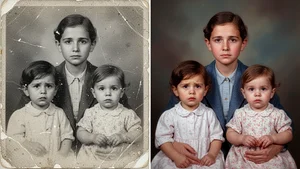
I found a box of old family photos in my grandmother's attic last month. Some were barely recognizable anymore.
Water damage. Scratches across faces. Colors so faded they looked like ghosts. I held one of my great grandparents on their wedding day and could barely make out their expressions. That feeling hit me hard because these photos are all we have left of them.
But then I remembered something. AI can fix this now.
So I spent weeks testing every photo restoration tool I could find. What I discovered completely changed how I think about preserving family memories.
The Moment Everything Changed
The first photo I tried was the worst one. A portrait of my great grandmother from the 1940s, torn down the middle, covered in scratches, so faded you could barely see her face.
I uploaded it to JPGHD, which uses what they call 2026 cutting edge AI models. Upload. Choose your restoration level. Wait.
Three minutes later, I had my great grandmother back.
The scratches were gone. The tear was invisible. Her face was clear and sharp. And here's what got me, they colorized it too. Her dress was this beautiful deep blue. It looked like a photo that could have been taken yesterday, not 80 years ago.
I sat there staring at it for probably ten minutes. This person I'd only seen as a blur suddenly felt real.
How It Actually Works
Modern AI photo restoration does something remarkable. These tools have been trained on millions of old photographs. They learned what typical damage looks like and what those photos probably looked like before the damage happened.
When you upload a damaged photo, the AI doesn't just blur out the scratches. It reconstructs what was likely there. Facial features get restored based on surrounding context.
LetsEnhance does this particularly well for faces. Their model was trained on portrait photography. I tested it on family portraits and the facial detail it recovered was genuinely impressive.
VanceAI focuses on preserving authenticity while removing damage. The restored photos look historically accurate rather than artificially enhanced.
The Order Actually Matters
You can't just throw a damaged photo at these tools and expect magic.
The sequence matters. If your photo has physical damage like tears or deep scratches, fix those first. Then upscale and enhance the resolution. Only after you've got the structure right should you try colorization.
I made the mistake of colorizing a scratched photo first. The AI colorized the scratches too, making them even more visible.
JPGHD has an "Ultra Restore" mode that handles the whole sequence automatically. MyHeritage breaks it into separate steps so you have more control.
The Free Options That Actually Work
I tested the free tiers thoroughly.
VanceAI gives you 5 free credits per month. That's 5 full photo restorations with no watermark. For most people preserving family photos, that's enough.
MyHeritage offers 5 free enhancements. Their mobile app is probably the easiest to use if you're not comfortable with technical tools.
Cliptics AI image tools also offers photo enhancement capabilities completely free with no signup required. Works directly in your browser.
What surprised me most was how good these free options are. A few years ago, you'd need Photoshop skills and hours of manual work. Now it takes minutes and costs nothing.
When Colorization Feels Right
The colorization feature is probably the most emotionally charged part.
Some of my restored photos look absolutely stunning in color. A photo of my grandfather as a young man suddenly felt alive. The greens of the trees. The warm tone of his skin. His blue eyes that I'd never known were blue.
But other photos felt wrong colorized. A formal portrait from 1935 lost something when color was added. The dramatic black and white contrast was part of what made it powerful.
I learned to trust my gut. Not every photo needs color.
Quick Tips That Matter
Start with copies, never originals. Scan your physical photos before uploading.
Download everything immediately. Some tools only keep processed images for 24 hours.
Quality of your scan matters. A blurry phone photo won't restore well. Use a proper scanner if you can.
Don't expect miracles with severely damaged photos. AI can't invent details that are completely gone.
Where I Landed
For seriously damaged photos, JPGHD. Their Ultra Restore handles complex repairs better than anything else I tried.
For quick enhancements, VanceAI's free tier. Simple, fast, good results.
For the easiest experience, MyHeritage mobile app. My mom restored her entire childhood photo collection on her phone in an afternoon.
For quick upscaling, I use Cliptics AI image upscaler. Fast, free, and works great for photos that just need a quality boost.
The best tool is whichever one you'll actually use.
Why This Matters
These aren't just photos. They're the only visual connection I have to people who shaped my family but died before I was born.
My grandmother cried when I showed her the restored wedding photo of her parents. She'd never seen it that clearly. The original had already been damaged by the time she was born.
That's when I realized this technology isn't just about fixing pictures. It's about preserving connection. Maintaining memory across time.
The photos in that attic box aren't lost anymore. They're restored, backed up, and shared with family members across three generations. All because AI tools made it possible for someone with no photo editing skills to bring them back to life.
That feels like something worth caring about.