
AI Portrait Touch-Up: Natural Results vs Over-Processed | Cliptics
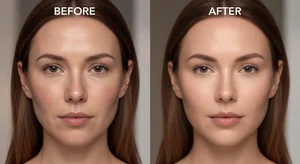
My cousin asked me to edit her headshot for LinkedIn.
I ran it through an AI portrait tool with default settings and sent it back. She said "who is this person because it's not me."
The AI had smoothed her skin to plastic, brightened her eyes to an unnatural blue, and basically turned her into a completely different human. We both learned something that day about AI portrait enhancement.
Default settings are designed to make everyone look like an Instagram filter, not like themselves.
Where AI Portrait Tools Go Wrong
Most AI enhancement defaults assume everyone wants to look 10 years younger with perfect skin and enlarged eyes.
Maybe some people want that. But for professional headshots, dating profiles, or anything where you actually need to look like yourself, it's terrible.
The tools can do subtle natural enhancements. You just have to turn off all the aggressive beautification features first.
What Natural Enhancement Actually Means
Fixing blemishes is fine. A random pimple or temporary skin irritation isn't part of your actual appearance.
Slight color correction to match how you look in good lighting is reasonable.
Sharpening slightly blurry photos makes them look more professional without changing your features.
The portrait enhancer and AI photo filter tools on Cliptics let you control enhancement levels instead of just applying maximum beautification automatically.
The Skin Smoothing Problem
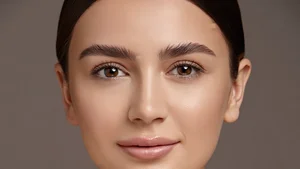
This is where most AI portrait tools destroy authenticity. They smooth skin until all texture disappears.
Real skin has pores, fine lines, character. Removing all of that makes you look like a video game character.
Light skin smoothing to reduce harsh shadows or even out tone can work. Complete texture removal looks fake instantly.
If you can't see any skin texture at all in the enhanced version, it's over processed.
The Eye Enhancement Trap
AI loves to enlarge and brighten eyes. Probably because beauty standards favor large bright eyes.
But when you make brown eyes bright hazel, or add an unnatural sparkle, it stops looking like you.
Slight brightening of the whites of your eyes can make you look more alert. Changing your actual eye color or enlarging them noticeably is going too far.
Face Shape and Feature Changes
Some AI tools will subtly reshape your face. Narrower jaw, higher cheekbones, smaller nose.
These changes are often so subtle you won't notice unless you compare closely. But they add up to making you look like a related but different person.
For any photo where you might meet people in person, keep your actual face shape. The goal is better photography, not facial reconstruction.
The Professional Photography Standard
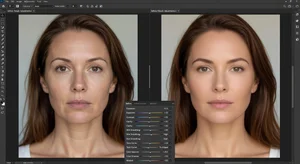
Professional portrait photographers retouch photos. Always have, always will.
But their retouching enhances the photo quality while keeping the person looking like themselves.
They fix lighting, remove temporary blemishes, adjust exposure. They don't change fundamental features.
AI portrait tools should follow this same standard. Improve the photo technical quality, not redesign the person.
When Heavy Enhancement Makes Sense
If you're creating avatar art or stylized profile pictures where everyone knows it's not realistic, go wild with AI enhancement.
Social media filters that make you look cartoon like or artistic are fine because the expectation is different.
But for business headshots, online dating, professional profiles, anything where authenticity matters, stick to subtle improvements.
How to Tell If You've Gone Too Far
Show the enhanced photo to someone who knows you. Ask if it looks like you.
If they hesitate or say "kind of" or mention it looks like a better version of you, you've probably over enhanced.
The correct response is "yes that's definitely you, nice photo."
The Settings I Actually Recommend
Turn skin smoothing way down or off completely. Maybe 10 to 20% maximum if you must.
Skip eye enlargement entirely. Slight brightening only if your eyes look unusually dark in the original.
Disable any face reshaping features. Keep your actual face structure.
Use lighting and color correction aggressively. These improve photo quality without changing your appearance.
Enable blemish removal for temporary issues only.
Different Use Cases Need Different Approaches
LinkedIn headshot needs to look exactly like you'll look in a video meeting. Minimal enhancement.
Dating profile should look like you on a good day with good lighting. Moderate but honest enhancement.
Social media profile pic has more flexibility for creative enhancement since people aren't expecting photographic accuracy.
Match your enhancement level to the stakes of people recognizing you accurately.
What I Actually Do Now
I start with zero enhancements and only add specific adjustments as needed.
Brighten shadows on my face? Yes. Make my skin porcelain smooth? No.
Fix the unflattering overhead lighting? Yes. Change my eye color? No.
Sharpen the photo? Yes. Reshape my nose? No.
This selective approach takes longer but results look professional while still looking like me.
The Authenticity Reality
We're in this weird era where everyone knows photos are enhanced but we all still pretend they're accurate.
I think the solution is honest enhancement. Make your photos look good without making yourself look different.
AI portrait tools make it easy to cross the line into uncanny valley territory. Just because you can smooth all texture and enlarge features doesn't mean you should.
Natural looking enhancement is harder than over processed enhancement. It requires restraint and judgment. But it's the only approach that works if you need people to recognize you.
My cousin's LinkedIn headshot now looks professional and polished while still unmistakably being her. That's what AI portrait enhancement should accomplish.