
Custom QR Codes with AI: Stand Out with Branded QR Design | Cliptics
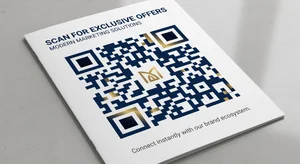
Standard QR codes are ugly. Those black and white squares work functionally but do nothing for your brand. They scream utilitarian tech rather than polished professional.
The problem is basic QR generators only give you basic output. No color customization that matters. No logo integration. No style options. Just those same boring pixelated blocks everyone's been using for years.
AI-powered QR code generation changes this. You can create codes that actually match your brand aesthetic while remaining fully functional. Custom colors, embedded logos, artistic styling. QR codes that people actually want to scan instead of ignoring.
Why Custom QR Codes Matter
Beyond just looking better, branded QR codes serve real purposes.
Brand consistency across all touchpoints matters. If your marketing materials are polished but your QR code looks generic, that's a disconnect customers notice.
Scan rates improve when codes are visually appealing. People are more likely to scan something that looks intentional rather than a last-minute technical addition.
Trust signals come from professional presentation. A well-designed QR code suggests the destination is legitimate and worth visiting.
Memorability increases when your codes have distinctive styling. Customers remember brands that pay attention to details.
How to Create Branded QR Codes
The process is straightforward but requires attention to certain principles.
Step 1: Start with your destination
What URL, contact info, or content will the QR code link to? This determines the data density and scanning complexity. Shorter URLs create simpler codes with more design flexibility.
Step 2: Choose your colors
Unlike traditional black and white, custom QR codes can use brand colors. But not randomly. The contrast between foreground and background must be sufficient for scanners to read reliably. Test thoroughly.
Step 3: Add your logo
Most QR codes can tolerate 30% data redundancy, meaning you can cover that much of the code with a logo and it still scans. Center placement works best. Keep the logo clear and not too detailed.
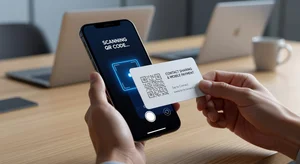
Step 4: Apply styling
AI generators offer various artistic styles. Rounded corners instead of sharp pixels. Gradient fills. Pattern overlays. The key is maintaining scannability while adding visual interest.
Step 5: Test extensively
Scan your code with multiple devices and apps before deploying. What works on iPhone might struggle on Android or vice versa. Test in different lighting conditions and at various distances.
Design Principles That Work
Certain approaches reliably produce scannable custom codes.
High contrast is non-negotiable. Whatever colors you choose, the difference between lightest and darkest areas must be significant. Subtle differences look nice but won't scan.
Logo size matters. Too small and it's pointless. Too large and scanning fails. The sweet spot is usually 15 to 25 percent of the total code area.
Complexity has limits. Intricate patterns or detailed imagery might look amazing but can confuse scanners. Simpler is often more reliable.
Error correction levels can be increased to allow more customization. Higher error correction means the code tolerates more data loss from logo placement or styling.
Testing prevents disasters. Never deploy codes without thorough scanning tests across devices.
Common Customization Mistakes
People mess this up in predictable ways that break functionality.
Insufficient contrast is the number one killer. Your brand colors might not have enough difference for reliable scanning. Sometimes you need to compromise aesthetics for function.
Logo placement blocking critical areas. QR codes have specific patterns in corners that must remain clear for orientation detection. Covering these breaks everything.
Over-styling to the point where the underlying QR structure is lost. The code needs to still look like a QR code for scanners to recognize it.
Not testing across devices. What scans perfectly on your phone might fail on common scanner apps others use.
Forgetting about print vs digital. What works on a screen might not survive printing at small sizes.
Strategic QR Code Placement
Beyond design, placement determines success.
Size matters for distance. Codes on billboards need to be much larger than codes on business cards for the same scan distance.
Call to action helps. "Scan for menu" or "Scan to connect" gives people a reason. Bare QR codes get ignored.
Context influences scanning. People expect QR codes on restaurant tables and event posters. They're surprised by them in other contexts. Use that expectation.
Accessibility considerations mean some people can't easily scan codes. Always provide an alternative like a short URL typed manually.
Use Cases for Custom QR Codes
Branded codes make sense in specific applications.
Business cards where the QR code shares contact information elegantly.
Marketing materials where brand consistency matters and you want professional presentation.
Event badges where custom codes can include event branding while encoding attendee information.
Product packaging where the code needs to fit the overall design aesthetic.
Restaurant menus where a well-designed code feels more premium than generic tech.
Retail displays where the code is part of the visual merchandising, not an afterthought.
Tools and Platforms
Several approaches exist for creating custom QR codes.
Free online generators offer basic customization like colors and logos. Good for testing and simple use cases.
Paid platforms provide advanced styling, analytics tracking, dynamic QR codes that can be edited after creation, and bulk generation.
Enterprise solutions include API access, brand management features, and integration with marketing automation platforms.
The choice depends on volume needs, required features, and whether you need dynamic codes or static is sufficient.
Dynamic vs Static QR Codes
Understanding the difference matters for planning.
Static QR codes encode the destination URL directly. Once created, they can't be changed. If you need to update where the code points, you need a new code.
Dynamic QR codes point to an intermediate URL that redirects to your actual destination. This lets you update the final destination without changing the code itself.
Dynamic codes also enable analytics. Track scan counts, locations, times, and device types. This data helps measure campaign effectiveness.
The tradeoff is dynamic codes require ongoing service from the generator platform. Static codes work forever but can't be updated or tracked.
Analytics and Tracking
For marketing applications, scan data provides valuable insights.
Track which codes get scanned most frequently. Test different designs or placements and measure performance.
Geographic data shows where physical marketing materials are being engaged with.
Time-based analytics reveal when people scan codes, helping optimize campaign timing.
Device information helps understand your audience's technical profile.
This data informs future QR code strategies and overall marketing decisions.
Future Developments
QR code technology continues evolving.
We're seeing augmented reality integration where scanning codes triggers AR experiences beyond simple URL redirects.
Animation in digital QR codes adds motion while maintaining scannability.
Better error correction allows even more customization while preserving function.
And AI generation enables styles that were previously impossible while ensuring the underlying code structure remains intact.
For anyone using QR codes in marketing, design, or customer engagement, understanding how to create custom versions is increasingly valuable. The difference between generic tech-looking codes and branded professional ones affects perception and performance.
Your QR codes are part of your brand presentation. Make them look like it.