
AI Sketch to Image: Turn Your Rough Drawings Into Stunning | Cliptics
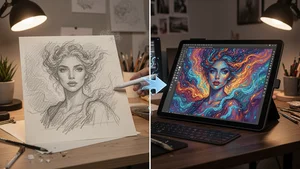
You drew something on a napkin. Maybe it was a creature that popped into your head during lunch, or a rough layout for a poster you want to make, or just a weird face you scribbled while on a boring call. Now imagine feeding that messy little sketch into a tool and watching it come back as a fully rendered, jaw dropping piece of digital art.
That is exactly what AI sketch to image tools do. And in 2026, they have gotten ridiculously good.
I have been testing these tools for months now, throwing everything from careful pencil drawings to absolute chicken scratch at them. What I found changed how I think about the creative process entirely. Whether you are a professional concept designer or someone who can barely draw a stick figure, this technology has something genuinely useful for you.
How AI Sketch to Image Actually Works
The basic idea is surprisingly elegant. You provide a sketch, the AI interprets its structure, lines, shapes, spatial relationships, and then generates a detailed image that follows your composition while adding all the detail, color, texture, and lighting that your rough drawing lacks.
Most modern sketch to image systems use a form of conditioned diffusion. Your sketch acts as a spatial guide, telling the AI where things should go. A text prompt then tells it what style and mood to aim for. The two inputs work together, your drawing provides structure while your words provide creative direction.
Think of it like handing a rough thumbnail to a professional illustrator and saying "make this look amazing in a watercolor style." Except the illustrator works in seconds, never gets tired, and can try fifty different interpretations before you finish your coffee.
Tools like Cliptics Sketch to Image have made this process accessible to everyone. You upload your sketch, describe what you want, pick a style, and the AI handles everything else. No technical setup, no GPU requirements, no command line nonsense.
What Makes a Good Sketch for AI
Here is something that surprised me early on. The quality of your drawing matters way less than you think, but the clarity of your composition matters way more.
A sloppy sketch with clear shapes and obvious spatial relationships will produce better results than a detailed drawing where everything overlaps and nothing is distinct. The AI needs to understand what is what. It needs to know that this blob is a head, that line is a horizon, those squiggles are trees.
Some practical tips that consistently improve results. Use darker lines for important edges. Leave some white space between distinct objects. If you are drawing a character, make the silhouette readable even if the internal details are rough. Close your shapes when possible, because open lines confuse the interpretation.
And here is a tip most people miss. Draw bigger than you think you need to. When you scan or photograph a tiny sketch, compression and noise eat into the line quality. A sketch that fills most of the page gives the AI much cleaner data to work with.
The Best Approaches for Different Skill Levels
If you are a complete beginner who genuinely cannot draw, start with basic geometric shapes. Circles for heads, rectangles for buildings, triangles for mountains. The AI is shockingly good at interpreting simple shapes into complex imagery when you pair them with descriptive prompts. A circle with two dots and a curved line becomes a detailed portrait. A few rectangles stacked together become a cityscape.
If you have some drawing ability, lean into your strengths. Sketch the composition and the elements you care about most, then let the AI fill in the rest. I have found that spending five minutes on a focused sketch with clear intention produces better AI output than spending thirty minutes on a detailed drawing that tries to do everything.
For experienced artists and concept designers, these tools become a rapid iteration machine. Sketch five different compositions for a scene in ten minutes, run them all through the AI, and immediately see which composition works best when fully realized. This is where the Cliptics AI Image Generator really shines, letting you batch multiple concepts and compare outputs side by side.
Style Transfer and Creative Direction
The real magic happens when you start experimenting with style prompts alongside your sketches. The same rough drawing of a cat can become a photorealistic photograph, an oil painting, a Studio Ghibli character, a cyberpunk illustration, or a vintage botanical illustration. Your sketch provides the what. Your prompt provides the how.
I have been keeping a personal library of style prompts that consistently produce interesting results. "Detailed concept art, dramatic lighting, muted color palette" gives you something that looks like it belongs in a game studio pitch deck. "Soft watercolor, gentle gradients, botanical illustration style" transforms even crude sketches into something that looks hand painted by a professional.
The combination of sketch guidance and style direction gives you a level of creative control that pure text to image generation simply cannot match. When you type a prompt without a sketch, you are hoping the AI places things where you want them. When you provide a sketch, you are telling it exactly where things go. That difference is enormous for anyone who has a specific vision.
Practical Workflows That Actually Work
Here is my daily workflow that has become second nature. I keep a small sketchbook and a thick marker pen on my desk. When an idea hits, I draw it in under two minutes. Bold lines, simple shapes, no erasing, no perfectionism. I photograph it with my phone, upload it to Cliptics Sketch to Image, type a style prompt, and within a minute I have a polished version of my idea.
For more refined work, I sketch on a tablet and export directly. The cleaner digital lines give the AI even better guidance, and the results are consistently impressive. If the first output is not quite right, I can take it into the Cliptics AI Image Editor for targeted adjustments without starting over from scratch.
Some creators are building entire visual libraries this way. One illustrator I follow sketches character poses on paper, runs them through AI for base renders, then paints over the results digitally. She estimates it has cut her concept art production time by roughly 60% while actually improving the variety of her output because she iterates more freely.
Where This Technology Is Heading
The gap between a rough sketch and professional output gets smaller every few months. Current tools already handle complex scenes with multiple subjects, environmental detail, and consistent lighting. The next wave of models is starting to understand depth and perspective from simple line cues, which means even flat sketches can produce images with convincing three dimensionality.
What excites me most is the democratization angle. You no longer need years of technical training to bring a visual idea to life. The barrier between imagination and image has dropped to basically zero. If you can hold a pencil and describe what you see in your head, you can create something genuinely beautiful.
That does not replace traditional artistic skill. Not even close. But it gives everyone access to a creative superpower that simply did not exist a few years ago. And for professional artists, it is not a threat. It is the most powerful brainstorming tool they have ever had.
Getting Started Today
If you have never tried this before, here is what I would do. Grab whatever is nearby, a pen, a pencil, a marker, and draw the simplest version of something you want to see. Do not overthink it. A house, a face, a robot, a tree, anything. Upload it, add a short description of the style you want, and hit generate.
That first moment when your rough little doodle comes back as something beautiful is genuinely thrilling. And once you feel that, you will want to sketch everything. That crumpled napkin drawing from lunch might just become the best piece of art you have ever made.