
AI Tools for YouTube Creators in 2026: Scripts to Thumbnails | Cliptics
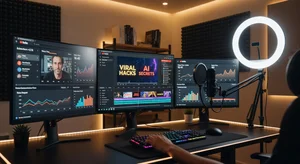
Something shifted for YouTube creators this year. The tools we used to spend hours learning and wrestling with have gotten genuinely smart. Not gimmicky smart. Actually useful smart. The kind of smart where you describe what you want and the tool figures out how to make it happen.
I've been testing pretty much every AI tool that promises to make YouTube easier. Most of them overpromise. But a handful of them have fundamentally changed how I approach making videos, from the first spark of an idea all the way through to the final thumbnail. Here's what's actually worth your time in 2026.
Writing Scripts That Sound Like You
This is where most creators start, and honestly where AI has gotten surprisingly good. Tools like VidIQ and ChatGPT can generate full video scripts now. Not just outlines or bullet points. Complete scripts with hooks, transitions, and calls to action.
But here's the thing that took me a while to figure out. You don't want AI to write your script for you. You want it to write the first draft that you then make yours. The creators who use AI scripts as a starting point and inject their own personality, stories, and opinions are the ones whose content still feels authentic. The ones who hit "generate" and read it verbatim? Their audiences can tell.
VidIQ's AI is particularly interesting because it's connected to actual YouTube data. When it suggests a hook or a topic angle, it's pulling from real search trends and competitor analysis. It knows what's getting clicks in your niche right now, not what worked six months ago. The AI chat feature lets you ask questions about your own channel analytics, which is genuinely useful for figuring out what to make next.
For the actual writing, I've found that Cliptics text to speech is great for testing how your script sounds before you record. Read it out loud through TTS and you'll catch awkward phrasing that looks fine on screen but sounds weird when spoken. That little step saves me from so many re-records.
Thumbnails: The Make or Break Moment
Let's be honest. Your thumbnail matters more than almost anything else. YouTube's own data shows that 90% of the best performing videos have custom thumbnails. And making good ones used to require real design skills or expensive software.
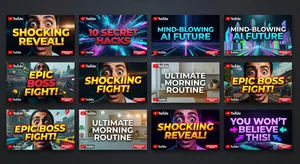
That's changed dramatically. Cliptics AI thumbnail creator lets you generate professional looking thumbnails by describing what you want. Bold text, expressive faces, contrasting colors, all the elements that drive clicks. You don't need to understand layers or color theory. You just need to know what emotion you want your thumbnail to convey.
Canva has also stepped up its AI thumbnail game. Their Magic Design feature can analyze your video title and suggest thumbnail layouts. It's not perfect every time, but it gives you a solid starting point that you can customize. The templates are specifically designed for YouTube's aspect ratio and they understand the visual patterns that perform well.
VidIQ added thumbnail generation too. What's clever about their approach is that it analyzes your actual video content and generates thumbnails that match. It pulls relevant frames from your video and combines them with text overlays and design elements. The thumbnails it creates often outperform ones I've made manually, which is both impressive and slightly humbling.
The key insight I've learned about AI thumbnails: generate five or ten options, then pick the one that makes you feel something. Not the prettiest one. The one that creates curiosity or emotion. That's what gets clicks.
Video Editing Without the Learning Curve
Editing used to be the bottleneck. You'd spend three hours filming and then eight hours editing. That ratio has completely flipped for many creators thanks to AI.
Descript remains the standout here. Their text based editing approach is brilliant. You get a transcript of your video and you literally edit the video by editing the text. Delete a sentence from the transcript and the corresponding video footage disappears. It sounds simple but it changes everything about how editing feels.
Their Underlord AI feature has gotten significantly better in 2026. You can now describe edits in plain English. "Remove all the ums and ahs." "Cut the section where I repeated myself." "Add a transition between these two topics." It handles these requests with surprising accuracy. The paid plans start at $24 per month for the Hobbyist tier, which includes 10 hours of transcription and 400 AI credits.
CapCut is the free alternative that keeps getting better. Their auto captions feature produces remarkably accurate subtitles, and their AI effects can transform basic footage into something that looks professionally produced. For creators just starting out who can't justify a Descript subscription, CapCut is honestly incredible for the price of free.
The Research and Optimization Layer
Making a great video means nothing if nobody finds it. This is where the analytics and SEO tools come in.
VidIQ and TubeBuddy both offer AI powered keyword research that goes beyond basic search volume. They analyze competition levels, trending velocity, and search intent. VidIQ's daily ideas feature gives you personalized video topics based on gaps in your niche, topics that have high search demand but low competition.
What I find most valuable is the predictive analytics. These tools can now estimate how a video will perform before you publish it, based on your title, thumbnail, and description. It's not magic and it's not always right. But it gives you a data point to consider before you commit hours to a video that might not find an audience.
Putting It All Together: A Real Workflow
Here's what a typical video creation process looks like for me now. I start with VidIQ for topic research and trend analysis. Then I use ChatGPT or Claude to draft a script, which I revise heavily to make it mine. I test the script through Cliptics text to speech to catch any awkward phrasing. I film the video, then edit in Descript using their AI features to clean up the footage. Finally, I generate thumbnails using Cliptics AI thumbnail creator and VidIQ, testing multiple options.
The whole process that used to take me 15 to 20 hours per video now takes about 6 to 8. And the quality hasn't dropped. If anything, the videos are better because I'm spending less time on tedious tasks and more time on creative decisions.
What's Actually Worth Paying For
Not every AI tool justifies its price tag. Here's my honest breakdown. VidIQ is worth it for the keyword research and analytics alone. The AI features are a nice bonus. Descript is worth it if you're editing regularly. The time savings pay for the subscription within a couple of videos. Canva Pro makes sense if you're creating thumbnails and social media content consistently.
The free tools like CapCut, Cliptics, and YouTube Studio's built in analytics are genuinely capable. You can build a successful channel without spending a dollar on AI tools. The paid options just save time and give you slightly more polish.
The bottom line is this: AI tools won't make you a great YouTuber. They'll make a good YouTuber faster. The storytelling, the personality, the genuine connection with your audience, that still has to come from you. But the hours of grunt work between having an idea and publishing a video? That's where these tools shine. And in 2026, they're shining brighter than ever.