
AI Video Watermark Removal: Platform Comparison | Cliptics
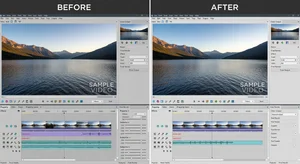
I spent the last month testing every major AI video watermark remover I could find. Not just clicking around for five minutes. Actually using them on real projects with actual deadlines.
Here's what nobody tells you upfront: these platforms are wildly different. Some excel at one thing and completely fail at another. And the one everyone recommends might not be the best fit for what you're trying to do.
So let's cut through the marketing noise and talk about what actually matters when you're choosing a tool.
What I Tested and Why
I focused on the platforms video editors actually use. Cliptics AI video watermark remover, Sora watermark remover, Runway watermark remover, and Kling watermark remover.
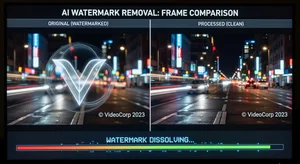
Each test used the same footage. A 30 second clip with a watermark in the bottom right corner. Standard stuff you'd encounter on stock footage or AI generated video that you want to clean up for client work.
I measured three things: removal quality, processing speed, and how much the rest of the frame got affected. Because removing a watermark is pointless if it makes the video look worse everywhere else.
The Quality Breakdown
Quality varied more than I expected.
Cliptics gave the cleanest results on static watermarks. When the logo stayed in one spot, the AI filled in that area almost smoothly. I had to zoom in to 200% to spot artifacts. For most commercial use, that's more than good enough.
Sora handled motion better. If the watermark moved across the frame or the camera panned, Sora's temporal consistency stayed solid. But it struggled with complex backgrounds. Brick walls, grass, anything with lots of texture sometimes came out blurry in the watermark area.
Runway surprised me. The quality wasn't always the best, but it preserved the original video's characteristics better than others. Color grading stayed intact. Grain structure matched. If you're working on footage that's already been carefully processed, that matters.
Kling was the wildcard. Sometimes it nailed it perfectly. Other times it left obvious smudges. Inconsistent, but when it worked, it really worked.
Speed Tests and Reality Checks
Processing time matters when you're on deadline.
Cliptics processed that 30 second clip in about 45 seconds. Fast enough that I could iterate if the first pass wasn't perfect.
Sora took around 2 minutes. Noticeably slower, but the motion handling justified the wait for certain projects.
Runway clocked in at 90 seconds. Middle of the pack.
Kling was the fastest at 30 seconds, but again, that inconsistency meant I often needed multiple attempts.
Here's the thing though. Speed only matters if the quality works. A fast result you can't use is worthless. A slower result that saves you hours of manual frame by frame editing is worth every second.
Platform Specific Quirks
Every tool had its weird moments.
Cliptics works entirely in browser. No downloads, no installations. That's incredibly convenient but means you need stable internet. I tried processing on hotel wifi once and it timed out twice.
Sora required account creation. Minor inconvenience, but the interface felt more polished once you were in. Better progress tracking, clearer quality options.
Runway integrated with their other video tools. If you're already using their space for AI video generation or editing, the workflow is smooth. If you're not, the learning curve is steeper.
Kling had the simplest interface by far. Upload, click, done. But that simplicity came at the cost of control. No fine tuning. You get what you get.
When to Use Which
Based on everything I tested, here's how I'd decide:
Use Cliptics when you need reliable quality on standard watermark removal and want browser convenience. It's my default for most projects.
Pick Sora when motion is involved. Panning shots, moving subjects, anything where temporal consistency matters more than processing speed.
Choose Runway if you're already invested in their platform or if preserving the exact look of your footage is critical. Color accuracy is its strength.
Try Kling when you need something quick and simple, and you have time to re-run if needed. The speed is genuinely useful for batch processing once you know it'll work.
The Stuff That Surprised Me
A few things caught me off guard during testing.
First, watermark placement matters way more than I thought. Center frame watermarks are harder for all platforms. Corner placement gives better results across the board.
Second, video resolution affects quality differently on each platform. Cliptics and Runway handled 4K better. Sora and Kling worked best at 1080p.
Third, none of them are magic. Really complex watermarks, animated logos, or watermarks over high detail areas will show some artifacts on every platform. The AI is good, but it's not perfect.
What Actually Works
After a month of real world use, here's my honest take.
For most video editors, Cliptics handles 80% of watermark removal needs without fuss. It's fast, it's accessible, and the quality is consistently good.
But keeping Sora in your toolkit for motion heavy work makes sense. Same with Runway if you do a lot of color critical projects.
The best platform is the one that solves your specific problem. Test your actual footage. See what works. Don't just trust someone else's recommendation, even mine.
Because at the end of the day, the tool that gets your project delivered is the right tool. Everything else is just noise.