
AI vs Manual Object Removal: Quality Comparison 2026 | Cliptics
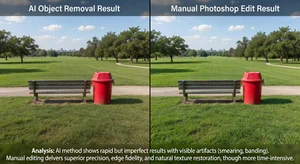
I spent 45 minutes manually cloning out a person from a group photo in Photoshop. Edges looked soft, background patterns didn't quite line up, obvious editing if you knew where to look.
Tried same photo with AI object removal. 30 seconds. Background reconstruction looked more natural than my careful manual work.
The object remover uses AI that analyzes surrounding context and fills removed areas intelligently. Sometimes better than manual editing, sometimes worse. Knowing which situations favor which approach saves time and improves results.
Speed Differences
Manual Photoshop object removal requires clone stamp, content aware fill, careful blending. Simple removals take 10 to 20 minutes. Complex objects with intricate backgrounds can take an hour plus.
AI tools process in seconds to a minute. Upload photo, mark object, click remove, download result. Entire workflow under 2 minutes for most cases.
The time difference is dramatic. AI lets you attempt removal, see results, decide if it works. Manual commits you to significant time investment before knowing if the approach will succeed.
For professional work where time is money, AI speed advantage matters enormously. Testing multiple removal options becomes practical instead of prohibitive.
Quality in Simple Backgrounds
Simple backgrounds like solid colors, gradients, or subtle textures. Both AI and manual produce excellent results here.
AI often matches or exceeds manual quality because there's less context to interpret. Solid blue sky, plain wall, smooth water surface. Algorithm extends surrounding area cleanly.
Manual work can achieve perfect results but requires more effort than the simple background deserves. Diminishing returns on time invested.
I default to AI for simple background removals. Success rate is high enough that manual backup rarely becomes necessary.
The AI image editor handles these straightforward cases efficiently without needing Photoshop skills.
Complex Background Challenges
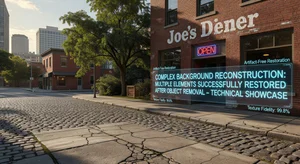
Intricate backgrounds test both approaches. Brick walls with varying mortar, tree branches creating complex patterns, crowds of people.
Manual editing with clone stamp lets you carefully match patterns, align elements, preserve detail. Time intensive but controllable.
AI analyzes broader context but can create believable yet inaccurate patterns. Background looks natural at first glance but close inspection reveals repeated elements or slightly wrong textures.
For final professional delivery where every detail matters, manual often wins on complex backgrounds. But AI gets surprisingly close surprisingly often.
Edge Quality Comparison
Edges around removed objects reveal editing quality. Clean natural looking edge versus obvious cutout appearance.
Manual editing requires careful feathering, edge blending, preserving subtle details. Skilled editors achieve smooth results. Less experienced editors create obvious halos or hard edges.
AI handles edges through context analysis. Usually preserves fine detail like hair strands, fabric texture, irregular object boundaries. Sometimes creates slight softness or incorrect edge continuation.
I've seen AI produce better edges than average manual work. Compared to expert manual editing, AI is competitive but not consistently superior.
Perspective and Lighting Consistency
Removing objects from photos with strong perspective requires reconstructing converging lines correctly. Hallway floors, building facades, tiled surfaces.
Manual editing lets you follow perspective guides, use transform tools, maintain geometric accuracy. Requires understanding perspective but achieves correct results.
AI sometimes maintains perspective correctly, sometimes creates subtle distortions. Background patterns might not align to proper vanishing points.
Lighting consistency is similar. Manual editing can match light direction, shadow positions, highlight placement deliberately. AI analyzes lighting context but occasionally creates shadows facing wrong directions or inconsistent illumination.
For architecture and product photography where geometric accuracy matters, manual retains advantage. For casual photos where slight perspective errors go unnoticed, AI works fine.
Large Object Removal
Removing small objects differs from large ones. Small distracting element uses less surrounding context to fill. Large removed area requires reconstructing significant image portion.
AI trained on millions of images understands common scenes. Removing person from beach scene, AI knows beach should have sand, water, sky. Fills plausibly even for large removals.
Manual large removals require piecing together background from various source areas. Clone from here, patch from there, blend everything together. Tedious and risks visible seams.
AI actually excels at large removals relative to manual work. The time savings become enormous while quality often remains acceptable.
The AI watermark remover demonstrates similar advantages when dealing with watermarks covering significant image areas.
Multiple Object Removal
Removing several objects from one image compounds the editing challenge.
Manual approach: remove objects one by one, ensuring each blends properly with surrounding edits. Earlier removals affect how later ones must be handled. Very time intensive.
AI can handle multiple selections simultaneously or sequentially. Each removal takes seconds. Less coordination needed between removed areas.
Quality for multiple removals varies. Sometimes AI maintains consistency across the image. Other times, different removed areas use slightly different reconstruction approaches creating subtle inconsistencies.
Skin and Organic Textures
Removing objects from portraits or organic subjects like foliage, water, clouds.
Manual editing on skin requires matching skin texture, maintaining pore detail, preserving lighting subtleties. Expert retouchers achieve flawless results. Average users create overly smooth or mismatched patches.
AI trained on portrait data often reconstructs skin convincingly. Maintains texture, matches tone, preserves natural appearance. Not perfect but frequently good enough for most uses.
Organic patterns like grass, leaves, water ripples. AI excels here. These textures have natural variation so exact matching isn't required. AI generates plausible variations that blend smoothly.
Cost Considerations
Photoshop subscription costs $10 to $50 monthly depending on plan. Includes object removal capabilities plus full editing suite.
AI object removal tools range from free with limits to $10 to $30 monthly for unlimited use. Some charge per image processed.
For users who only need object removal occasionally, AI tools offer better value. No point paying for full Photoshop if that's your only use case.
Professional photographers already using Photoshop can use either approach. Manual for critical work, AI for quick jobs.
Skill Requirements
Manual object removal requires Photoshop knowledge. Clone stamp tool, content aware fill, layer masks, blending modes. Learning curve before achieving quality results.
AI tools need minimal skill. Mark object, click remove. Interface is accessible to complete beginners.
This accessibility democratizes object removal. Anyone can get decent results without years of Photoshop practice.
Drawback is less control. AI does what it does. Manual editing offers infinite adjustability if you have the skills to use it.
When AI Wins
Quick removals needed within minutes. Social media posts, casual photos, rapid iteration testing different removal options.
Simple to moderate backgrounds where AI succeeds reliably. Solid colors, subtle patterns, natural organic textures.
Budget conscious users without Photoshop access. Free or low cost AI tools deliver results impossible manually without software investment.
Large removals where manual work would be prohibitively time consuming. AI reconstructs big areas faster and often better than tedious manual patching.
When Manual Wins
Critical professional work where every detail must be perfect. Commercial photography, high end retouching, deliverables under close scrutiny.
Complex geometric backgrounds requiring perspective accuracy. Architecture, interior design, product photography with structured environments.
Situations where AI fails repeatedly and manual approach becomes necessary fallback. Unusual object shapes, very complex backgrounds, AI limitations.
Projects where you're already in Photoshop for other edits. Adding manual object removal to existing workflow makes sense rather than switching tools.
Hybrid Approach
Use AI for initial removal. Evaluate results. If quality meets needs, done. If not, refine manually in Photoshop.
This combines AI speed with manual control. Get 80 percent there in 30 seconds with AI. Spend 10 minutes polishing the remaining 20 percent manually instead of 45 minutes doing everything from scratch.
AI removes bulk of object. Manual fine tunes edges, fixes perspective errors, adjusts any reconstruction issues. Best of both methods.
Most professional workflows evolve toward this hybrid. AI for efficiency, manual for perfection.
My Decision Process
I try AI first almost always. 30 seconds invested to see if it works. If quality is good enough, I'm done.
Check edges at 100 percent magnification. Look for background pattern consistency. Verify lighting and perspective make sense.
If AI result has minor issues in non critical areas, I often accept it. Perfectionism has diminishing returns for casual use.
For client work or important projects, I use AI as starting point then manually refine. Faster than pure manual while achieving quality standards.
Very complex removals get manual from start. No point trying AI when I know the complexity will exceed its capabilities.
AI object removal has reached the point where it matches or beats average manual editing in many situations. Expert manual work still wins for critical applications but AI dramatically reduces the time and skill needed for quality results. Know which tool suits your specific situation and you get better results faster than either approach alone could deliver.