
Alt Text Compliance 2026 Deadline - Meet ADA/WCAG | Cliptics
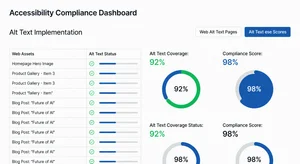
I'm not usually the person who sounds alarm bells, but this one matters. If your website has images without alt text, you've got a deadline coming that you really don't want to miss.
The 2026 compliance deadline for ADA and WCAG image accessibility isn't just another regulatory thing you can ignore. Companies are already getting hit with lawsuits, and the penalties are getting serious. I've watched businesses scramble to fix this at the last minute, and it's never pretty.
Here's what most people don't realize. Alt text isn't just about being nice to screen reader users anymore. It's a legal requirement that's actively being enforced. The Department of Justice finalized rules making WCAG 2.1 Level AA the official standard for web accessibility, and image descriptions are right at the center of it.
Why This Deadline Actually Matters
You know that sinking feeling when you realize you've been ignoring something important? That's what happens when businesses discover their entire image library is non-compliant two months before the deadline.
The legal landscape changed. Accessibility lawsuits jumped 14% in 2025, and most of them cite missing or inadequate alt text as a primary violation. Courts aren't being lenient about it either. Settlements are running anywhere from $10,000 for small sites to millions for larger ecommerce operations.
But here's the thing that bothers me more than the legal stuff. There are millions of people using screen readers who literally cannot access your content without proper alt text. Your product photos, your infographics, your brand imagery, it's all invisible to them. That's not just a compliance issue, that's leaving customers out.

What Actually Counts as Compliant Alt Text
This is where people get tripped up. Slapping "image" or "photo" on everything doesn't cut it. WCAG has specific requirements, and auditors know exactly what to look for.
Your alt text needs to convey the same information and function as the image itself. For a product photo, that means describing what someone would see. For a graph, it means explaining the data. For decorative images, you actually use empty alt text (alt="") to tell screen readers to skip it.
I see websites using AI to auto-generate alt text, and yeah, that helps. But you can't just set it and forget it. Those AI descriptions need human review because they miss context all the time. An AI image description generator can speed up the process massively, but someone needs to verify accuracy.
Length matters too. Keep it under 125 characters when possible. Screen readers handle shorter descriptions better. If you need more detail, use longdesc or put the information in surrounding text.
Running Your Compliance Audit
Start with a crawl of your entire site. You need to know exactly how many images you're dealing with and which ones are missing alt text. There are automated tools that'll flag this, but don't rely on automation alone for the fix.
Check your CMS settings first. A lot of websites have been uploading images for years without alt text fields even showing up in the editor. WordPress, Shopify, Squarespace, they all handle this differently. Make sure your content team actually sees those fields when they upload images.
Look at your historical content. Blog posts from 2020, product pages from three years ago, archived news sections. All of it needs compliant alt text. This is usually where the biggest volume lives, and it's the stuff people forget about.
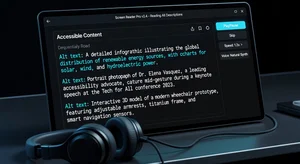
Test with actual screen readers. NVDA and JAWS are the most common. Pull up your site and navigate it without looking at the screen. You'll catch problems that automated audits miss. If your alt text doesn't make sense when read aloud, it's not compliant.
The Batch Fix Strategy
When you're staring at 5,000 images that need alt text, you need a system. Trying to do it manually one by one will burn out your team before you're halfway done.
Start with customer-facing pages. Homepage, product pages, checkout flow. These get the most traffic and carry the highest lawsuit risk. Fix these first, even if your blog archive has to wait a week.
Use tools that actually speed things up without sacrificing quality. You can bulk process images through an image compression tool while you're at it, but for alt text specifically, you want something that can suggest descriptions that your team then refines.
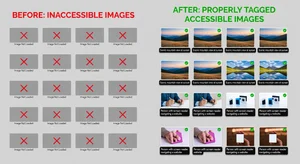
Create alt text templates for repetitive image types. If you're an ecommerce site with 200 product shots on white backgrounds, you can template the structure. "Black leather wallet with brass zipper, front view" follows the same pattern as "Blue denim jacket with silver buttons, front view." Templates keep things consistent and fast.
Delegate by category, not by page. Have one person handle all product images, another tackle infographics, another do team photos. They'll develop expertise in that image type and work faster with better quality.
What Happens After Compliance
Getting compliant isn't the finish line. It's the baseline. You need processes to keep it that way.
Build alt text into your content workflow from day one. When someone uploads an image, alt text happens right then, not as a backfill project six months later. Make it a required field in your CMS if you can.
Train everyone who touches your website. Marketing, customer service, whoever loads images needs to understand this. One sentence explanation: "Describe what people would see if they couldn't see the image." That covers 90% of situations.
Monitor ongoing. Set up quarterly audits to catch anything that slipped through. New hires sometimes don't follow the process, plugins can strip alt text during migrations, things happen. Catch it early.

Update the AI image editor workflows to include accessibility checks. When you're editing images, that's the perfect time to verify or add descriptions.
Getting It Done Before the Deadline
You've probably got less time than you think. Between identifying all the images, writing or reviewing descriptions, adding them, and testing, even a small site can take weeks.
Start today, not next month. Map out how many images you have, divide by the number of weeks until deadline, and that's your daily quota. If the math doesn't work, you need more people or better tools.
Don't aim for perfection on the first pass. Aim for legally compliant, then improve from there. An okay alt text that meets WCAG standards is infinitely better than no alt text with a lawsuit attached.
The 2026 deadline isn't moving. Compliance standards aren't getting looser. And the longer you wait, the more expensive and stressful the fix becomes. But if you start now with a clear process, this is totally manageable.
Your website either works for everyone, or it's leaving people out. Alt text is how you fix that gap while staying on the right side of regulations that are only getting stricter.