
Watermarking 500 Product Images in Under 10 Minutes: Batch | Cliptics

The math on individual image watermarking is straightforward and miserable. If you have 500 product images and it takes 45 seconds each to open, watermark, and save in an image editor, you've just committed 6.25 hours to a task that produces no creative value whatsoever.
Most Etsy and Shopify sellers either skip watermarking (and then watch their images appear on competitors' listings and stock sites) or do it painfully one at a time. Batch watermarking changes this from a half-day task to a 10-minute workflow.
Why Product Image Watermarking Matters for Sellers
Image theft in ecommerce is endemic. On Etsy specifically, the platform is large enough and the seller community global enough that product photos routinely get scraped and used by other sellers, sometimes for direct competing listings, sometimes for completely unrelated products.
The watermark serves two functions. The visible deterrent: a well-placed watermark makes your images less usable for theft because removing it convincingly requires effort that most image thieves won't invest. The attribution function: if your photos do get used without permission, a visible watermark makes takedown requests to platforms and Google Image Search much cleaner because attribution is built into the asset.
For custom and handmade sellers, your photography represents a significant investment of both time and creative labor. Protecting it is a business decision, not paranoia.
Setting Up Your Watermark Design
Before batch processing, you need a watermark asset that works consistently across your product range.
The most effective ecommerce product watermarks share a few characteristics: semi-transparent (60-75% opacity) so the product is still clearly visible, positioned in a corner or along an edge rather than center where it would obstruct the main product, and sized appropriately for your typical image dimensions.
For text watermarks: your brand name or website URL in a clean font. Avoid cursive fonts that become illegible at small sizes. The text should be readable at a glance without requiring the viewer to focus.
For logo watermarks: export your logo at a size appropriate for the typical corner position on your images. A watermark that's 15-20% of the image width is usually right. Smaller becomes invisible; larger becomes obtrusive.
The ideal watermark file is a PNG with transparency, which allows the batch tool to place it correctly against any background color in your product images.
The Batch Watermarking Workflow
Organize your product images into a folder by product category or collection before starting. This keeps your output organized and makes it easier to verify the batch completed correctly.
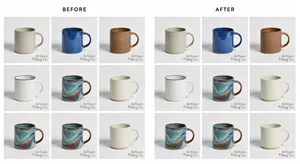
Upload your image batch to your watermark tool. Select your watermark asset (PNG with transparency), set position (corner of your choice), and set opacity (start at 70% and adjust based on your watermark design and typical background colors).
The key settings to test before running the full batch:
- Position: corner positioning keeps the watermark out of the main product view
- Size: relative to image dimensions (percentage-based sizing handles images with different native resolutions consistently)
- Opacity: test against your lightest product images and your darkest; you need visibility on both
Run the batch on a sample set of 10-15 images first. Review the output and adjust settings before running your full 500-image batch. The sample review step takes 2 minutes and prevents having to re-run a full batch because the opacity was off.
Platform-Specific Considerations
Etsy and Shopify have different listing requirements that affect watermark strategy.
For Etsy: The first (hero) image is what shows in search results, so watermark placement and visibility on this image matters most. Most sellers apply watermarks to all images including the hero. Some sellers watermark all images except the hero, arguing that search result images don't need watermarks since they're too small for unauthorized use. Both strategies are valid; consistency within your shop is what matters.
For Shopify: Your images often appear at various sizes depending on the theme and device. Test your watermarked images at the smallest size they'll display at (mobile product thumbnails are often as small as 200px) to ensure the watermark is still visible rather than a muddy artifact.
Building Watermarking Into Your Product Photography Workflow
The most efficient sellers build watermarking into their workflow before images go live, not as a remediation project afterward.
Establish a final step in your photography workflow: shoot, edit, batch watermark, upload to shop. This means every image that leaves your editing process is watermarked by default. No decisions about which images need it. No selective application.
If you update product images (seasonal shoots, updated lifestyle images), process new images through the same batch watermark step. Use the same watermark asset and settings to maintain consistency across old and new images in your shop.
For product launches: watermark all product images, then upload the entire set. Starting a new product with professional, consistent watermarks establishes your brand presentation from the first listing view.
The 10-Minute Math
Setup time (first use, including watermark creation): 15-20 minutes. After setup, the recurring batch workflow is: upload images, apply settings, run batch, download output. For 500 images, the processing time is 3-5 minutes depending on image size. Total workflow time including upload, configuration, and download: 8-12 minutes.
For an Etsy seller adding 100 new products per month with 5 images each, this workflow processes 500 images in under 10 minutes on a regular basis. The alternative, manual watermarking at 45 seconds per image, is a 6.25-hour monthly task. The batch workflow recaptures those hours for actual business activity.
The images are the most visible part of your product listing. Protecting them efficiently is a basic operational hygiene step that the batch workflow makes trivially achievable.

The time savings are real and they compound. Every hour not spent on manual watermarking is an hour available for sourcing, customer service, or the creative work that actually grows your shop. Set up the batch workflow once and use it for every upload going forward.