
From Prompt to Published: The Complete 2026 Beginner's | Cliptics
Six months ago, I couldn't draw a recognizable stick figure. Today I'm creating images that look like they came from professional creative agencies, using only my words and an AI image generator. This isn't a natural talent story. This is a tools story, and it's a story about what's become accessible to anyone who's willing to learn how to describe what they want to see.
AI image generation in 2026 has crossed a threshold. The results are good enough to use professionally. The tools are accessible enough to learn in an afternoon. What remains is understanding how to communicate with the AI in a way that produces what you actually intend.
How AI Image Generation Works (The Non-Technical Version)
You write a description of the image you want. The AI converts that description into a visual output. That's the user-facing version of the process.
What's happening underneath: the AI has learned from billions of images and their associated text descriptions, which means it has internalized the relationship between visual concepts and the words people use to describe them. When you type "a cozy bookshop at night with warm lamp light and rain on the windows," the AI isn't searching for a photo that matches. It's generating a new image based on its learned understanding of what each of those visual concepts looks like.
The quality of your output depends on how clearly you communicate the visual concept. Not how artistically sophisticated your vocabulary is. Just how specifically and completely you describe what you want to see.
Your First Image: A Step-by-Step Guide
Open Cliptics AI Image Generator and look at the prompt input field. This is where your description goes.
Start with a simple, specific description. Not "a landscape" but "a misty mountain valley at sunrise with a river reflecting orange and pink sky colors, photography style."
The elements of a useful first prompt:
- The subject: what the main thing in the image is
- The setting or context: where it is or what surrounds it
- The style: photography, illustration, painting, concept art, watercolor
- The mood or lighting: warm, dramatic, soft, foggy, bright
- Any important details: specific colors, times of day, weather conditions
Generate your first image. Look at the result and identify what it got right and what it didn't. This feedback is the learning loop that makes you better at prompting.
Understanding Why Your Prompt Produces What It Produces
If the result doesn't match what you imagined, the problem is almost always in the specificity of the description.
Common mismatch patterns:
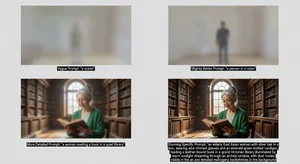
Too abstract: "a beautiful natural scene" is a valid description of thousands of different images. The AI makes choices within that description, and they may not be yours. Be more specific: which nature, which season, which time of day, what's the focal point?
Missing the style: AI generators default to photorealistic imagery unless you specify otherwise. If you wanted a watercolor illustration and got a photo-realistic render, add "watercolor illustration style" to your prompt.
Missing scale and composition cues: "a coffee cup" could be an extreme close-up, a top-down shot, or a scene with a coffee cup on a table in a cafe. Tell the AI what you see in your mind: "A close-up of a white ceramic coffee cup on a wooden table, steam rising, morning light from the left side."
The Prompt Enhancement Shortcut
For beginners who aren't sure how to describe visual qualities more precisely, Cliptics AI Image Prompt Enhancer takes your basic description and expands it with visual detail vocabulary that consistently produces better results.
Type "a mountain at sunset" and the enhancer might return "a dramatic mountain peak silhouetted against a fiery amber and magenta sunset sky, with scattered pine trees in the foreground and light mist in the valley below, photography style, golden hour lighting, wide angle composition."
Both are valid inputs. The second consistently produces more interesting, intentional, and usable results. The enhancer teaches you the vocabulary as you use it, which means you'll need it less over time as you internalize the pattern.
Style Vocabularies Worth Learning
Knowing a handful of style terms dramatically expands your creative range. These are the most practically useful:
Photography styles: "DSLR photography," "35mm film," "Polaroid," "macro photography," "aerial photography," "black and white photography," "editorial photography"
Illustration styles: "vector illustration," "flat design," "line art," "cel shading," "ink drawing," "pencil sketch," "gouache illustration"
Painting styles: "oil painting," "watercolor," "acrylic painting," "impressionist style," "photorealistic painting," "concept art"
Digital art styles: "digital art," "concept art," "3D render," "cyberpunk aesthetic," "vaporwave," "low poly," "isometric design"
Lighting styles: "golden hour," "blue hour," "studio lighting," "dramatic side lighting," "soft natural light," "neon lighting," "volumetric lighting"
These aren't exhaustive, but learning these terms and experimenting with them opens up most of the visual range you'll need for practical creative use.
What AI Image Generation Is Good For Without Art Skills
The practical applications that don't require artistic judgment, just good prompting:
Social media graphics and illustrations: backgrounds, header images, thumbnail concepts, abstract textures for designs.
Concept visualization: "show me what a living room would look like with dark green walls and natural wood furniture" is a design research prompt, not an artistic project.
Content illustrations: blog posts, presentations, and reports benefit from custom illustrations. Describing the concept you want illustrated is a research and communication skill, not an art skill.
Brand mood boards and concept exploration: before committing to a visual direction for a brand or project, AI generation lets you explore options quickly.
Personal projects: custom artwork for gifts, prints, profile images, event invitations.
Common Beginner Mistakes and How to Avoid Them
Describing feelings rather than visuals: "make it feel cozy" is less effective than "warm lamp light, dark wood furniture, a fireplace, throw blankets." Feelings become visuals through their specific elements.
Over-complicating the prompt: longer isn't always better. "A red apple on a white surface, soft natural lighting, close-up photography" consistently outperforms a 200-word prompt trying to specify every aspect of the image.
Giving up after one generation: every prompt produces a result you refine from. Generate several variations of a similar prompt. Identify which elements of each result are closest to what you want. Incorporate those observations into the next prompt iteration.
Getting Better Quickly
The fastest way to improve: spend 30 minutes just generating images from prompts inspired by descriptions of artwork you admire. Describe what you see in an image you like (a photograph, a painting, an illustration) and see how closely the AI can reproduce the visual qualities. This builds your vocabulary for describing visual elements because you're working from known reference points.
The most important thing I can tell you as someone who was a complete beginner six months ago: the learning curve is genuinely short. The first prompt that produces something you're excited about comes faster than you expect. And from that moment, the creative possibilities keep expanding.
You don't need to be an artist. You need to be able to describe what you see in your mind clearly enough for the AI to build it. That's a skill anyone can develop in an afternoon.
Start with one image today. Don't overthink the prompt. Generate something, look at it, and think about what would make it closer to what you imagined. That iteration cycle is the whole game. It gets satisfying remarkably quickly.