
Build AI Chatbot for Your Website No Code | Cliptics
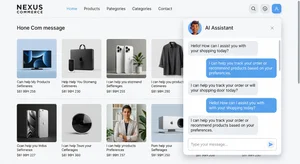
You know that sinking feeling when a potential customer lands on your site at 2 AM, has a question about your product, and there's nobody there to answer? They leave. They probably won't come back. That sale is gone, and you didn't even know it happened.
This is the reality for thousands of small and medium businesses right now. You can't afford 24/7 support staff, but your customers expect instant answers. It doesn't matter if you sell handmade jewelry or run a SaaS platform. People want help the moment they want it, not during your business hours.
The good news? You don't need to hire a developer or learn to code to fix this. AI chatbots have gotten ridiculously accessible. You can build one that understands your business, answers real questions, and handles sales conversations. All without writing a single line of code.
Let me walk you through exactly how to do it.
Why Your Website Needs an AI Chatbot Right Now
Let's be honest about the numbers. Studies consistently show that businesses using chatbots see a 30 to 50 percent reduction in support tickets. That alone should grab your attention if you're spending hours answering the same questions over and over.
But it goes beyond saving time. An AI chatbot trained on your specific content can recommend products, guide visitors through checkout, qualify leads before they talk to your sales team, and collect feedback automatically. It turns your website from a static brochure into an active salesperson that never sleeps.
The old generation of chatbots was painful. Those rigid decision trees where you clicked through menus and the bot never understood what you wanted. Those are dead. Modern AI chatbots use large language models to understand context, follow up on previous messages, and give answers that feel conversational.
Here's something a lot of business owners miss: chatbots collect data. Every conversation tells you what your customers need, what confuses them, where they get stuck. That information is gold for improving your product and marketing. If you're exploring how AI tools can streamline your business, the Cliptics AI tools directory has a solid breakdown of chatbot options worth looking at.
Choosing the Right No Code Chatbot Builder
Not all chatbot platforms are created equal, and picking the wrong one will cost you time and frustration. Here's what actually matters when you're choosing.
For small businesses and solopreneurs, you want something quick to set up and affordable. Tidio is a strong option here. It combines live chat with AI chatbot features, has a generous free tier, and the visual builder is genuinely intuitive. You can train it on your FAQ page and have something running in under an hour. ChatBot.com is another solid pick with drag and drop conversation flows that make sense even if you've never built anything technical.
For mid size businesses with more complex needs, Intercom and Drift step up the game. They offer deeper CRM integrations, can route conversations to human agents when the AI gets stuck, and have analytics dashboards that help you improve over time. The price jumps significantly, but so does the sophistication. If your team handles hundreds of conversations a day, these tools pay for themselves fast.
For e-commerce specifically, look at platforms that integrate directly with your store. Tidio works well here with its Shopify and WooCommerce plugins. The chatbot can pull product information, check order status, and handle returns automatically. That's not a gimmick. That's a real workflow that saves your support team hours every week.
The key question to ask yourself: how complex are my customer conversations? If 80 percent of your questions are variations of the same ten topics, a simpler tool works perfectly. If your customers need personalized answers based on account data, you'll need something more solid. For a broader view of what fits different business scenarios, this comparison of chatbot builders covers the landscape well.
Step by Step: Building Your First AI Chatbot
Here's the actual process. This works with most no code platforms, though I'll use a general approach that applies broadly.
Step 1: Define your chatbot's purpose. This sounds obvious but most people skip it. Write down the top five to ten questions your customers ask. Check your email inbox, your social media DMs, your support tickets. Those recurring questions are exactly what your chatbot needs to handle first. Don't try to make it do everything on day one.
Step 2: Gather your training content. Pull together your FAQ page, product descriptions, return policy, shipping information, and pricing details. The better the source material, the smarter your chatbot will be. Some platforms let you point the AI at your website URL and it scrapes the content automatically. Others need you to upload documents or paste text manually.
Step 3: Set up the conversation flow. Even with AI, you want some structure. Create a welcome message that sets expectations. Something like "Hey, I'm here to help with product questions, order tracking, and returns. What can I help you with?" Then configure your fallback response for when the AI doesn't know the answer. Always give users a way to reach a human.
Step 4: Customize the look and feel. Match your chatbot widget to your brand colors. Use your logo. Pick a name that fits your brand personality. These details matter more than you'd think. A chatbot that looks like it belongs on your site builds trust. A generic one feels like an afterthought.
Step 5: Test it relentlessly. Before you go live, spend time trying to break it. Ask weird questions. Misspell things. Use slang. See how it handles edge cases. Ask your team members to test it too. Every dumb question they ask now is one a real customer won't get a bad answer to later.
Step 6: Launch and iterate. Go live, but don't walk away. Review the conversation logs weekly. You'll spot gaps in your training data, find new questions you didn't anticipate, and discover opportunities to make the bot more helpful. Most platforms let you refine responses without rebuilding anything.
Scaling Your Chatbot as Your Business Grows
Your first chatbot is really just a foundation. Once it's handling the basics, you can layer on features that genuinely transform how your business operates.
Start connecting your chatbot to your other tools. Link it to your email marketing platform so it can add subscribers. Connect it to your CRM so every conversation creates or updates a contact record. Integrate it with your calendar so it can book appointments. Each connection eliminates a manual step your team currently handles.
For e-commerce operators, the next level is proactive engagement. Instead of waiting for visitors to click the chat bubble, trigger the chatbot based on behavior. Someone lingering on the pricing page for 30 seconds? Pop up with "Got questions about our plans?" Someone adding items to cart but not checking out? Offer help. These triggered conversations can recover a surprising amount of abandoned revenue.
If you're managing multiple channels, look for platforms that unify your chatbot across your website, Facebook Messenger, WhatsApp, and Instagram. Your customers shouldn't get a different experience depending on where they reach you. The smarter chatbot strategies covered here go deeper into how businesses are using multi channel bots to grow faster.
Common Mistakes That Waste Your Time
I want to save you from the pitfalls I've seen business owners stumble into.
Don't make your chatbot pretend to be human. People figure it out instantly and it erodes trust. Be upfront: "I'm an AI assistant for [your business]." Customers respect honesty and they'll still engage.
Don't launch without a human handoff option. Your AI will get questions it can't handle. If there's no way to reach a real person, frustrated customers leave. Always have an escalation path, even if it's just a "leave your email and we'll get back to you within 4 hours" message.
Don't set it and forget it. The biggest waste is building a chatbot and never looking at the data. Those conversation logs are a direct window into what your customers think, need, and struggle with. Review them. Act on them. That feedback loop separates businesses that use chatbots as a gimmick from those that use them as a genuine competitive advantage.
And don't overcomplicate the initial build. Start with a chatbot that handles your five most common questions really well. That alone will save you more time than a complex bot that handles fifty topics poorly. You can always expand later.
Building an AI chatbot for your website isn't a technical challenge anymore. It's a decision. The tools are ready. The setup is straightforward. And the impact on your customer experience and your workload is immediate. The only question left is how much longer you want to keep losing those 2 AM visitors.