
Business Card QR Codes: Design and Tracking Setup | Cliptics
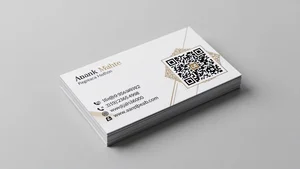
I handed out 200 business cards at a conference with a QR code. Only 12 people scanned it.
Next conference I redesigned the QR code approach. Got 87 scans from 150 cards handed out.
The QR code itself wasn't the problem. How I presented it and what it linked to made all the difference.
Why Most Business Card QR Codes Fail
Nobody knows what the QR code does. Is it your website? LinkedIn? Contact info? People won't scan mystery codes.
The QR code links somewhere useless. Your homepage doesn't help someone who just met you. They need specific context.
The code is too small or poorly positioned. If people have to work to scan it, they won't bother.
There's no reason to scan it. If all your info is already on the card, why scan?
What To Actually Link To
I link to a simple landing page with my contact info, social links, and current projects. Takes 5 seconds to save my info to their phone.
Some people link to their LinkedIn. Works if that's where you want connections to happen.
Calendar booking link is smart for people who do lots of meetings. Scan code, book time, done.
Portfolio or work samples for creative professionals. Show don't tell.
The QR code generator on Cliptics lets you create trackable codes quickly so you can test different destinations.
Design That Gets Scans
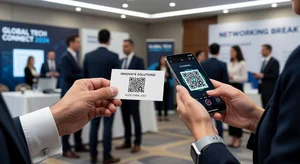
Label your QR code. "Scan for contact info" or "Scan to connect" tells people exactly what will happen.
Make it big enough. Minimum half inch square. Bigger is better for quick easy scanning.
Add a small arrow or finger icon pointing at it. Obvious visual cue that this is interactive.
Use high contrast. Black QR code on white background scans faster than creative color schemes.
Positioning on the Card
Back of the card works best. Front is for quick visual information, back is for detail and action items.
Bottom right corner if you're putting it on the front. That's where thumbs naturally rest when holding a card.
Give it breathing room. QR codes surrounded by text and graphics are harder to scan.
Dynamic vs Static QR Codes
Static QR codes link directly to a URL. You can't change where they go after printing.
Dynamic QR codes point to a redirect service. You can change the destination anytime.
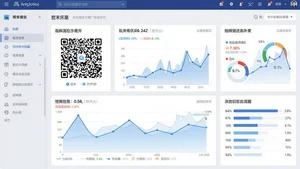
Dynamic codes let you track scans. See how many people scanned, when, and from where.
I always use dynamic codes now. The tracking data alone is worth it.
Setting Up Scan Tracking
Use a URL shortener with analytics. Bitly, TinyURL, or custom domains with UTM parameters.
Track scan counts, scan times, and device types. This tells you if your cards are actually working.
Set up separate tracking links for different events. Helps you know which networking situations are most effective.
What To Show After The Scan
A mobile optimized landing page. Most scans happen on phones obviously.
Quick loading. If your page takes forever to load, people leave.
Clear next action. Save contact button, connect on LinkedIn button, schedule meeting button. Make it obvious what to do.
Your photo. Helps people remember who you are when they review scanned cards later.
Common Mistakes to Avoid
Linking to a PDF. Nobody wants to download files from a business card QR code.
Requiring app downloads. Huge friction. People won't do it.
Auto playing video or audio. Annoying and potentially embarrassing in public.
Collecting email addresses before showing content. You just met them, don't gate keep.
Testing Before Printing
Scan your QR code with multiple phones. Android and iPhone cameras behave slightly differently.
Check that the landing page looks good on phones. Desktop view doesn't matter here.
Confirm the tracking link is working. Test scan should show up in your analytics.
Print one sample card and test it in real lighting conditions. Sometimes printed QR codes scan differently than screen versions.
When QR Codes Don't Make Sense
If your card already has all the info someone needs. Don't add a QR code just because you can.
If your target audience is unlikely to scan codes. Some industries and age groups don't use QR codes much.
If you don't have a good destination. QR code to your basic contact page wastes everyone's time.
My Current Setup
My QR code links to a simple Carrd page with my photo, contact methods, and three current projects.
I update the projects every few months so the page stays relevant.
I use a shortened tracked URL. Can see exactly how many scans I get per batch of cards.
I've labeled it "Quick Connect" on the card. Scan rate went up significantly after adding that label.
Measuring ROI
Track scans per cards distributed. Less than 20% scan rate means something's wrong with your setup.
Track actions from scans. Did they connect on LinkedIn? Book a meeting? Send an email? Scans without action don't matter.
Compare networking events. Which venues or types of events generate the most engaged scans?
What Actually Works
Clear labeling of what the QR code does. "Scan to save my contact" gets way more scans than an unlabeled code.
Big enough to scan easily. Don't be subtle. Make it obvious and accessible.
Destination page that provides immediate value. Convenience beats cleverness.
Tracking so you know if your cards are actually working or just decorative trash people throw away.
Business cards with QR codes are only effective if people actually scan them. Design with that goal in mind, not just because QR codes look modern and tech savvy.
The best QR code is one that reduces friction for the person you just met. Make it easy to stay connected, track whether it's working, refine based on data.