
"Content Repurposing: One Post, Ten Platforms | Cliptics"
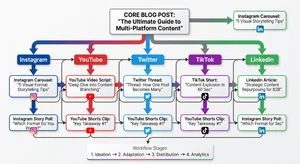
I published one blog post last Tuesday. By Friday, that single post had turned into content for ten different platforms. Not copies. Not lazy cross-posts. Actual platform-native content that made sense in each feed.
Total extra time spent? About two hours. And honestly, most of that was the first time. Now I can do it in under an hour.
This is content repurposing, and in 2026 it's not optional anymore. Not if you want to stay visible without burning out or hiring a team of eight.
Here's exactly how I do it, step by step, with the tools and decisions behind each transformation.
Why Repurposing Beats Creating From Scratch
Let me get the obvious out of the way. Creating original content for every single platform is unsustainable. Even for full-time creators. Even with AI assistance.
The math doesn't work. Say you're active on Instagram, TikTok, YouTube, LinkedIn, X, Threads, Pinterest, your blog, your newsletter, and a podcast. That's ten platforms. If each piece takes 45 minutes to create from scratch, you're looking at 7.5 hours per day just to post once on each. Every single day.
Nobody does that. What actually happens is people pick two or three platforms and ignore the rest. Which means they're leaving audience on the table.
Repurposing flips the equation. You invest deep effort once into one piece of anchor content. Then you extract and adapt from that anchor. The quality stays high because the research and thinking already happened. You're just reshaping the delivery.
And here's what surprised me when I started doing this seriously: repurposed content often outperforms original content on secondary platforms. Why? Because the core idea has already been validated. You know it resonates. You're just finding new ways to present it.
Start With an Anchor Post
Everything begins with one strong piece of content. I call it the anchor. For me, that's usually a blog post between 1,200 and 2,000 words. But it could be a YouTube video, a podcast episode, or even a detailed newsletter issue.
The anchor needs three qualities. First, it should cover a topic your audience actually cares about. Don't repurpose filler content. Second, it should have multiple distinct points or sections. Each one becomes a potential standalone piece. Third, it should express a clear perspective. Generic advice doesn't repurpose well because there's nothing distinctive to carry across platforms.
For this walkthrough, let's say your anchor is a blog post titled "Five pricing mistakes freelancers make in 2026." That gives you a clear topic, five distinct sections, and room for a strong point of view.
The Ten Platform Breakdown
Here's where it gets practical. Each platform gets its own treatment, not a copy-paste.
Platform 1: Your Blog. This is the anchor itself. The full, detailed post. Optimized for search, thorough, and structured with headers for scanability. This is where Google finds you.
Platform 2: Newsletter. Take the blog post and rewrite the intro to be more personal and conversational. Strip out the SEO formatting. Add a personal anecdote or a "here's what I didn't include in the blog" bonus insight. Your newsletter readers want to feel like insiders, not like they're reading a website.
Platform 3: LinkedIn. Pull the single most counterintuitive point from your post and expand it into a standalone LinkedIn text post. For our freelancer example, maybe it's "Raising your prices actually reduces client complaints." That's a hook that stops the scroll. Keep it under 1,300 characters. End with a question to drive comments.
Platform 4: X (Twitter). Turn your five main points into a thread. Each point gets one or two tweets. Start with a hook tweet that frames the whole thread. Something like "I've reviewed 200+ freelancer invoices. These 5 pricing mistakes cost people thousands." Add a final tweet linking back to the full blog post.
Platform 5: Instagram Carousel. Each pricing mistake becomes one slide. Design ten slides total: a hook slide, five mistake slides with brief explanations, two solution slides, a summary slide, and a call-to-action slide. Canva templates make this a ten-minute job once you have the content written.
Platform 6: Instagram Reels or TikTok. Pick the most surprising or controversial point and record a 30 to 60 second video. Don't script it word for word. Use three bullet points as your guide and talk naturally. The "talking head with text overlay" format still performs extremely well in 2026 for educational content.
Platform 7: YouTube Shorts. Same short video approach but slightly different framing. YouTube Shorts audiences respond well to "mistake and fix" formats. Show the mistake, pause, then reveal the fix. Keep it under 55 seconds to hit the algorithm sweet spot.
Platform 8: Pinterest. Create two to three pins. One infographic style pin summarizing all five mistakes. One quote pin with your boldest statement from the post. One "blog post preview" pin that links directly to the full article. Pinterest is a long-game traffic source that most people completely ignore.
Platform 9: Podcast Snippet or Audio. Record yourself discussing the topic for five to eight minutes. Not reading the blog post. Discussing it. Add personal stories, expand on points, mention things you cut from the written version. Post it as a podcast episode, or if you don't have a podcast, post the audio on Spotify as a short-form piece.
Platform 10: Threads. Write a casual, opinion-driven version of your main argument. Threads rewards personality and hot takes more than polished advice. Take your core thesis and make it spicier. "Freelancers who don't raise their prices every year are subsidizing their clients' businesses" hits different on Threads than on LinkedIn.
The Actual Workflow
The order matters. Don't try to create all ten simultaneously. Here's the sequence that works.
Day one: write and publish the blog post. This is where 80 percent of your creative energy goes. Get the thinking right here and everything else flows.
Day one, immediately after: copy the blog text into a doc and highlight every section, statistic, quote, and strong opinion. These are your extraction points.
Day two: create the newsletter version and the LinkedIn post. These are text-based and draw directly from the blog. Should take 20 to 30 minutes combined.
Day two: build the Instagram carousel and Pinterest pins. Use tools like Canva or Cliptics image editor to create visuals from your key points. Template-based, so this goes fast once you've done it a few times.
Day three: record the short-form videos for Reels, TikTok, and YouTube Shorts. Batch them in one sitting. Same setup, same lighting, slightly different angles and hooks for each platform.
Day three: write the X thread and Threads post. Quick text adaptations.
Day four: record the podcast snippet if applicable.
The whole cycle from anchor to ten platforms takes roughly two to three hours spread across three to four days. And the more you do it, the faster it gets because you develop templates and instincts for what to extract.
Tools That Make This Faster
You don't need expensive software. Here's my actual toolkit for 2026.
Buffer or Later for scheduling across platforms. Pick one and stick with it. The time saved from batch scheduling alone is worth the subscription.
Descript for quick video editing and creating transcripts from your recordings. The AI editing features cut production time significantly.
OpusClip or similar for automatically extracting short clips if your anchor is a long-form video. It identifies the most engaging segments and formats them for vertical platforms.
Canva for all static visuals. The brand kit feature keeps everything consistent without thinking about it.
Repurpose.io for automating some of the cross-posting, especially from YouTube to other video platforms.
A simple spreadsheet for tracking which anchor posts have been fully repurposed and which still have platforms remaining. Low tech but effective.
Common Mistakes to Avoid
The biggest mistake is copy-pasting. Every platform has its own culture, format expectations, and audience behavior. A LinkedIn post that's just your blog intro copy-pasted will underperform badly. Take the extra five minutes to adapt the tone and format.
Second mistake: trying to repurpose everything. Not every blog post deserves ten platform treatments. Pick your best content. The posts that got strong engagement, that you're genuinely proud of, that cover topics your audience cares about. Repurpose those. Let the mediocre ones stay where they are.
Third: ignoring platform-specific timing and format changes. Instagram's algorithm in March 2026 is different from what it was in September 2025. Stay current on each platform's best practices, or your repurposed content lands flat no matter how good the original was.
Fourth: not tracking results. You need to know which platforms actually drive value for your specific audience. Maybe Pinterest sends you more blog traffic than X. Maybe LinkedIn generates more leads than Instagram. Without tracking, you're guessing, and you might be spending time on platforms that aren't earning it.
The Compound Effect
Here's what happens after you do this consistently for three months. You'll have published 12 to 15 anchor posts and created 120 to 150 pieces of platform content from them. Your presence across platforms starts reinforcing itself. Someone sees your Instagram carousel, then your LinkedIn post on the same topic, then your blog shows up in a Google search. That repetition builds familiarity and trust without feeling repetitive because each piece is native to its platform.
Content repurposing isn't about working harder or gaming algorithms. It's about respecting the creative work you've already done and making sure it reaches everyone it should. One post, ten platforms, maximum two hours of extra work.
That's the workflow. Start with your next blog post and see how many platforms you can hit by Friday.