
Core Web Vitals Image Optimization Emergency - Fix Failing | Cliptics
Your Core Web Vitals are tanking and you need them fixed yesterday. I get it. Google's been cranking up the pressure on page performance, and images are usually the biggest culprit when LCP times are in the red.
Let's skip the background explanation and get straight to fixes that actually work. If your Largest Contentful Paint is failing, your Cumulative Layout Shift is bouncing all over the place, or your images are dragging down your page experience score, here's what you do right now.
Most sites I audit have the same problem. Massive hero images loading at 3MB, product photos that haven't been compressed since 2019, and zero lazy loading on anything below the fold. That's fixable in an afternoon if you know what to tackle first.
The Fastest Win: Compress Everything
Before you touch lazy loading, before you mess with CDNs, compress your images. Not the gentle 10% reduction, I mean real compression that cuts file sizes by 60 to 80% without visible quality loss.
Your hero image does not need to be 2400px wide. Most screens are 1920px max, and mobile is way smaller. Resize to actual display dimensions first, then compress. That's two separate steps people skip.
Use a JPG photo compressor for product shots and photography, PNG compressor for graphics with transparency, and WebP compressor if your site supports modern formats. WebP gives you better compression ratios than JPG while keeping quality high.

I'm talking batch processing here. If you've got 500 product images, don't compress them one by one. Batch tools let you process entire folders in minutes. Set your target quality to 80 to 85 for JPGs. Human eyes can't tell the difference from 100%, but file sizes drop dramatically.
Fix Your LCP Image Right Now
Largest Contentful Paint is usually your hero image or the biggest visual element above the fold. That one image carries massive weight in your Core Web Vitals score.
Priority number one: make sure that image loads first. Use fetchpriority="high" on the img tag. Preload it in your head tag if you need to. Browsers need to know this image matters more than your footer logo or sidebar thumbnail.
Size it correctly. If it displays at 1200px wide on desktop and 600px on mobile, serve different image files for each. Srcset and sizes attributes handle this automatically. Don't make mobile users download desktop-sized images.
Format matters. A 2MB JPG becomes a 400KB WebP with zero visible quality loss. That's a 5x improvement just from changing file type. All modern browsers support WebP now. Serve it with a JPG fallback for ancient browsers if you must, but most sites can just go all-in on WebP.
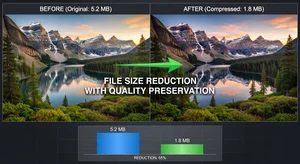
Watch the dimensions. Serving a 3000px image when your container is 1200px wide just wastes bandwidth and slows everything down. Resize the actual image file to match display size. Compress images at the right dimensions from the start.
Stop Layout Shift From Images
Cumulative Layout Shift happens when images load and push content around. Users hate it, Google penalizes it, and it's completely preventable.
Always set width and height attributes on img tags. Always. Even if you're using CSS to resize them. The browser needs those dimensions to reserve space before the image loads. No dimensions means no reserved space means layout shift when images pop in.
For responsive images, use aspect-ratio in CSS instead of trying to calculate heights dynamically. Set aspect-ratio: 16/9 or whatever your image ratio is, and the browser handles the rest. Clean, simple, no layout jump.
Background images are trickier. They don't have width/height attributes. Either use inline styles with explicit dimensions or switch to img tags with object-fit: cover. Object-fit gives you the same visual effect as background-size: cover but with proper dimensions set.
Lazy Load Everything Below the Fold
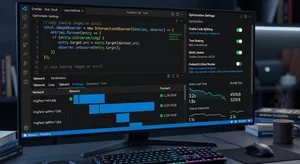
If an image isn't visible when the page loads, lazy load it. Native lazy loading is built into browsers now. Just add loading="lazy" to the img tag. That's it. No JavaScript libraries needed.
Don't lazy load above-the-fold images. That's counterproductive. Your hero image, your logo, your main product photo, those need to load immediately. Everything else can wait until the user scrolls near it.
Check your setup. Some themes lazy load everything by default, including hero images, which tanks your LCP score. Make sure images in the viewport load eagerly, everything else loads lazy.
Videos and iframes benefit from lazy loading too. Background videos on hero sections are particularly heavy. Consider replacing them with optimized images or lazy loading the video element entirely.
Next-Gen Formats and CDN Delivery
WebP is good. AVIF is better but browser support is still catching up. For maximum compatibility and performance in 2026, serve WebP with a JPG fallback. Most users get the lightweight WebP, older browsers get the JPG.
Use a CDN for image delivery if you're not already. Cloudflare, CloudFront, Fastly, doesn't matter which one. What matters is images loading from servers geographically close to your users instead of making round trips across continents.
Image CDNs like Cloudinary or Imgix can resize and optimize on the fly. Request the exact dimensions you need via URL parameters. That's powerful for ecommerce sites with thousands of products where resizing everything manually isn't realistic.

Auto-optimization plugins work if you're on WordPress or Shopify. But don't just install one and forget it. Check that it's actually doing what you think it is. Some plugins add more overhead than they save. Test before and after with PageSpeed Insights.
Monitoring and Maintenance
Core Web Vitals aren't a one-time fix. New content gets added, images get uploaded, performance drifts back down if you're not watching.
Set up monitoring. Google Search Console shows your field data, PageSpeed Insights shows lab testing. Check both monthly at minimum. Weekly if you're running an ecommerce site with frequent content updates.
Train your team. Content editors need to know image guidelines. Max file size, required dimensions, lazy loading rules. One person uploading 5MB images every week can undo all your optimization work.
Create image templates or presets. "Product photos must be 1200x1200 WebP, compressed to under 150KB." Make it a checklist. AI image editor workflows can enforce size and format rules automatically.

The Reality Check
Perfect Core Web Vitals scores aren't always possible, especially on content-heavy sites or ecommerce platforms with hundreds of product images. But good scores absolutely are.
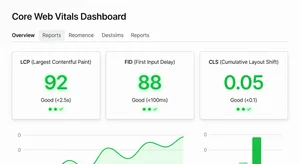
You don't need 100 on PageSpeed. You need to pass the thresholds: LCP under 2.5 seconds, CLS under 0.1, FID or INP in the green. Hit those targets and you're fine for rankings.
Image optimization is the fastest path there because images are almost always the bottleneck. Compress aggressively, lazy load intelligently, fix layout shift, and your scores will jump. This isn't theoretical. It's what works when Core Web Vitals are failing and you need results fast.
Start with the hero image, batch compress everything else, add lazy loading, then check your scores again. You'll see improvement within hours, not weeks.