
Creating Brand-Consistent Product Mockups with AI | Cliptics
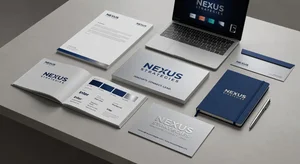
I remember the exact moment I realized professional mockups didn't have to cost hundreds of dollars per design.
I was helping a friend launch her skincare line, and we hit a wall. She needed product mockups for her website, social media, investor pitch deck. The quotes from designers ranged from $150 to $400 per mockup. For a bootstrap startup, that was devastating. We needed at least a dozen variations to test different approaches.
That's when I started experimenting with AI image tools. What I discovered completely changed how I think about visual branding for small businesses. You can create professional, brand-consistent mockups yourself. No design degree required. No expensive software subscriptions. Just the right approach and some freely available tools.
Why Brand Consistency Actually Matters
Before we dive into the how, let's talk about the why. Because honestly, I used to think brand consistency was one of those things big companies obsessed over while small businesses had more important problems to solve.
I was wrong.
When someone encounters your brand across different touchpoints, their brain is doing pattern recognition. Website, Instagram post, email newsletter, product packaging. If those visuals feel connected, they register as professional and trustworthy. If they're all over the place, even subtly, it triggers uncertainty.
And here's the thing about mockups specifically. They're how you communicate your vision before you've manufactured thousands of units. They're how you test market reception. How you pitch to retailers or investors. How you build excitement on social media before launch day.
Getting them right matters. Getting them consistent matters even more.
The Traditional Mockup Problem
The old way of creating product mockups involved several expensive pain points.
First, you'd need design software. Photoshop, Illustrator, maybe Sketch or Figma. That's subscription fees before you've generated a single dollar in revenue.
Then you'd need templates. Good mockup templates cost anywhere from $15 to $50 each. And you'd need different ones for different angles, settings, and product types.
If you couldn't do it yourself, you'd hire a designer. Freelancers typically charge $100 to $300 per mockup, depending on complexity. For an entire product line with variations, you're looking at thousands.
The timeline was another issue. Back and forth revisions. Waiting for designer availability. Miscommunications about your vision. What should take hours stretched into weeks.
AI tools have fundamentally changed this equation.
How I Approach AI Mockup Generation
I've refined my process through dozens of projects. Here's what actually works.
Start with your brand fundamentals locked down. This is critical. Before you generate a single mockup, you need clarity on your color palette, typography style, overall aesthetic direction, and the feeling you want people to experience.
Write these down. Be specific. Not just "modern and clean" but "minimalist Nordic aesthetic with warm neutrals and organic textures." The more precise your brand language, the better your AI prompts will be.
Next, gather reference materials. Screenshots of mockups you like from other brands. Not to copy, but to understand composition, lighting, context. Save them in a folder. You'll reference these when crafting prompts.
When you start generating, begin with your hero product in a neutral setting. This becomes your baseline. You'll use it to establish the visual consistency that all other mockups need to match.
I typically use the AI image generator for initial mockup creation. The key is in prompt engineering. Instead of "coffee bag mockup," try something like "premium coffee bag on white marble counter, natural morning light from left, minimalist Nordic kitchen background, warm color palette, product photography style, shallow depth of field."
The details matter enormously. Lighting direction. Background elements. Perspective. Color temperature. The more specific you are, the more consistent your output becomes.
Once you have your baseline mockup, you can use the AI image editor to create variations. Same product, different settings. Same lighting approach, different angles. This is where brand consistency really comes together.
The Iteration Process Nobody Talks About
Here's what nobody tells you about AI mockup creation: your first generation is rarely your best.
I usually go through 5 to 8 iterations before I land on something I'm truly happy with. And that's fine. That's part of the process.
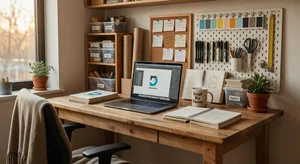
What I've learned is to iterate systematically. Change one variable at a time. If the lighting isn't quite right, adjust just the lighting in your next prompt. If the background is too busy, simplify just that element.
Keep a document tracking what prompts generated what results. This becomes your mockup recipe book. When you nail a particular style, you can replicate it across your entire product line.
Pay attention to shadows and reflections. This is where AI sometimes struggles, and it's also where mockups can start feeling inconsistent. If one mockup has soft shadows and another has harsh ones, the brain picks up on that mismatch immediately.
Color accuracy is another critical detail. If your brand uses specific hex codes, you'll need to check the generated mockups against those values. AI approximates colors based on descriptions. "Sage green" could generate twenty different greens. Sometimes you'll need to do minor color correction in a basic photo editor to maintain perfect consistency.
Where AI Mockups Actually Shine
After creating mockups for everything from cosmetics to tech accessories to food products, I've noticed certain categories where AI really excels.
Packaging design mockups are phenomenal. Bottles, boxes, bags, labels. The AI handles product photography contexts beautifully, especially with good prompts.
Lifestyle and context shots work incredibly well. Your product in someone's home, office, or outdoor setting. These used to require photoshoots or expensive stock photo licenses. Now you can generate exactly the context you need.
Color and pattern variations are effortless. Testing how your product looks in different colorways used to require either manufacturing samples or hours of Photoshop work. With AI, you can visualize twenty color options in an afternoon.
Environmental mockups for products in retail settings, on shelves, in displays are surprisingly good. Especially useful if you're pitching to stores and need to show how your product would look in their environment.
The Limitations You Should Know About
I'm not going to pretend AI mockup generation is perfect for everything. There are real limitations.
Text and fine typography can be problematic. If your product has detailed label copy, the AI might generate blurry or inaccurate text. You'll often need to overlay real text in a separate editing step.
Complex product shapes sometimes confuse the generators. Unusual geometries, transparent materials, intricate mechanical details. The AI approximates based on its training, and sometimes those approximations look off.
Brand-specific logos and graphics need to be added separately. You can't just describe your logo in a prompt and expect perfect reproduction. Generate the mockup, then overlay your actual logo file.
Physical accuracy isn't guaranteed. Proportions, perspective, how light interacts with materials. These might be close enough for concept visualization but not for technical specifications.
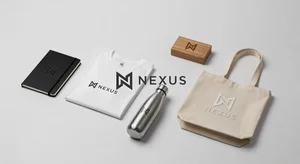
That's why I think of AI mockups as concept tools, not final photography replacements. They're extraordinary for testing ideas, pitching concepts, and building excitement. For final e-commerce product photography, you'll probably still want real photos of real products.
The Workflow I Actually Use
On a practical level, here's my current workflow for a new product line.
Day one is all research and planning. I define the brand parameters, gather references, and write detailed descriptions of what I'm trying to achieve. This might take 2 to 4 hours, but it saves so much time later.
Day two is generation day. I create baseline mockups for each main product, iterating until I'm satisfied with the consistency. I might generate 50 to 100 images to get 10 to 15 keepers.
Day three is refinement. I take my best mockups and create variations for different contexts and use cases. This is where the AI image editor becomes essential for maintaining consistency while adjusting specific elements.
Day four is final polish. I add real logos, correct any color inconsistencies, crop to final dimensions, and export in the formats I need for different platforms.
The entire process typically takes about 12 to 15 hours of focused work for a complete product line with 20 to 30 final mockups. Compare that to the timeline and cost of traditional approaches, and the difference is dramatic.
What This Means for Small Businesses
I keep thinking about how different my friend's skincare launch would have been if these tools had existed a few years earlier.
Small businesses compete on creativity and speed more than budget. Being able to visualize and test product concepts rapidly, without significant financial investment, fundamentally changes what's possible.
You can test ten packaging designs to see which resonates with your audience before you commit to manufacturing. You can pitch to investors with professional mockups that communicate your vision clearly. You can build social media excitement with beautiful product visuals before your first production run is complete.
This isn't about replacing professional designers. It's about empowering founders and small teams to move faster and more confidently in the early stages. Get your concept validated, build some momentum, then invest in professional photography and design when the revenue supports it.
Where I Think This Goes Next
The technology is improving rapidly. What struggled six months ago works smoothly now. What's impossible today will probably be routine next year.
I'm particularly excited about better material rendering. As AI gets better at understanding how light interacts with different surfaces, the realism will become indistinguishable from photography.
Integration with 3D modeling could be transformative. Imagine describing your product and getting a full 3D model you can rotate, view from any angle, place in any context. That's probably closer than we think.
Collaborative tools where teams can iterate together on mockup concepts, with AI suggesting variations based on brand guidelines and previous choices. That workflow could streamline the entire creative process.
But even with today's tools, right now, the capability is remarkable. Anyone with a clear vision and willingness to learn can create professional-looking mockups that maintain brand consistency across an entire product line.
That democratization of creative capability is what genuinely excites me. Not the technology itself, but what people build with it.