
E-commerce Photography on a $0 Budget: 11 AI Tools That | Cliptics
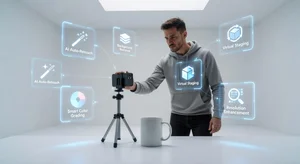
A professional e-commerce photography session costs $300-800 per product category. For a small business launching with 20 product SKUs, that's $6,000-16,000 before you've sold anything. For most early-stage operators, that budget doesn't exist or shouldn't be allocated to photography when the product is still being validated.
What exists in 2026 is a collection of AI tools, most free or nearly free, that handle the post-production work that used to require a professional studio setup. The photography still requires a phone and reasonable conditions. The output competes with studio-produced results at a fraction of the cost.
Here are the 11 tools that make this possible, and how they fit into the workflow.
The Foundation: Your Shooting Setup
Before the AI tools come into play, you need usable source photos. This doesn't require professional equipment. It requires decent lighting and stable conditions.
Natural light near a window, diffused through a thin white curtain if the light is direct, is the best free lighting available to most home-based operators. Set up your product on a white foam board, white poster board, or white fabric. Keep the background clean and extended so there's no background edge visible in the frame.
Shoot at the highest resolution your phone allows. Multiple angles: hero (front-facing), lifestyle (in use or contextual), detail (texture, labels, materials), and scale reference. AI tools process what you give them and better source material produces better AI output, consistently.
Tool 1: Background Removal
Cliptics Remove Background cleanly removes the background from product photos, leaving a transparent PNG with the product isolated. This is the foundational step for almost every other manipulation in the toolkit.
Professional background removal used to require masking in Photoshop, which is genuinely time-consuming for products with complex edges (jewelry with chains, textured products, items with holes or transparency). AI background removal handles most cases in under 10 seconds.
Tool 2: Object Removal
Cliptics Object Remover removes unwanted elements from photos that survived the shoot: price tags, dust, manufacturer stickers, stray objects that entered the frame, cable management clips. For product photography, this eliminates retouching work that would previously require Photoshop clone stamping.
Tool 3: AI Photo Filters and Enhancement
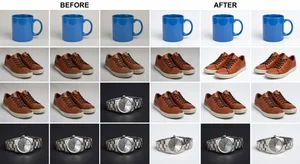
Cliptics AI Photo Filter handles the color correction and enhancement work that a professional photographer would do in Lightroom: white balance correction, exposure balancing, contrast optimization, color grading for brand consistency.
The filter presets are calibrated for product photography, which means they understand the difference between "natural enhancement" and "over-processed," a common pitfall for non-professional editing.
Tool 4: Image Compression
Cliptics Compress Images reduces file sizes without visible quality loss. For ecommerce, image size directly affects page load speed, which affects both user experience and SEO ranking. A product page with six 3MB photos loads 3-4 seconds slower than the same page with six 300KB photos, with no visible quality difference to the customer.
Compress all final product images before upload as a final workflow step.
Tools 5-6: Image Editing and Extension
Cliptics AI Image Editor handles editing tasks that go beyond single-function tools: adjustments to specific areas of the image, composite element additions, and targeted corrections.
Cliptics AI Image Extender handles format adaptation: taking a square product shot and extending it for a horizontal banner, a vertical story format, or a wide product page hero image. This is the format multiplication step that removes the need to reshoot for every format requirement.
Tools 7-8: Visual Identity Additions
Watermarking through a batch watermark workflow protects your product images from unauthorized use on other listings. For Etsy and Amazon sellers, where image theft is endemic, watermarking should be part of the standard workflow.
QR code additions for certain product contexts (packaging photos, care instruction cards, product documentation) are handled through the Cliptics QR Code Maker, creating scannable links to tutorials, warranty registration, or additional product information.
Tool 9: Text Extraction for Competitor Research
When you're building your product photography by studying what high-performing listings look like in your category, Cliptics Photo to Text extracts text from screenshots of competitor listings, making their copy and structure easily copyable for reference and analysis.
This isn't about copying competitor content. It's about analyzing successful listing structures and applying the insights to your own photography and presentation strategy.
Tools 10-11: Marketing Asset Creation
Once your product images are finalized, they need to function as marketing assets. Gradient backgrounds for lifestyle-adjacent display contexts (social ads, email headers, branded content) are created through the Cliptics Gradient Maker, giving your brand a visual context without requiring additional photography.
Social media format adaptation through the Image Extender completes the marketing asset production: one hero product shot becomes vertical Instagram story, horizontal Facebook ad, LinkedIn content image, and YouTube thumbnail through AI extension.
The Complete Workflow
The end-to-end workflow for a product SKU, from raw phone photo to publishing-ready marketing asset:
Shoot multiple angles in good lighting conditions (30-60 minutes for a product category).
Process all images through background removal. Select your hero shots from the clean-background versions (15 minutes).
Run object removal on any images with distracting elements (10 minutes).
Apply AI photo filter preset for enhancement and brand consistency (10 minutes).
Compress all finals (5 minutes).
Generate format variants through image extension for marketing assets (15 minutes).
Apply watermarks via batch process (5 minutes).
Total: 90-110 minutes per product category for a complete set of product and marketing images. Studio-quality output without studio costs.
The Quality Calibration
A note on expectation-setting: this workflow produces images that compete with competent professional product photography. It does not produce images at the level of high-end lifestyle brand campaigns with creative direction, professional models, and extensive post-production.
For most ecommerce products in most markets, the former is what's needed. The question your customer is asking is "does this product look like what I want to buy?" not "is this photography award-winning?" AI tools answer the first question reliably.
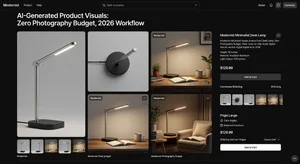
The $0 budget isn't a permanent constraint. As your products sell and your business grows, investing in professional photography for hero content and brand campaigns makes sense. But the validation stage, the moment you're testing whether your product has market fit, doesn't need studio-quality photography to succeed. It needs good-enough photography produced efficiently.
The AI toolkit described here produces good-enough photography at zero ongoing cost. Start there, and allocate the photography budget savings toward customer acquisition that tests your product's market fit faster.


The tools are free. The workflow is learnable in an afternoon. The photography budget can go somewhere that accelerates growth instead.