
Fantasy Character Filters: Cosplay Preview Guide | Cliptics
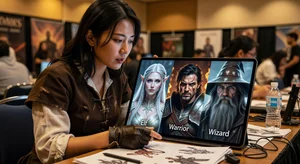
The moment I fell in love with cosplay, I also discovered its most expensive problem: you never really know if a character design works for you until you've invested hundreds of dollars and dozens of hours building it. That stunning armor that looked perfect on your favorite streamer? Might completely overwhelm your frame. That wig color you ordered based on reference images? Could clash terribly with your skin tone.
I learned this the hard way with an elaborate demon hunter cosplay. Spent $400 on materials. Built the costume over six weeks. Wore it to one convention and realized the proportions were completely wrong for my body type. The character's signature oversized shoulder armor that looked badass in concept art made me look like I was drowning in foam. That costume now lives in my closet as an expensive lesson in the importance of preview testing.
That's when I discovered AI fantasy character filters. They're not perfect representations of finished cosplays. no filter can fully replicate handmade costumes. But they're incredibly valuable for answering crucial pre-build questions: Does this character's aesthetic work on me? Do these colors suit my complexion? Will these proportions look right on my body type? Should I commit resources to this build or explore other options?
After using character preview filters for two years and discussing them with dozens of cosplayers, I've developed a systematic approach for using them effectively in cosplay planning. Here's how to use AI filters to make smarter build decisions and avoid expensive mistakes.
Why Preview Matters More Than Ever
Cosplay has gotten increasingly ambitious and expensive. What once meant throwing together a costume from thrift store finds now often involves foam fabrication, 3D printing, LED electronics, contact lenses, and custom wig styling. A moderately complex character can easily cost $500-1000 in materials before accounting for your time investment.
That rising investment makes preview testing crucial. You need to answer fundamental questions before committing:
Does the character's aesthetic suit your look? Some character designs work beautifully on certain body types, face shapes, or complexions but look completely wrong on others. Finding out before building saves enormous resources.
Which costume variation should you pursue? Many characters have multiple canonical looks. Previewing different versions helps you choose the one that suits you best or that convention attendees will most recognize.
What modifications might improve the design? Maybe the canon color scheme doesn't flatter you, but adjusting toward warmer or cooler tones would. Perhaps proportions need tweaking for your build. Preview filters let you experiment digitally before cutting foam.
Is this character feasible for your skill level? Seeing yourself in the complete look sometimes reveals complexity you didn't appreciate from reference images. Maybe that intricate armor is beyond your current fabrication skills. Better to discover that in preview than halfway through construction.
I've saved thousands of dollars and countless hours by using preview filters to eliminate character choices that wouldn't have worked and refine those that would. The return on investment is massive.
Choosing Effective Fantasy Character Filters
Not all character filters serve cosplay planning equally well. The best ones for preview purposes have specific characteristics:
Body-aware transformation. Filters that appropriately map costume elements to your actual body shape provide more useful previews than those that simply paste character art over your photo. You need to see how armor proportions work on your build, not on some standardized avatar.
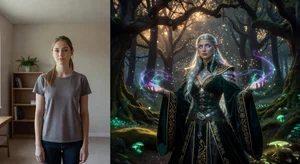
Color accuracy. Since color choices significantly impact material purchases and final appearance, filters that render colors accurately help make informed decisions. Heavily stylized filters that change everything to neon or sepia don't serve practical planning.
Detail preservation. The best preview filters maintain enough detail that you can evaluate complexity. If a costume has intricate patterns or specific construction details that matter, you need filters that show those rather than blurring everything into generic fantasy aesthetic.
Multiple style options. Characters appear differently across source material. game renderings, concept art, cosplay photos, fan art. Filters offering multiple stylistic approaches let you explore which interpretation works best for your build.
Adjustable intensity. Being able to dial costume elements up or down helps you explore modifications. Maybe full armor overwhelms you, but a lighter version would work. Adjustable filters let you test variations.
For cosplay planning, I use AI photo filters with fantasy and costume settings, AI costume generators for initial exploration, and image generators for conceptualizing custom variations.
The Preview Testing Process
Here's my systematic approach for using character filters in cosplay planning:
Step 1: Gather reference materials. Before filtering, collect high-quality reference images of the character from multiple angles. Front, side, back views. Close-ups of details. Different lighting conditions. This helps you evaluate whether preview filter results accurately represent the character.
Step 2: Take quality source photos. The better your starting photos, the more useful the preview. I shoot in natural lighting, neutral expressions, plain backgrounds, and multiple angles matching my reference images. Full-body shots for full costumes. Close headshots for makeup and wig previews.
Step 3: Apply multiple filter variations. Never rely on a single preview. Test different intensities, color variations, and stylistic approaches. This reveals which elements work consistently versus which only look good under specific filter interpretations.
Step 4: Evaluate critical elements. For each preview, assess:
- Proportions: Does armor/costume scale appropriately to your body?
- Colors: Do character colors complement your complexion and coloring?
- Complexity: Does the detail level seem achievable for your skills?
- Recognition: Would convention attendees identify the character?
- Personal fit: Do you genuinely feel excited about wearing this?
Step 5: Compare alternatives. If considering multiple characters, preview all of them. Direct comparison often reveals clear winners. The character you thought would be perfect might look mediocre compared to one you hadn't considered seriously.
Step 6: Test modifications. Use filters to explore variations. different color schemes, simplified designs, hybrid approaches combining elements from multiple character versions. Digital exploration is free; physical building is expensive.
Step 7: Seek community feedback. Share preview results in cosplay communities. Experienced cosplayers often spot issues you miss. They'll tell you if proportions seem off, if colors clash, or if the character choice is inspired.
Interpreting Preview Results Accurately
AI filters aren't perfect representations. Learning to interpret results accurately prevents both false confidence and unnecessary discouragement:
Costume complexity. Filters often simplify intricate costume elements. If preview shows "armor," recognize that building actual functional armor is far more complex than the smooth CGI representation suggests. Use previews for proportions and colors, but don't underestimate construction difficulty.
Material quality. Filters can't show texture, weight, or movement. That flowing cape in your preview might drape beautifully digitally but hang awkwardly in real fabric. Consider material properties separately from visual previews.
Wig accuracy. Hair in AI filters rarely matches real wig behavior. Style, volume, and color may appear differently. Treat wig previews as rough guides, not specifications.
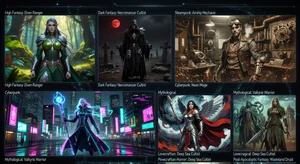
Lighting and setting. Filters often place you in fantasy environments with dramatic lighting. Real convention halls have fluorescent lights and cluttered backgrounds. Factor in how your costume translates to less flattering real-world conditions.
Body modification limitations. Filters can digitally change your proportions significantly. Some characters require physical modifications (padding, binding, platform shoes) that filters handle magically but you'll need to engineer practically.
The key is using previews for what they do well. testing aesthetic compatibility, exploring color options, comparing character choices. while remaining realistic about their limitations for technical planning.
Character Selection Strategy
Fantasy character filters help optimize your character selection process. Here's how I use them strategically:
Start broad, narrow systematically. Begin with 10-15 characters you're interested in. Preview all of them. Eliminate clear mismatches. Focus deeper testing on the 3-4 strongest options. This prevents premature commitment to your "dream character" that might not actually suit you.
Consider convention context. Preview how characters photograph in typical convention lighting and settings. Some costumes that look stunning in dramatic filtered images fall flat in convention centers. Others that seem plain in preview pop beautifully at actual events.
Balance recognition and uniqueness. Popular characters get recognized easily but blend into convention crowds. Obscure characters stand out but might not be identified. Preview filters help you find characters that work aesthetically for you while hitting your preferred recognition/uniqueness balance.
Account for comfort and mobility. Previews show static poses. Mentally simulate moving, sitting, eating, and standing for hours in the costume. That elaborate armor might look amazing in preview but be unwearable practically.
Test demographic fit. Some characters are strongly associated with specific demographics. Preview helps you assess whether you can pull off a character that differs from you demographically, or if the mismatch is too significant.
Modification and Personalization
One of the most valuable applications of character filters is exploring modifications before committing to them:
Color scheme variations. Canon colors don't always suit every cosplayer. Filters let you test alternative palettes. Maybe shifting from cool blues to warm golds better complements your complexion. Digital testing reveals this before buying materials.
Armor and costume proportion adjustments. Characters designed for fantasy body proportions might need adaptation for human builds. Filters help visualize reduced shoulder armor, lengthened torso sections, or other practical modifications.
Hybrid designs. Combining elements from multiple character interpretations creates unique builds. Preview filters let you test combinations. armor from one design, color scheme from another, accessories from a third. to find optimal personalized versions.
Crossover and mashup concepts. Mixing characters or translating them into different aesthetics (steampunk, cyberpunk, historical) requires visualization. Filters provide starting points for conceptualizing creative reinterpretations.
Skill-appropriate simplification. Preview filters can help you visualize simplified versions that maintain character recognition while matching your construction abilities. What elements are essential? Which can be minimized or eliminated?
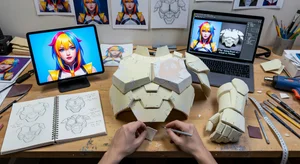
I've seen cosplayers create award-winning builds by using filters to iterate on modifications until finding perfect personalized versions of characters. The digital experimentation that filters enable leads to more thoughtful, intentional design decisions.
Building From Preview to Reality
Once preview testing identifies a strong character choice, how do you translate digital results into physical costumes?
Extract specific design details. Study your best preview results closely. Note proportions, color relationships, layering, and structural elements. These become construction specifications.
Create reference sheets. Compile your preview images alongside source material into comprehensive reference documents. These guide material selection, pattern drafting, and construction decisions.
Material test matching. Use preview results to guide fabric and material shopping. Photograph test materials against your preview images to ensure colors and textures will achieve similar results.
Construction prioritization. Previews often reveal which costume elements are most visually important. Build those first and most carefully. Less prominent elements can be simplified if time or budget constrains.
Iterative comparison. As you construct, regularly photograph yourself in progress pieces and compare to preview images. This catches deviations early when they're easier to correct.
Modification permission. Remember that previews are tools, not mandates. If something works better different from your preview as you build, trust your judgment. The goal is a great finished cosplay, not perfect preview replication.
Community and Social Applications
Character preview filters have also created new social dimensions in cosplay communities:
Virtual cosplay events. During periods when physical conventions aren't possible, filtered character previews let cosplayers share and celebrate builds digitally. It's not the same as wearing finished costumes, but it maintains community connection.
Collaboration visualization. Group cosplays benefit from previewing together. Filters help coordinate color schemes, proportion balance, and group composition before individual members commit to builds.
Commission visualization. If commissioning costume pieces, filtered previews help communicate your vision to creators. They show what you're trying to achieve more clearly than verbal descriptions or reference images alone.
Portfolio building. New cosplayers without extensive costume portfolios can use filtered previews to demonstrate range and planning skills when applying for cosplay groups or sponsored opportunities.
Educational content. Cosplay tutorial creators use filtered previews to illustrate concepts, show before/after transformations, and help learners visualize outcomes.
The social applications continue expanding as filters improve and communities develop new uses for the technology.
Ethical Considerations
Using AI filters in cosplay raises some considerations worth thinking through:
Transparency about preview vs. actual costume. When sharing filtered previews, be clear they're planning tools, not finished costumes. This prevents confusion and maintains community standards around showcasing actual craftsmanship.
Credit for inspiration. If filters significantly influence your build direction, acknowledging that inspiration maintains intellectual honesty. Cosplay culture values attribution.
Balancing digital preview and practical building. Filters are tools for planning, not replacements for actual costume construction. The community ultimately celebrates craftsmanship, not AI-generated imagery.
Setting realistic expectations. Especially when newer cosplayers see filtered previews, be honest about the gap between digital preview and physical reality. This prevents discouragement when their results don't match filtered perfection.
Most cosplay communities embrace preview filters as valuable planning tools while maintaining that actual builds and the craftsmanship they represent remain the heart of the hobby.
The Evolution of Cosplay Planning
AI character filters represent one innovation in how cosplayers plan and execute builds. They join other technological advances. 3D printing, LED programming, thermoplastics. that have transformed what's possible in costume creation.
The cosplayers succeeding most with these tools are those who view them as enhancing rather than replacing traditional skills. Filters inform better decisions. Digital previews prevent expensive mistakes. But hand fabrication, attention to detail, and creative problem-solving remain essential.
As filters improve. better body mapping, more accurate material representation, enhanced detail rendering. they'll become even more valuable for cosplay planning. But they'll remain tools in service of craftsmanship, not replacements for it.
What makes cosplay special isn't just wearing cool costumes. It's the creative process of bringing fictional characters to life through your own hands. Preview filters make that process more efficient and successful, helping you choose characters wisely and build them effectively.
That's a tool worth mastering, one preview at a time.