
Free Background Remover for Car Photography — Best Tools | Cliptics
Car photography has a challenge that most product photography doesn't: the subject is enormous, reflective, and you're usually shooting it wherever it happens to be parked. Dealership lots, driveways, streets, and parking garages are the typical backdrops. None of them are ideal.
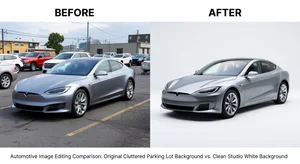
High-end dealer groups solve this with expensive studio shoots, professional photographers, and backdrop systems that cost thousands of dollars. But for independent dealers, smaller lots, private sellers, and auto marketing agencies working with tighter budgets, there's a better answer now. AI background removal for vehicles has gotten genuinely good, and the best tools to do it are free.
Why Car Backgrounds Are Harder Than Normal Products
Cars are tricky for AI background removal for a few reasons. The vehicle reflects surrounding surfaces, including parts of the background you're trying to remove. The wheels and undercarriage are close to the ground, making the boundary between car and surface harder to detect. And unlike a product on a table with clear depth separation, a car's reflection of the lot, sky, and other vehicles blurs the line between vehicle and environment.
That said, modern AI handles this considerably better than it did even two years ago. The key is in how you photograph the vehicle and which tool you use.
Best Free Tools for Car Photo Background Removal
Cliptics Car Background Changer is the most specific tool for this use case. The car background changer on Cliptics is designed specifically for automotive photography. It handles the reflective surfaces and complex outlines of vehicles better than generic tools, and lets you swap backgrounds with different options: solid colors, studio gradients, natural outdoor scenes, and showroom-style environments.
Cliptics Remove Background works well for general background removal when you want a transparent output to composite onto your own background. Remove background at Cliptics gives you the transparent PNG to work with. From there you can drop the vehicle onto any background in your image editor.
Cliptics Photo Background Changer is another option for direct background swaps without going through the transparent step. The photo background changer lets you select a replacement background directly, which speeds up the workflow if you have a specific replacement in mind.
For vehicles specifically, you'll likely get the best results with the dedicated car tool, but testing both approaches on your specific vehicle types is worth doing since results can vary by model, color, and shooting conditions.
Photography Tips That Make the AI Work Better
The quality of the AI output depends heavily on the quality of your input photo. A few habits that consistently produce better results:
Shoot in good light, avoid overcast or harsh midday sun. Overcast gives you even, diffused light with no hard shadows, which means cleaner vehicle outline definition and less shadow to deal with at the bottom of the frame.
Get your angles right. 3/4 front and 3/4 rear are the automotive industry standard angles for a reason. They show the most of the vehicle in a single frame. Side profiles are also clean. Avoid extreme perspective distortion from shooting too low or too high.
Leave clearance around the vehicle. Don't crop too tight to the vehicle in camera. Leave space around all edges. The AI needs that buffer to detect where the vehicle ends and the background begins.
Keep the car clean and unobscured. Mud, door dings, dealer plate frames, and even reflections of trees or other cars complicate the AI's edge detection. A clean, washed vehicle always processes better.
Consistent angle for each vehicle. If you're doing a lot of inventory, picking two or three standard angles and sticking with them makes your listings look cohesive and makes batch processing faster.
Choosing the Right Background
The background you add after removal matters as much as the removal itself. For different use cases:
Solid white or light gray works for CarGurus, AutoTrader, and marketplace listings that require or prefer neutral backgrounds. It reads cleanly on mobile and in list views.
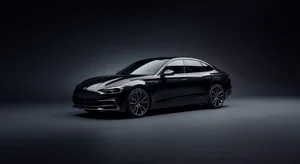
Studio gradient backgrounds (light-to-dark gray or dark-to-light) give a more premium feel common in luxury dealer marketing. They make the vehicle pop with a sense of depth.
Outdoor location backgrounds like urban streets, mountain roads, or coastal settings add lifestyle context. These work well for social media and brand marketing but look less appropriate on inventory listing pages.
Showroom floor backgrounds give a clean, trust-building feel that reads as "this vehicle is in good hands at a real dealership."
Workflow for Dealership Volume
If you're processing multiple vehicles regularly, building a repeatable workflow saves a lot of time.
Create a standard shooting checklist for your photographers or whoever is capturing inventory. Same angles, same distance, same lighting conditions when possible. Batch your editing sessions. Process ten vehicles at a time rather than one immediately after it's photographed.
For high volume, consider using Cliptics' in-browser background remover if you prefer keeping vehicle images on your local machine rather than uploading to cloud tools. Processing stays local, which also tends to be faster for large files.
Keep your source files. Once you have the background-removed PNG for a vehicle, that file is your master. You can generate white background versions for some platforms and lifestyle background versions for social ads from the same source without re-doing the AI processing.
What Makes a Car Listing Actually Convert
Background is one piece. The combination that works is: correct exposure with the vehicle well-lit, clean backgrounds consistent across inventory, multiple angles per vehicle (exterior front/rear, interior, dash, wheels), and clear photos of any notable features or existing damage.
Buyers shopping online for vehicles know they're making a significant purchase without physically seeing the car first. The more thorough and professional your photos look, the more comfortable they are contacting you. Background removal is part of that equation, not because the background itself matters, but because it signals that you care about presenting your inventory well. And that care extends to how buyers expect you'll handle the sale.
The free tools available for this are genuinely capable now. There's no budget reason to have lot-cluttered backgrounds on your vehicle listings in 2026.