
Free Text-to-Video Tools: Budget Filmmaking 2026 | Cliptics
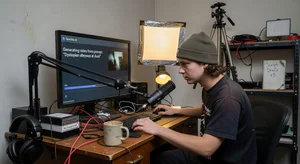
I wanted to make a short film last year. The problem? I had no camera, no crew, and roughly twelve dollars in my bank account. That is not an exaggeration. Twelve actual dollars. What I did have was a laptop and an internet connection, and it turns out that in 2026, that is enough to start making videos that look surprisingly good.
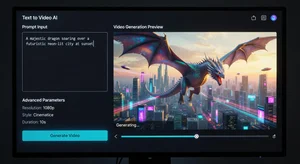
Text-to-video AI tools have gotten shockingly capable over the past year. You type a description of what you want to see, and the software generates video footage that matches your words. Some of these tools are completely free to use, and even the ones with paid tiers offer enough on their free plans to get real work done. For indie filmmakers, YouTubers, small business owners, and anyone who needs video content but cannot afford a production budget, this changes everything.
The free text to video generator creates videos from text prompts, making professional content accessible to people who would otherwise never be able to afford it. And the best part is that the quality keeps getting better every few months.
What Free Tools Actually Offer in 2026
There are about a dozen text-to-video platforms worth paying attention to right now, and most of them have a free tier that gives you somewhere between 5 and 15 generations per month. That might not sound like much, but think about it this way: if each generation gives you a usable 4 to 6 second clip, that is already a minute or more of footage per month. Enough to build out a short video, an ad, or a social media post.
The quality gap between tools is real though. Some platforms produce footage that looks smooth and almost photorealistic, with natural lighting and believable motion. Others still struggle with hands, faces, and physics in general. You will see people walking in slightly wrong ways or objects floating when they should not be. Testing a few different options before committing to one is worth the effort because what works for product demos might not work for storytelling, and what looks great for nature scenes might fall apart for close up shots of people.
One thing worth knowing is that most free plans cap resolution at 720p or 1080p. For Instagram Reels, TikTok, or YouTube Shorts, that is perfectly fine. If you are trying to project something on a big screen or deliver broadcast quality work, you will eventually need to upgrade. But for getting started and learning the craft, free tiers are more than enough.
The AI video watermark remover can clean up branding from generated clips when you need a polished final product without visible tool logos.
Writing Prompts That Actually Work
Here is where most beginners go wrong. They type something like "a dog running" and get disappointed by the generic, bland result. Then they assume the tool is bad. But the tool is only as good as the instructions you give it.
Think of writing prompts the way you would write a shot description in a screenplay. Instead of "a dog running," try something like "a golden retriever running through shallow ocean waves at sunset, camera tracking alongside at eye level, warm golden light, water splashing around the dog's legs, slow motion." That level of detail completely transforms what you get back.
Camera direction matters a lot. Mention whether the shot is a wide angle, a close up, or a tracking shot. Describe the lighting. Is it harsh midday sun, soft overcast, or moody blue hour? Tell the AI about movement, both the subject's movement and the camera's movement. These details are what separate usable footage from throwaway test clips.
I keep a notebook of prompts that worked well for me. When I find a phrasing that consistently produces good results on a particular platform, I save it as a template. Over time, you build up a personal library of reliable prompt structures that you can adapt for different projects. It is like learning the language of a new collaborator, except the collaborator happens to be software.
Working Around the Limitations
Let me be honest about what free tools cannot do yet. The biggest limitation is clip length. Most free generations top out at 3 to 6 seconds. That is not enough for a single continuous scene, let alone a whole video. So you have to think in terms of short clips and then stitch them together during editing.
This actually mirrors how real filmmaking works. Most shots in professional films and TV shows are only a few seconds long. Watch any well edited movie and count how long individual shots last. Usually 2 to 5 seconds. So working with short AI clips is not as limiting as it first sounds, you just need to plan your edit before you generate.
Consistency between clips is another challenge. If you generate two clips of the same character, they might not look like the same person. Hair color shifts, clothing changes, facial features drift. Some tools handle this better than others, and seed controls or character reference features help when they are available. But often, the practical workaround is to plan your project around variety rather than continuity. Think montage sequences, travel compilations, mood pieces, and abstract storytelling rather than a single character walking through a continuous scene.
Audio is the other gap. These tools generate video only, no sound. You will need to add music, sound effects, and voiceover separately. The good news is that there are plenty of free resources for that too. Freesound.org has a massive library of creative commons sound effects. YouTube's Audio Library offers royalty free music tracks. And if you need voiceover, there are free text-to-speech tools that produce natural sounding results.
My Actual Zero Dollar Workflow
Here is exactly how I put together a 90 second promotional video without spending anything. First, I wrote a simple script, just a few paragraphs describing what I wanted the viewer to see and hear. Then I broke that script into individual shots, each one becoming its own text-to-video prompt.
I generated around 20 clips across two different free platforms. About 14 of them were usable. The other 6 had weird artifacts or did not match what I needed, so I tossed them and either regenerated with tweaked prompts or found free stock footage to fill the gaps. Sites like Pexels and Pixabay have solid video libraries that blend well with AI generated footage.
For editing, I used DaVinci Resolve, which is genuinely free and more powerful than most paid editors. I arranged my clips, added transitions, dropped in a music track from YouTube Audio Library, and recorded a quick voiceover on my phone. Color grading everything to match took about thirty minutes. The final export looked professional enough that several people asked what production company I hired.
Total cost: zero dollars. Total time: about six hours spread across two evenings. That is the real promise of these tools. Not that they replace professional filmmaking, but that they give people who could never afford professional filmmaking a way to tell their stories anyway.
Getting Better Over Time
The trick with budget filmmaking using AI tools is to treat it like any other skill. Your first few videos will be rough. The prompts will be too vague, the clips will not match, and the editing will feel clunky. That is normal. Everyone starts there.
But after your third or fourth project, something clicks. You start to understand what each tool does well and where it struggles. You develop an instinct for writing prompts that produce usable footage on the first try instead of the fifth. You figure out editing patterns that hide the limitations and highlight the strengths.
The tools themselves are improving fast too. What was impossible six months ago is routine now. Features that used to require paid plans are trickling down to free tiers. Resolution is climbing. Clip lengths are stretching. Motion quality is getting more natural with every model update.
If you have been putting off making videos because you thought you needed expensive gear or a big budget, stop waiting. Grab a free text-to-video tool, write a detailed prompt, and hit generate. The results might surprise you. They certainly surprised me.