
Gemini Watermark Remover: Google AI Video Cleanup | Cliptics
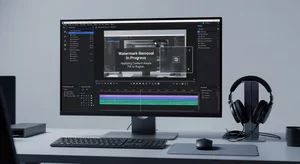
Google's Gemini creates impressive AI videos. Then slaps a watermark on them.
Makes sense from their perspective. Attribution, brand visibility, preventing misuse. From user perspective, that watermark makes videos less usable for actual projects.
The Gemini watermark remover specifically handles Google AI video watermarks. Removes them cleanly without destroying video quality underneath.
Why Gemini Videos Get Watermarked
Google watermarks AI generated content for transparency. Users and viewers should know when they're seeing AI created material rather than filmed footage.
This serves legitimate purposes. Prevents deepfakes from being passed as real. Helps platforms moderate AI content. Protects against misuse.
But it creates problems for creators who want to use Gemini videos legitimately in projects. The watermark announces "this is AI" even when that's obvious or irrelevant to your use case.
Educational content, creative projects, concept demonstrations. Plenty of valid uses where the watermark just looks unprofessional without adding value.
Where Gemini Places Watermarks
Google typically places watermarks in corner positions. Lower right most common. Sometimes lower left or subtle central placement.
Watermark style varies. Text based Gemini branding, small logo, timestamp information. Different Gemini models use slightly different watermark formats.
Some watermarks animate or fade. Others stay static throughout the video. Removal approach depends on watermark type.
The AI video watermark remover handles various watermark styles including animated and static Google AI branding.
Removal Quality Considerations
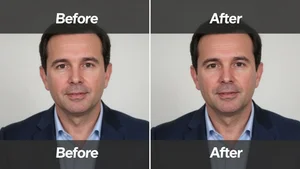
Clean removal means no artifacts, no blur patches, no obvious editing traces where the watermark was.
Poor removal leaves ghosting. You can still see faint outline of where the watermark sat. Defeats the purpose.
Area underneath the watermark needs to be reconstructed believably. AI removal tools analyze surrounding video to fill the watermark space naturally.
Static watermarks are easier to remove cleanly than animated ones. Consistent position throughout frames versus changing position requires different processing.
Legal and Ethical Use
Removing watermarks to pass AI content as real footage is misuse. Creates misinformation risk. Violates platform terms usually.
Legitimate use cases exist. Incorporating AI video clips into larger projects where attribution happens differently. Creating demos or prototypes where watermark distracts from the concept.
Check Google's current terms of service for Gemini. Some uses explicitly allow watermark removal. Others don't.
When in doubt, add your own attribution elsewhere in your project. Transparent about AI use without leaving the watermark visible.
Processing Time and Resources
Video watermark removal processes frame by frame. Takes significantly longer than image watermark removal.
Short clips under 30 seconds process relatively quickly. Longer videos can take considerable time depending on resolution and watermark complexity.
Higher resolution videos require more processing power. 4K takes longer than 1080p. 1080p longer than 720p.
Batch processing multiple Gemini videos works but requires patience and good computer specs. Background processing while you work on other tasks makes sense.
Quality Loss During Removal
Any video editing introduces some quality degradation. The key is keeping it imperceptible.
Good watermark removal maintains original video quality except in the specific watermark area. Bad removal reduces quality across the entire frame.
Compression artifacts can increase after watermark removal if processing isn't handled properly. H.264 versus H.265 encoding affects final quality.
Testing removal on a short clip first shows what quality to expect before processing entire video.
Alternative Approaches
Cropping removes watermarks if they're positioned at edges and your composition allows losing that portion of frame.
Sometimes easier than removal. Faster processing. Zero risk of artifacts from removal process.
Downside is you lose part of your video frame. Only works if watermark sits in an area you can afford to crop without hurting composition.
Overlaying graphics or text can cover watermarks instead of removing them. Adds your own branding while hiding Google's. Not removal but solves the visibility problem.
Comparing Removal Tools
Specialized Gemini watermark removers understand Google's specific watermark formats. Better results than generic watermark removal trying to handle all types.
Generic tools work but might struggle with animated Gemini watermarks or specific transparency effects Google uses.
Quality differences show up most clearly in motion heavy videos. Static shots with minimal movement are easier for any tool to handle cleanly.
The AI watermark remover offers broader removal for various platforms while Gemini specific tools optimize for Google AI video watermarks.
When Removal Makes Sense
Client projects where AI video is part of final deliverable but watermark looks unprofessional. Client knows it's AI, end viewers don't need Google branding.
Portfolio work demonstrating your ability to use AI tools creatively. The watermark distracts from your concept and editing.
Educational content teaching AI video generation where showing the process matters more than keeping Google's attribution visible throughout.
Internal company videos or prototypes where watermark adds no value and looks unpolished.
When to Keep the Watermark
Content distributed on social media where transparency about AI generation matters. Viewers benefit from knowing it's AI created.
Experimental work where the AI nature is part of the point. Watermark reinforces that this is the latest AI capability.
Uses where Google's terms specifically require keeping attribution visible. Check current TOS before removal.
Quick tests and personal projects where the effort of removal isn't worth it. Watermark doesn't matter for your purposes.
Future of AI Video Watermarking
Platform watermarking will likely become more sophisticated. Harder to remove, embedded deeper in video data.
Invisible watermarks are coming. Detectable by platforms and tools but not visible to viewers. Solves attribution without aesthetic issues.
Blockchain based provenance tracking might replace visible watermarks. Video metadata proves AI origin without on-screen branding.
For now, visible watermarks are standard and removal remains straightforward with right tools.
Processing Workflow
Export your Gemini video at highest available quality. Starting with best source gives best removal results.
Upload to removal tool. Select watermark area if tool requires manual selection. Automated detection works for standard Gemini watermark positions.
Process and preview results. Check removed area for artifacts or quality issues.
If quality is acceptable, download cleaned video. If not, adjust settings and reprocess.
Re-encode at appropriate quality for your final use. Match the codec and bitrate to your distribution platform.
Handling Edge Cases
Watermarks overlapping important content complicate removal. Tool might struggle to reconstruct what was underneath.
Multiple watermarks or watermark plus other branding requires addressing each element separately.
Very compressed source video makes clean removal harder. Compression artifacts and low bitrate limit what tools can reconstruct convincingly.
Rapid motion during watermarked sections can cause temporal artifacts. Watermark area might flicker or show inconsistencies between frames.
My Removal Process
I evaluate if removal is necessary. Sometimes watermark doesn't matter for my use case. No point processing if I don't need to.
Check Google's current terms for my specific use case. Confirm removal is allowed for how I'm using the video.
Export Gemini video at maximum quality Google provides. Better source equals better removal results.
Use Gemini specific removal tool rather than generic watermark remover. Better optimized for Google's watermark formats.
Preview processed video carefully. Check the formerly watermarked area in motion, not just paused frames. Artifacts show up during playback.
If quality is good, incorporate into my project with appropriate attribution added elsewhere if needed.
Removing watermarks from Gemini AI videos makes sense for many legitimate professional uses. The key is doing it ethically, using specialized tools for clean results, and understanding when removal is appropriate versus when keeping Google's attribution serves everyone better. Clean up your AI videos when needed, but stay transparent about your use of AI tools in your work.