
GIF vs. MP4 vs. WebP: The 2026 Definitive Guide to | Cliptics
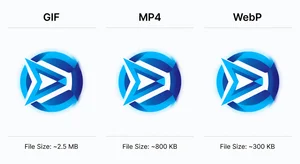
If you're still using GIFs because they're familiar and they work, you're probably slowing your website down by 3-8x for what should be a simple animation. The format question isn't just a technical preference. It's a performance decision that directly affects load time, bounce rate, and Core Web Vitals scores.
Here's the complete breakdown of when to use each format, backed by actual file size comparisons and browser support data.
Why This Still Matters in 2026
The web has had several candidate GIF replacements for years. The fact that GIFs are still widespread in 2026 isn't because they're good. It's because format inertia is real and migration has friction.
But Core Web Vitals have raised the stakes. Slow-loading animation assets directly impact your LCP (Largest Contentful Paint) and CLS (Cumulative Layout Shift) scores, which feed into search ranking signals. An 8MB GIF that could be a 400KB MP4 isn't just a user experience problem. It's an SEO problem.
GIF: What It Actually Is and When It Still Makes Sense
The Graphics Interchange Format was designed in 1987. For a web animation format, it has held on longer than anything should reasonably have been expected to.
GIF's advantage is near-universal support and zero-friction embedding. Drop a GIF into any environment: email, CMS, social platform, Slack, documentation, and it plays. No codec questions, no container format issues, no JavaScript required.
The cost is catastrophic file size. GIF uses LZW compression optimized for palette-based images and supports a maximum of 256 colors. A 5-second animation at 800x450 in full color can easily hit 15-25MB as a GIF. The same animation as MP4 is typically 500KB-1.5MB. As WebP, 1-3MB.
When GIF still wins: email clients (MP4 and WebP don't animate in most email clients), Slack and chat tools where format compatibility is uncertain, documentation tools and wikis with limited format support, and social media platforms that don't support native video embedding.
For any of these contexts, GIF is the only reliable choice.
MP4: The Performance Champion
For website use where you control the environment, MP4 with H.264 or H.265 encoding is the clear performance winner.
File size comparison on a 5-second, 800x450 animation with moderate motion:
- GIF: 18.4MB
- MP4 (H.264): 680KB
- MP4 (H.265): 380KB
- WebP animated: 2.1MB
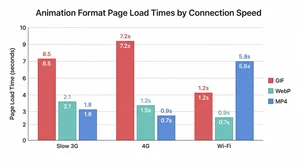
That's a 27x size difference between GIF and MP4 H.264. On a 3G mobile connection, that's the difference between 2.1 seconds load time and 57 seconds.
Browser support for MP4 H.264 is effectively universal in 2026, covering all major browsers on all platforms. H.265 is more efficient but requires hardware decoding support that isn't universal, so H.264 remains the safe default.
The setup requires an HTML video element instead of an img tag:
<video autoplay loop muted playsinline>
  <source src="animation.mp4" type="video/mp4">
</video>
The muted attribute is required for autoplay to work in modern browsers. playsinline prevents full-screen takeover on iOS.
The limitation: MP4 can't be used in email, has limited support in some documentation platforms, and requires more setup effort than dropping in an image tag.
WebP Animated: The Middle Ground
WebP animated is Google's format for replacing GIF with better compression and modern color support. It supports 16 million colors (versus GIF's 256) and compresses significantly better than GIF, though it typically can't match MP4 for highly complex motion.
Where WebP wins: static platforms where video isn't supported, content management systems without video hosting, and situations where you need animation but don't want to set up a video player.
WebP animated support is solid across Chrome, Firefox, and Edge. Safari added WebP support in 2020 and has steadily improved, though some older iOS devices have inconsistent support. For 2026, WebP is safe for the vast majority of users.
The Decision Framework
Choose by the deployment environment first, then optimize within that constraint.
Email: Use GIF, no choice. Slack, Discord, chat tools: Use GIF unless the platform explicitly supports WebP. Website with full HTML control: Use MP4, period. The performance advantage is too large to leave on the table. CMS without video hosting: Use WebP animated. It's dramatically better than GIF and doesn't require video infrastructure. Social media: Platform dependent, check each platform's current format support. Documentation tools (Notion, Confluence, etc.): GIF is most reliable, though some platforms now support WebP.
Core Web Vitals Implications
If you have any GIFs serving as above-the-fold hero animations on your website, they should be your first migration target.
An above-the-fold GIF is contributing directly to your LCP score, which Google uses as a ranking factor. Replacing a 20MB hero GIF with an equivalent MP4 can move your LCP from the "Poor" to "Good" range without any other changes to the page.
The audit process: use Chrome DevTools Network tab to identify animation assets, sort by size, and flag any GIF over 500KB serving on-site (not in email or external platforms). Each flagged asset is a conversion opportunity.
Practical Conversion Workflow
For existing GIF libraries: FFmpeg is the standard command-line tool for GIF-to-MP4 conversion. For non-technical workflows, online converters handle the job. The output quality is generally excellent because MP4's color reproduction is superior to GIF's.
For WebP conversion from GIF: Google's cwebp tool handles this, or use an online tool. Settings that balance quality and size: method 6, quality 75 for most use cases.

The Migration Priority Order
If you're auditing a site with existing animation assets, prioritize in this order:
First, any GIF on a page that's in your Core Web Vitals measurement set, especially homepage, key landing pages, and high-traffic blog posts. The ranking impact of improving these pages is immediate.
Second, GIFs over 5MB anywhere on the site. These are the worst UX offenders and the easiest wins.
Third, GIFs used in marketing assets that are also placed on web pages. If you created a GIF for email but also embedded it on a landing page, the email use is legitimate but the web use should be converted.
The format decision isn't permanent. What belongs in GIF stays in GIF. What belongs on your site converts to MP4. The two use cases serve different environments and that's fine. The problem is using GIF by default when a better format exists and your environment supports it.
In 2026, with Core Web Vitals as a ranking factor and mobile performance as a baseline expectation rather than a nice-to-have, there's no good reason for a website to be serving GIFs where MP4 or WebP would work.