
GIF vs MP4: Which One Loads Faster on Websites? | Cliptics
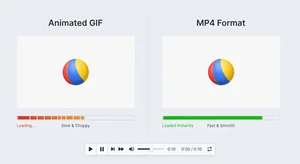
So here's a question I've wrestled with more times than I can count. You need an animation on your website. Do you use a GIF or convert it to MP4? Both show moving images, but they're wildly different under the hood and that difference shows up in your page load times.
Most people default to GIFs because they're easy and compatible with everything. Just drop it in like an image tag and you're done. But that convenience might be costing you serious performance, especially if you're using anything longer than a few seconds.
File Size Differences Are Massive
Let's start with the most obvious thing. MP4 files are way smaller than GIFs for the same content. I'm not talking about a little bit smaller. I mean like 70 to 90 percent smaller depending on the video.
I tested this with a simple 5 second product demo animation. As a GIF at decent quality, it came out to 4.8MB. Converted to MP4, same visual quality, 680KB. That's 14 percent of the original size. The load time difference is huge.
Video compression algorithms are just way more sophisticated than GIF compression. MP4 uses inter frame compression, meaning it only stores what changes between frames. GIFs store every frame completely, even if 90 percent of the pixels don't change. That's incredibly inefficient for most animations.
The longer your animation, the worse this gets for GIFs. A 2 second loop might be manageable as a GIF. A 10 second sequence? Forget it. You're looking at massive file sizes that will absolutely kill your page speed.
Browser Loading Behavior
Here's where it gets interesting though. Browsers treat these formats differently when loading pages. GIFs load like images, which means the browser tries to download the entire file before displaying anything. Large GIFs can block rendering and slow down your whole page.
MP4 videos support streaming. The browser can start playing the video while it's still downloading. For users, that means they see your content faster even if the file isn't fully loaded yet. Progressive display feels way faster than waiting for a complete download.
Modern browsers are also really good at video playback. They use hardware acceleration, which means your device's GPU handles the decoding instead of the CPU. This makes playback smoother and uses less battery on mobile devices. GIFs don't get that benefit.
The Compatibility Question
The big argument for GIFs has always been compatibility. They work everywhere. Email clients, messaging apps, old browsers, you name it. MP4 has spotty support in some contexts.
But for websites specifically, that's not really an issue anymore. Every modern browser supports MP4 playback with autoplay and looping. You can make an MP4 behave exactly like a GIF from the user's perspective. They won't even know it's a video file.
The code is barely more complicated. Instead of an img tag, you use a video tag with autoplay, loop, and muted attributes. Maybe add playsinline for iOS. That's it. The user experience is identical to a GIF but with way better performance.
Older browsers that don't support MP4? At this point that's such a small percentage of traffic it's probably not worth optimizing for. And you can always provide a fallback poster image if you're really concerned.
Quality Considerations
GIFs are limited to 256 colors per frame. That's a hard technical limitation. For simple graphics and logos, that's fine. For photographic content or complex images, that's really constraining. You end up with banding and color distortion.
MP4 doesn't have that limitation. You can encode video with millions of colors. The result looks way better, especially for detailed visuals. And remember, the MP4 file will still be smaller than the GIF despite having better color depth. That's how much more efficient the compression is.
Quality settings for MP4 also give you way more control. You can dial in exactly how much compression you want versus visual quality. With GIFs, your options are more limited and you're working within that 256 color restriction no matter what.
Mobile Performance Impact
Mobile users really feel the difference. A 5MB GIF on a 4G connection might take several seconds to load. That same animation as a 700KB MP4 loads almost instantly. On slower connections, the gap widens even more.
Battery life matters too. Playing back heavy GIFs drains mobile batteries faster because the CPU is working harder. MP4 playback uses hardware acceleration, which is way more power efficient. Your animations won't kill your visitors' battery as quickly.
Mobile data caps are real. If someone's on a limited data plan, they're probably not thrilled about loading massive GIF files. Smaller MP4 files are more respectful of your visitors' data usage. That might seem minor, but it contributes to overall user experience.
When GIFs Still Make Sense
Look, I'm not saying never use GIFs. For really short animations, like 1 or 2 seconds, the file size might be small enough that it doesn't matter. A simple loading spinner or icon animation works fine as a GIF.
If you need your animation to work in contexts beyond just web browsers - like email newsletters or certain social media platforms - GIF might be your only option. Just be aware of the performance cost and keep the file size as small as possible.
Sometimes the simplicity is worth it. If you're doing a quick mockup or prototype and you need an animation fast, GIF might be easier. For production use though, especially on performance critical pages, MP4 is probably the better choice.
Real World Testing
I ran PageSpeed Insights on two versions of the same landing page. One with three product demo GIFs, another with those same demos as MP4s. The GIF version scored 61 on mobile. The MP4 version scored 89. That's a huge difference.
Load time on a simulated 4G connection went from 6.2 seconds with GIFs down to 2.1 seconds with MP4s. Both pages looked identical to visitors, but the performance gap was massive. That directly impacts bounce rate and conversions.
Using a tool like Cliptics to compress your GIFs helps, definitely. But even heavily compressed GIFs are still going to be larger than equivalent MP4 files. Compression improves things but doesn't fundamentally change the format limitations.
The Conversion Process
Converting GIF to MP4 is pretty straightforward. Plenty of free tools do it, including command line options like FFmpeg if you want control. You can usually maintain visual quality while getting those massive file size reductions.
Settings matter. Make sure you're using modern codecs like H.264 or H.265. Set your bitrate appropriately - you don't need super high bitrates for these kind of animations. Often you can go pretty low and still maintain good quality.
Test the output before deploying. Make sure it looks good and behaves how you want. Check that autoplay and looping work correctly in your target browsers. It takes an extra minute but saves you from surprises later.
Making the Decision
For most website use cases, MP4 is the clear winner. Better compression, smaller files, faster load times, superior quality, hardware accelerated playback. The advantages are overwhelming.
The only real reason to stick with GIFs is compatibility in specific contexts where MP4 isn't supported. Email campaigns, certain social platforms, or environments where you can't use video tags. For regular website content, go with MP4.
Your page speed will improve measurably. Your users will have a better experience. Your hosting costs might even go down from reduced bandwidth usage. All while maintaining the exact same visual experience. That's about as close to a free win as you get in web performance.
Bottom Line
GIFs load slower than MP4s. Like, significantly slower. The file sizes are bigger, the format is less efficient, and browsers handle them less optimally. If you care about performance, which you should, MP4 is the way to go for any animation longer than a couple seconds.
The technical superiority of MP4 for web use is pretty much undeniable at this point. The only question is whether your specific use case has compatibility requirements that force you to stick with GIFs. For the vast majority of websites, it doesn't. Make the switch and watch your page speed metrics improve.