
Free Image Tools Every Small Business Should Be Using | Cliptics

Running a small business means wearing every hat, including photographer, designer, and marketing person. And for a lot of owners, image editing is the hat that fits the worst. The tools feel overwhelming, subscriptions are expensive, and who has time to learn Photoshop when you're also managing inventory and customer emails?
Here's the thing though: most of what small businesses actually need from image tools is pretty straightforward. Clean product photos. Consistent visuals for social media. Compressed images for a fast website. You don't need advanced software for any of that. You need a few free tools that each do one thing well.
These are the ones worth your time.
Background Remover: The Most Useful Tool You're Probably Not Using
If you're selling anything online, a clean background is the difference between a product photo that converts and one that makes customers scroll past. Retail giants spend thousands on studio shoots to get consistent white-background product images. You can get the same result in 30 seconds.
Cliptics' background remover uses AI to automatically detect and remove the background from product photos. Upload your image, download the cutout. No selection tools, no careful tracing around edges, no Photoshop required.
Once you have a clean cutout, you can place the product on a white background for your online store, or drop it onto any other background for social media content. This one tool probably saves more time than anything else on this list.
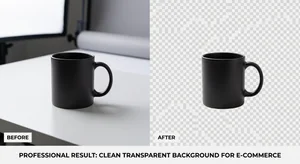
Image Compressor: Your Website Speed Fix
Every unoptimized image on your site is a tiny anchor dragging down your page load speed. And slow pages don't just frustrate customers; they rank lower in search results. For a small business depending on local or organic search traffic, that matters.
Cliptics' image compressor reduces file sizes by 60 to 80 percent without any visible loss in quality. The process is simple: upload your image, download the compressed version. Do this for every image before it goes on your site.
Make it a habit. Before you upload any photo to your website, store product listing, or blog post, run it through the compressor first. It takes 15 extra seconds and makes a measurable difference in page speed over time.
AI Image Editor: Quick Fixes Without the Learning Curve
Sometimes your product photo is good but not quite right. The lighting is a bit off. There's something in the background that shouldn't be there. The colors don't look quite like the real product.
Cliptics' AI image editor handles these adjustments through natural language prompts and AI-powered tools. You describe what you want changed, or use the built-in editing options, and the AI handles the execution. It's the kind of editing that would take real Photoshop skill if you were doing it manually, but it works in the browser with no experience required.
This is especially useful for business owners who don't have a design background but need occasional image fixes without paying a freelancer for small jobs.
Watermarking: Protect What's Yours
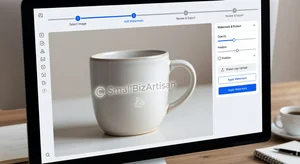
If your product images are good, people will copy them. It happens constantly in e-commerce, and while it's frustrating, the practical defense is simple: watermark your images before sharing them widely.
Cliptics' watermark tool lets you add text or logo watermarks to images. You can set the position, opacity, and size so the watermark is visible enough to deter theft without distracting from the product itself.
For social media content especially, where images get shared and re-shared without credit, a subtle watermark with your business name or website is good practice. It also serves as free advertising every time your image shows up somewhere else.
Putting Them Together: A Simple Workflow
Rather than using these tools randomly, build a quick workflow that becomes automatic:
When you photograph a product, run the photo through the background remover first. Save the clean cutout.
Use the AI image editor if there are any fixes needed: light adjustments, color corrections, object removal.
Compress the final image before it goes anywhere.
Add a watermark before sharing on social media or anywhere outside your own website.
That whole process takes five to ten minutes per product. Compare that to what a single freelance editing session would cost for the same work.
Why Free Tools Are Genuinely Good Enough Now
The gap between free browser-based tools and paid professional software has narrowed dramatically over the past few years. AI-powered background removal that used to require advanced masking skills now works automatically. Compression algorithms have gotten smarter at preserving quality. Editing interfaces have gotten simpler.
For small businesses with reasonable image needs, free tools aren't a compromise. They're often the fastest and most practical choice.

The businesses that look professional online aren't necessarily the ones with the biggest budgets. They're the ones with consistent, clean visuals and good habits. These tools make that achievable without spending anything.
Start with the background remover and the compressor. Those two alone will make a visible difference to how your products look online and how your site performs. Add the others as you build the routine.