
Pencil Sketch Filter: Artistic Photo Transformation Guide | Cliptics
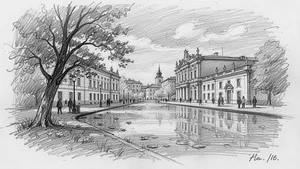
I wanted a sketched version of a family photo for a gift. Hiring an artist meant weeks of waiting and hundreds of dollars.
Pencil sketch filter turned the photo into beautiful line art in 30 seconds. Not identical to hand-drawn but convincingly artistic for a fraction of cost and time.
The pencil sketch tool converts photos to sketch style maintaining important details while creating authentic pencil drawing appearance.
Understanding Sketch Styles
Different pencil sketch effects create different artistic feels. Light delicate lines versus bold dramatic shading.
Fine line sketches work well for portraits emphasizing facial features. Heavier shading suits landscapes or architectural photos.
Cross-hatching patterns create depth through intersecting lines. Stippling uses dots for tonal variation. Choose style matching your photo content.
The sketch to image works reverse direction, turning sketches into photos. Understanding both helps grasp conversion process.
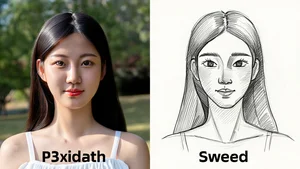
Photo Selection for Best Results
High contrast photos with clear subjects convert better than low contrast muddy images. Strong distinction between light and dark areas.
Simple compositions work better than busy cluttered scenes. Too many elements create confusing sketch with unclear focus.
Portraits, architecture, still life photography. These subjects suit pencil sketch style naturally. Abstract or very textured photos convert less clearly.
Lighting quality in original photo affects sketch quality. Even dramatic lighting translates well. Flat lighting creates flat sketches.
Detail Versus Simplification
Pencil sketches simplify reality into essential lines and shading. Too much detail looks messy. Too little loses subject recognition.
AI sketch filters balance detail preservation with artistic simplification. Adjust settings to control how much original photo detail remains versus artistic interpretation.
Faces need enough detail to be recognizable. Backgrounds can be more simplified to keep focus on subject.
Line Quality and Texture
Authentic pencil sketches have varied line weight. Thicker darker lines for emphasis, lighter thinner lines for subtle details.
Digital sketch filters sometimes create uniform line weight looking too perfect. Best filters vary line thickness naturally.
Texture matters. Real pencil on paper has grain and subtle imperfections. Pure vector-clean lines look too digital.
Add paper texture overlay if sketch filter doesn't include it. Vintage paper, watercolor paper, sketchbook texture all enhance realism.
Shading and Tonal Range
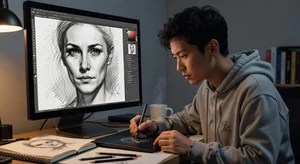
Pencil shading creates dimension through value gradients. Dark shadows, mid-tones, bright highlights.
Sketch filters analyze original photo's lighting and convert to appropriate pencil shading patterns.
Completely black or pure white areas should be minimal. Pencil drawings maintain detail in both shadows and highlights through varied pressure and techniques.
Color Versus Monochrome Sketches
Traditional pencil sketches are grayscale. Black graphite on white paper. Most sketch filters default to monochrome.
Colored pencil sketch effects exist but look less authentic. Natural pencil sketch stays black and white.
Starting photo can be color or black and white. Conversion to sketch removes color anyway. But color photo provides better luminance information for shading.
Edge Detection Importance
Sketch filters rely on edge detection to identify where to place lines. Sharp edges become defined sketch lines.
Soft gradients convert to shading rather than lines. Balance between defined edges and smooth tonal transitions.
Over-sharpening photo before sketch conversion creates too many detected edges and overly busy result. Use photo as-is or slightly soften instead.
Artistic Applications
Gift prints of sketched family photos or pets. Personal artistic touch compared to regular photos.
Social media profile pictures. Sketch style stands out from typical photo avatars.
Book covers, poster designs, artistic website headers. Sketch aesthetic works across creative applications.
The AI photo filter offers various artistic styles including sketch effects alongside other transformations.
Combining with Other Effects
Layer sketch over original photo at partial opacity. Creates mixed media effect showing both photo and sketch.
Add color tinting to monochrome sketch. Sepia tone, blue tone, any color wash. Maintains sketch aesthetic with subtle color.
Combine sketch filter with texture overlays. Canvas texture, watercolor paper, aged paper for vintage feel.
Print Considerations
Sketches print beautifully. Simple line art doesn't require high resolution like detailed photos. Even lower DPI maintains quality.
Matting sketched prints enhances presentation. White or cream mat around sketch creates gallery quality appearance.
Large format prints work surprisingly well. Sketch style scales up better than photos which can show pixelation.
Frame choice affects perception. Simple black or natural wood frames suit sketch aesthetic. Ornate frames can work for classical subjects.
When Sketch Filters Excel
Photos with strong composition and clear subject. Sketch emphasizes composition beautifully.
Portraits where you want artistic interpretation rather than photographic accuracy. Flattering while maintaining likeness.
Converting old family photos into art. Sketch effect can minimize photo damage and quality issues in vintage images.
Creating consistent art style across varied photos. Sketch filter unifies different photo qualities into cohesive artistic look.
Limitations and Alternatives
Very busy photos with lots of fine detail. Sketch can become confusing jumble of lines.
Photos relying on color for impact. Sunset colors, vibrant flowers, colorful events. Losing color removes key appeal.
For these cases, consider the AI image generator to create art from text descriptions instead of converting existing photos.
Professional fine art. Sketch filters create good results but won't match commissioned artwork from skilled illustrators.
My Conversion Process
I select photos with clear subject and good contrast. These convert most successfully.
Try sketch filter at default settings first. See baseline result before adjusting.
If too detailed or busy, reduce detail preservation. If too simplified losing important features, increase detail retention.
Add subtle paper texture if result looks too digital. Small touch enhances authenticity significantly.
Preview at intended display size. Sketch that looks great as smartphone background might need adjustment for large print.
Pencil sketch filters democratize artistic photo transformation. Create gallery-worthy sketched art from regular photos in seconds. Not replacement for hand-drawn artistry but accessible alternative producing results good enough for most personal and creative uses.