
Portrait Retouching: Natural vs Overdone - Quality Guide | Cliptics
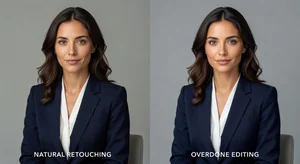
The first time a client rejected my work wasn't because of a technical error. It was because the portraits looked "too perfect." She couldn't recognize herself in photos where I'd smoothed every line, brightened every shadow, and polished away every trace of her actual face.
That rejection stung. But it taught me something crucial that every portrait photographer needs to learn: there's a thin line between enhancement and erasure. Cross it, and you lose the person you're trying to capture.
After years of navigating this balance, I've developed principles for retouching that preserve authenticity while still creating images clients love. Here's what actually works.
The Problem With Perfect
Modern retouching tools have become so powerful that we can make anyone look like a magazine cover. Flawless skin. Impossibly symmetrical features. Eyes that sparkle like they've been lit from within.
But here's what I've learned: people don't actually want to look like strangers. They want to look like the best version of themselves. There's a massive difference.
When you over-retouch, you remove the characteristics that make someone recognizable. That slight asymmetry in their smile. The laugh lines that appear when they genuinely beam. The texture of real human skin. These aren't flaws. They're identity markers.
I've watched photographers lose repeat business because their retouching style homogenizes everyone. Every portrait starts looking like it came from the same AI generator. Same smooth skin. Same enhanced features. No personality. No individuality.
Signs You've Gone Too Far
Learning to recognize over-retouching transformed how I work. Here are the telltale signs I now watch for:
Plastic skin texture. If someone looks like they're made of silicone, you've removed too much detail. Real skin has pores, fine lines, and subtle variations in tone. When you obliterate all of that, the result looks artificial no matter how "clean" it seems.
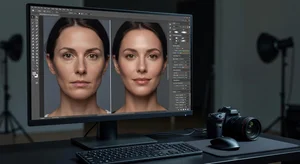
Loss of facial structure. Aggressive smoothing doesn't just remove blemishes. it flattens the three-dimensional quality of faces. Cheekbones lose definition. Jawlines soften into mush. The face becomes a flat surface instead of a sculptural form.
Uncanny valley eyes. Eyes are the first place viewers detect artificial manipulation. When you brighten whites too much, enhance irises unnaturally, or remove all bloodshot qualities, eyes stop looking human. They look like glass marbles inserted into a face.
Uniform lighting. Real faces have shadows. Noses cast shadows. Eye sockets have depth. When you fill in every shadow to "improve" the image, you remove the dimensionality that makes portraits feel present and real.
Inconsistent detail levels. This one's subtle but crucial. If the hair, clothing, and background maintain full texture and detail while the face is smoothed into oblivion, the disconnect is jarring. The face looks pasted on.
The Natural Retouching Approach
So what does natural retouching actually mean? It's not about doing less work. It's about being selective and intentional with your corrections.
Start with temporary distractions, not permanent features. A pimple that showed up the day of the shoot? Fair game for removal. Crow's feet that appear when someone smiles authentically? Those stay. They're part of how this person expresses joy.
I use a simple test: would this characteristic be here next week? If the answer is no, it's a temporary issue I can address. If it's a permanent feature like a scar, mole, or wrinkle pattern, I preserve it unless the client specifically requests otherwise.
For skin texture, I work with frequency separation. This technique lets you address tone and color issues without destroying texture. You can even out redness or discoloration while keeping pores and natural skin surface intact. It's more work than slapping a surface blur filter on everything, but the results look like actual human beings.
Eyes get subtle attention. never exaggeration. I'll remove stray hairs or reduce extreme redness, but I don't artificially enhance color or brightness. Natural eyes have depth variations. Some areas are lighter, some darker. Preserve that complexity.
Technique Over Automation
The retouching tools that promise one-click perfection are tempting. AI-powered skin smoothing. Automatic blemish removal. Instant eye enhancement. I've tried them all.
Here's what I discovered: they all make the same mistakes. They lack the judgment to distinguish between a temporary blemish and a permanent beauty mark. They can't recognize when a "flaw" is actually a defining characteristic. They optimize for technical perfection, not for preserving humanity.
So I take the manual approach for anything critical. Clone stamp for specific blemishes. Dodging and burning for subtle lighting corrections. Layer masks for targeted adjustments. It takes longer, but it gives you control over what stays and what goes.
For tools that help with legitimate retouching needs on your own work, AI portrait enhancer and image upscaler can be valuable for specific enhancement tasks. The key is using them as aids, not replacements for judgment.
Working With Different Skin Tones
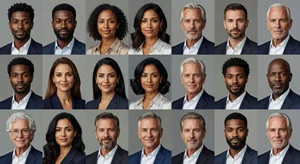
This is where a lot of photographers unknowingly cross into over-retouching territory. Default retouching actions and presets are often calibrated for lighter skin tones. When you apply them to darker complexions, you can inadvertently lighten skin in ways that erase cultural identity.
I learned this the hard way. A client with deep brown skin felt I'd "washed her out" in retouching. She was right. My usual approach had inadvertently lifted her skin tone because I was working with techniques designed around different complexions.
Now I adjust my approach based on skin tone. For darker skin, I'm especially careful with exposure and tone adjustments. The goal is evening out texture and tone while preserving the actual color. For lighter skin, I watch for over-brightening that makes subjects look washed out or sickly pale.
The principle stays the same across all skin tones: enhance what's there, don't reshape it into something else.
Client Conversations That Matter
The most important retouching skill isn't technical. it's communication. I start every portrait session with a conversation about expectations.
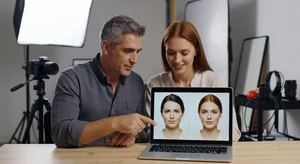
I show potential clients examples of my retouching style before they book. This sets expectations early. People who want heavily processed Instagram-style images can immediately see that's not what I deliver. People who value natural authenticity know they've found the right photographer.
During the shoot, I check in about specific concerns. Is there something temporary they're self-conscious about? A healing injury? A sudden breakout? I'll address those specifically. But I also explain what I preserve and why. Most people appreciate hearing that their laugh lines and natural features will stay.
After editing, if a client requests changes, I discuss them thoughtfully. Sometimes they're asking for adjustments that would genuinely improve the image. Other times they're asking me to make them look like someone else. In those cases, I explain the trade-off: more retouching means less "you" in the final image.
Most clients, when you frame it that way, choose authenticity.
The Long-Term Reputation Factor
Your retouching style becomes your signature. It's how people identify your work and decide whether they want to hire you.
Early in my career, I chased trends. Whatever retouching style was popular on Instagram became my template. High-contrast black and white with heavy dodge and burn. Crushed blacks with lifted shadows. Matte skin with bright eyes.
None of it felt like mine. And more importantly, none of it aged well. Looking back at work from five years ago, I cringe at how processed everything looks.
When I shifted to natural retouching, something changed. Clients started saying my portraits looked "timeless." Parents buying family photos appreciated that their kids looked like their actual kids. Professionals hiring me for headshots valued that they looked approachable and real, not airbrushed and corporate.
The work felt more sustainable too. I wasn't constantly trying to keep up with whatever retouching trend was hot that month. Natural doesn't go out of style because it's not trying to be stylish. It's just trying to be true.
Tools That Actually Help
While I advocate for manual control, certain tools genuinely streamline natural retouching without compromising quality:
AI headshot generator can provide reference points for professional portrait lighting and composition. AI image editor offers precise tools for selective adjustments. The key is using technology to support your vision, not replace it.
I use plugins for frequency separation, color grading, and batch processing of technical adjustments like lens correction. But anything touching faces or skin gets my direct attention and manual oversight.
Where I've Landed
After thousands of portraits and countless retouching hours, here's my philosophy: if viewers notice the retouching more than they notice the person, you've failed.
The goal of portrait photography isn't technical perfection. It's capturing humanity. Character. Presence. Personality. The things that make someone themselves.
Natural retouching serves that goal. Over-processing fights it.
Yes, it takes more time to work carefully and preserve authentic features. Yes, it requires developing judgment about what to adjust and what to preserve. Yes, it means sometimes disappointing clients who want magazine cover transformation.
But the portraits you create will actually look like the people in them. They'll age gracefully instead of dating themselves to a particular editing trend. And your clients will thank you for giving them images that feel true, not just technically impressive.
That's worth infinitely more than perfect skin.