
Real Estate Listing Photos: AI Enhancement Best Practices | Cliptics

I sold a house last year and learned something important about listing photos.
The difference between a property that sits for months and one that gets showings immediately often comes down to the photos. Not the actual property, the photos of it.
AI enhancement can make mediocre listing photos look professional without lying about what the property actually looks like. But there's a line you absolutely cannot cross.
Why Most Listing Photos Look Terrible
Real estate agents aren't photographers. They're salespeople who happen to need photos. Most listings get shot on a phone in ten minutes between showings.
Bad lighting, weird angles, cluttered rooms, unflattering colors. I've seen gorgeous homes look depressing in listing photos because nobody knew how to photograph them properly.
Professional real estate photographers exist but they're expensive. Minimum $200 to $500 for a full shoot. Not every seller wants to spend that.
AI enhancement lets you fix bad photography without hiring a professional. But only if you use it right.
What You Can Ethically Enhance
Lighting correction is completely fair game. A room that's actually bright and airy but photographed dark can be brightened to show reality.
Straightening crooked photos makes listings look more professional. Wonky horizons and tilted walls are distracting and fixable.
Color correction to accurate tones is fine. Phone cameras often make colors look wrong. Correcting them to match what the room actually looks like isn't deceptive.
The background remover and AI image enhancer tools help with these kinds of legitimate improvements without crossing into misrepresentation.
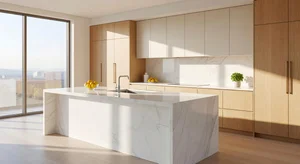
What You Absolutely Cannot Do
Adding furniture that isn't there is virtual staging and must be disclosed. Some markets require explicit labeling of virtually staged photos.
Removing major defects like wall damage, stains, or structural issues is fraud. People will see these problems during showings and you'll lose trust immediately.
Changing the actual space in any way is off limits. Making rooms look bigger, ceilings look higher, windows look larger, all deceptive.
Sky replacement to make weather look better is questionable. Some agents do it, but buyers notice when they show up to a property that never looks like the photos.
The Smart Middle Ground
Fix what the camera did wrong, not what the property is actually like.
If a room has great natural light but your phone made it look dim, brighten it. If a room is actually dark, leave it dark because that's the truth.
If white walls photographed with a yellow tint, correct the color. If walls are actually yellow, keep them yellow.
Clean up temporary mess like moving boxes or yesterday's dishes. Don't remove permanent issues like outdated fixtures or worn carpet.
How Much Enhancement Is Too Much
Here's my test: if someone walks into the property and feels misled by the photos, you enhanced too much.
They should recognize every room instantly and feel like the photos showed them something close to what they're seeing.
Some enhancement is expected. Professional photography always involves lighting and editing. But buyers can tell when photos crossed from professional to deceptive.
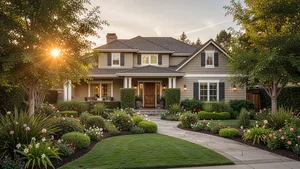
The Outdoor Photo Reality
Exterior shots are where agents get tempted to go overboard. Enhancing curb appeal is huge for first impressions.
Brightening a photo taken in flat midday light to look like golden hour is pretty common. Questionable but most people accept it.
Editing out the neighbor's cars or trash cans is a gray area. Temporary stuff feels okay to remove. Permanent eyesores you're stuck with.
Lawn and landscape enhancement is where I draw the line. If your lawn is brown, don't make it green in photos. People will notice immediately.
Room by Room Considerations
Kitchens and bathrooms sell homes, so photos of these get enhanced aggressively. But don't make outdated fixtures look modern. That's setting up disappointment.
Living spaces can handle more enhancement because buyers focus on layout and light, not specific details.
Bedrooms need accurate color since paint colors matter a lot to buyers.
Basements and utility areas should be accurate even if they're not pretty. Buyers expect these spaces to be less polished.
The Disclosure Problem
Some markets legally require disclosing AI enhancement or virtual staging. Know your local regulations.
Even where it's not legally required, noting "photos have been professionally enhanced" in the listing can protect you from accusations of misrepresentation.
Most buyers assume some level of photo editing anyway. Being upfront about it builds trust rather than damaging it.
What Professional Photographers Actually Do
I interviewed a real estate photographer friend about their editing process. They spend two hours editing a 30 minute shoot.
Straightening, color correction, HDR blending for proper exposure, removing distracting objects, sharpening. All standard practice.
AI tools can replicate most of these edits automatically. The difference is knowing when to stop.
My Actual Experience
For my listing, I used AI to brighten underexposed photos, straighten tilted angles, and correct color casts. Nothing more.
The photos looked significantly better than my initial phone shots. Professional quality without hiring a photographer.
Got three showing requests the first day. Two of those buyers specifically mentioned the photos looking great. When they toured, nobody seemed disappointed that reality didn't match photos.
That's the goal. Photos that generate interest without creating false expectations.
AI enhancement is a powerful tool for real estate listings. Use it to show properties at their best while staying honest about what they actually are.
The listings that perform best aren't the ones with the most enhanced photos. They're the ones where photos accurately represent an appealing property. There's a big difference.