
Regex for Non-Programmers: How to Validate Email, Phone | Cliptics
Regex has a reputation for being something that only developers touch. That reputation is mostly deserved: the syntax looks like keyboard mashing, the error messages are cryptic, and most tutorials assume you're already comfortable with programming concepts.
But the use cases for regex aren't developer-exclusive. Anyone who manages data entry forms, cleans spreadsheet data, runs marketing workflows, or handles customer information runs into the same problems that regex solves: you need to verify that what someone typed actually looks like an email address, a phone number, or a URL before you do anything with it.
The Cliptics Regex Builder removes the syntax barrier. Here's how to use it for the three most common validation needs.
What Regex Is Actually Doing
Regular expressions are patterns that describe text. When you validate an email address with regex, you're saying "this string should look like: some characters, then an @ symbol, then some characters, then a dot, then two to four characters at the end."
The regex that does this is: ^[a-zA-Z0-9._%+-]+@[a-zA-Z0-9.-]+\.[a-zA-Z]{2,}$
Reading that cold, it's incomprehensible. Reading it after you understand the building blocks, it's logical. And the visual builder shows you what each piece means as you build it, so you never have to memorize the syntax.
Validating Email Addresses
Email validation is the most common non-programmer use case. It comes up in form audits, CRM cleanup, and any situation where you've collected a list of emails and need to identify which ones are formatted correctly before sending to them.
Open the Cliptics Regex Builder. For email validation, you don't need to build from scratch: the builder has a library of common patterns you can load and modify.
The standard email validation pattern checks for:
- One or more valid characters before the @ symbol (letters, numbers, dots, underscores, plus signs, hyphens)
- An @ symbol
- A valid domain name (letters, numbers, dots, hyphens)
- A dot followed by two to six letters for the top-level domain
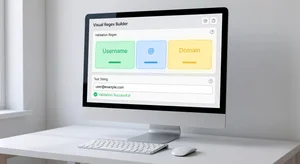
In the builder, this displays visually as color-coded segments. You can see exactly what each piece of the pattern matches and test it against sample addresses immediately.
What this catches: addresses without @, addresses without a domain, addresses with illegal characters, addresses with multiple @ symbols.
What this doesn't catch: whether the email address actually exists. Regex validates format, not deliverability. A correctly formatted email can still bounce. For deliverability verification, you need an email verification service. Regex is the first filter, not the complete solution.
Validating Phone Numbers
Phone number validation is more complex than email because phone number formats are genuinely inconsistent. US numbers can be formatted as 555-867-5309, (555) 867-5309, 5558675309, or +1 (555) 867-5309. International numbers have different length conventions entirely.
For a single-country use case (US numbers), a practical pattern handles the common formats without requiring exact spacing:
^\+?1?\s?\(?\d{3}\)?[\s.-]?\d{3}[\s.-]?\d{4}$
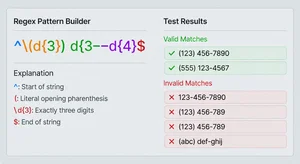
The visual builder shows this as: optional +1 country code, then area code (with or without parentheses), then 7 digits in any of the common dash/space/dot separator formats.
Testing this in the builder with sample numbers shows you instantly which formats pass and which don't. The interactive test input lets you paste a column of phone numbers and see validation results in real time.
For international collections, the approach is different. You'll want a country-specific strategy, or a permissive pattern that validates the structure without assuming country code specifics.
Validating URLs
URL validation with regex is the trickiest of the three because URLs legitimately have an enormous range of valid formats. A URL can have http or https, with or without www, with or without trailing slash, with query parameters, with anchors.
For most practical purposes, you don't need to validate the full complexity of URLs. You need to confirm that what someone entered looks like a URL rather than a typo or a plain domain without the protocol.
A useful practical pattern: ^https?://[^\s/$.?#].[^\s]*$
This validates that the URL starts with http:// or https://, is followed by at least one character that isn't a space or common invalid URL character, and continues with any non-space characters.
The builder lets you test this against your specific collection. Paste 20 sample URLs from your data, see which pass, and see what the failures have in common. Often one specific format adjustment (like adding or removing the www requirement) catches the outliers.
Practical Workflow for Data Cleaning
The most common non-programmer workflow: you have a spreadsheet of 3,000 form submissions and need to identify the rows with invalid contact information before importing them into your CRM.
In Google Sheets, regex validation works through the REGEXMATCH function:
=REGEXMATCH(A2,"^[a-zA-Z0-9._%+-]+@[a-zA-Z0-9.-]+\.[a-zA-Z]{2,}$")
This returns TRUE if the email in A2 is validly formatted, FALSE if not. Apply to the full column, filter for FALSE, and you have your list of invalid entries to review or re-collect.
Build your regex in the Cliptics visual builder, copy the output pattern, and paste it into the REGEXMATCH formula. You don't need to understand the syntax to use it correctly.
The Non-Technical Case for Learning This
Regex validation isn't just a developer tool. It's a data quality tool, and data quality is everyone's problem in organizations where forms collect contact information, spreadsheets travel through multiple hands, and CRMs get imported from varied sources.
The non-technical user who can validate their own data before it causes downstream problems in the CRM or email system is significantly more effective than one who has to route every data quality question through a developer.
The visual builder removes the barrier. You don't need to learn regex syntax. You need to understand what validation you want to achieve, load or build the pattern in the builder, test it against your data, and copy the output to wherever you need it.
That's a 15-minute skill to learn for something with recurring practical value across any data-heavy role.