
How to Remove Background from Jewelry Photos (Even Tiny | Cliptics
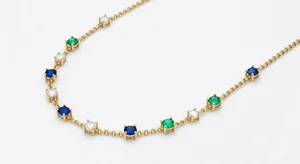
Jewelry is probably the hardest category for AI background removal. A simple shoe or bag has clean, defined edges. A delicate chain bracelet with linked loops, a ring with a pave diamond band, a pair of earrings with dangling filigree, these are entirely different challenges. The fine lines, semi-transparent stones, and metallic surfaces that reflect everything around them push AI tools to their limits.
But here's the thing. The standard has gotten good enough that most jewelry sellers can get usable results from free AI tools, especially with the right approach to both photography and editing. Let me walk you through how to actually make this work.
Why Jewelry Is the Hard Case
The main challenges are specific and worth understanding, because knowing them helps you work around them.
Fine chains and wire are the biggest issue. A gold chain photographed against a light background has very little contrast between the thin links and the surface. Background removal AI looks for edges. Where there are no edges, it guesses, and guesses on tiny jewelry details don't always go well.
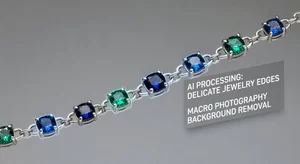
Gemstones create another problem. Transparent or semi-transparent stones, especially lighter ones like diamonds and certain quartz, can look partially transparent in a photo. The AI may not know what to include. It might remove part of the stone or leave background color inside it.
Metal reflections are the third challenge. Polished silver, gold, and platinum reflect their surroundings. If your background is patterned or colored, that color can appear in the metal of the jewelry. Removing the background doesn't remove those reflections.
The Photography Foundation
Before you touch any editing tool, getting the photography right makes background removal dramatically easier. These are the conditions that help most:
White or light neutral backgrounds for shooting. Counter-intuitive as it sounds, shooting on a white or very light surface first (even if you're going to replace it) gives the AI better contrast to work with on the actual jewelry edges. The exception is if you're shooting very light or white metal jewelry, where a mid-gray or neutral background creates better contrast.
Macro or close-up shots. The more of the frame your jewelry fills, the more pixels the AI has to work with for fine details. For small pieces like stud earrings or delicate chains, you want to fill at least 70% of the frame with the jewelry.
Even lighting from multiple angles. Jewelry needs even lighting to avoid harsh shadows at its base and to reduce strong reflections. A lightbox (which you can buy cheaply or make from a cardboard box and white paper) is actually excellent for jewelry. The diffused light all around reduces reflections dramatically.
No clutter near the jewelry. Props and surfaces add complexity near the edges. A velvet ring box next to the ring, a hand model wearing the bracelet, tags from the piece, all of these add to what the AI needs to figure out. For straight product shots, simpler is better.
Using AI Tools Effectively for Jewelry
Cliptics Remove Background handles jewelry reasonably well when the photo is clean. Upload, wait for processing, then examine the result closely before downloading. Pay attention to the areas around fine chains, earring wires, and the base of pieces where they meet any surface.
For complex pieces where the automatic result has issues, the Cliptics in-browser background remover processes locally which can sometimes give you slightly different results worth comparing.
Where AI tools specifically struggle with jewelry, consider a hybrid approach. Let the AI do 80% of the work by handling the main outline of the piece, then use a free browser-based tool like Photopea for fine-tuning the problem areas. Photopea has a proper selection tool and eraser that lets you clean up fine chain details manually. For most jewelry photos, this takes just a minute or two of cleanup after the AI pass.
For a transparent image final output, you want your jewelry floating with no background. This transparent version is your master file for both marketplace listings and any marketing composite work.
Object Removal for Jewelry Distractions
Sometimes jewelry photos have elements you want to remove that aren't background: a price tag, a scratch on the display surface, a stray hair. Cliptics Object Remover handles this without affecting the rest of the image. For jewelry, this is especially useful for removing the small stickers or tags that show up in product photos and can't always be physically removed before shooting.
Getting the Reflection Problem Right
Here's the situation with metallic reflections: if you shoot jewelry against a colored surface and that color is reflected in the metal, no background removal tool will fix it. The color is in the jewelry's surface data, not in the background layer.
The solution is to prevent it at the shooting stage. Shoot with white or neutral gray surroundings. A white lightbox or white foam board reflectors. If you're shooting small pieces on a table, the table surface should be white or neutral. Check your metal for unexpected color casts by zooming in on silver or gold areas before committing to an angle.
Backgrounds That Actually Work for Jewelry Listings
After you remove the background, what should you put in its place?
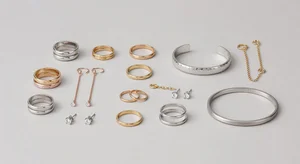
White is correct for Amazon and most marketplaces. It also works universally for any platform.
Light cream or ivory is warmer than pure white and makes gold tones appear richer. Popular choice for artisan jewelry brands.
Black or very dark gray creates a dramatic look that makes gemstones and precious metals pop. Good for high-end or fine jewelry brands and works especially well for diamond pieces where the sparkle really shows.
Marble or texture can work for social media imagery but feels less appropriate for standard listing pages where clean and clear is the goal.
Gradient light to dark is commonly used for fine jewelry advertising and catalog work. The gradient adds depth without competing with the piece.
The most important thing is consistency. Pick one background style for your main product images and use it across your entire catalog. Varied backgrounds across listings make even excellent jewelry look inconsistently presented. Consistency signals a professional brand, and in jewelry, professional presentation directly affects the perceived value of the pieces.
For individual sellers on Etsy or Depop with more casual aesthetics, flat lays on linen, marble cutting boards, or wooden surfaces with props can work beautifully for social sharing, but even then, keeping a clean white or neutral version for listing thumbnails is usually worth doing.
The combination of better photography and AI background removal tools available today means jewelry sellers don't need to outsource photo editing or compromise on image quality. With a lightbox, a decent phone camera, and Cliptics, the results are genuinely competitive with professional jewelry photography for most product categories.