
Rotate JPG Without Photoshop Free | Simple Online Tool | Cliptics
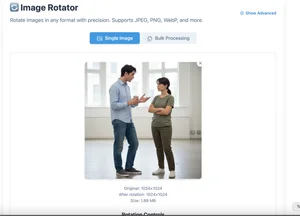
You know that feeling when your phone takes a photo sideways and you need to flip it real quick before sending it somewhere? And then you remember Photoshop costs money and takes forever to load and you just want to rotate one stupid image?
Yeah, me too. Way too often.
Here's what I figured out. You don't need Photoshop for this. You don't even need to download anything. There are free browser tools that rotate images in literally two clicks, and I wish I'd known about them years ago.
Why Rotating Images Is Weirdly Annoying
This should be simple, right? It's just turning an image 90 degrees. But somehow this basic task becomes unnecessarily complicated depending on what tools you have available.
Built in operating system tools exist but they're inconsistent. Mac Preview works fine until it doesn't save the rotation properly. Windows Photo Viewer rotates but sometimes messes with quality or metadata. Your phone's built in editor works great except when you need to send the file to a computer and the rotation doesn't stick.
And then there's Photoshop. Which is overkill for rotating an image. It's like using a chainsaw to slice bread. Sure, it'll work, but come on. You don't need a $60 monthly subscription just to turn photos the right way.
What you need is something simple that just works. Browser based. Free. No account required. Fast. That's actually asking for a lot less than it sounds like.
The Actual Easiest Way To Rotate Images Online
Cliptics has a free image rotation tool that I've been using instead of everything else, and honestly it's exactly what this task needs. Nothing fancy. Just functional.
You drag your JPG onto the page. Click the rotate button. Download the fixed image. That's genuinely the entire process. Three steps. Maybe ten seconds total including upload and download time.
What makes it work is what's not there. No signup wall. No ads covering half the screen. No "upgrade to premium to rotate more than one image." Just a tool that does what it says without friction.
The quality stays intact too, which matters more than you'd think. Some free tools compress your images when you rotate them, and you end up with a correctly oriented photo that looks worse than the original. This keeps the quality the same, which is kind of the whole point.
When You Actually Need This
I use this way more often than I expected once I found it. Turns out rotating images comes up constantly in small annoying ways.
Screenshot correction is a big one. You take a screenshot of something on your phone that was viewed in landscape mode, now the image is sideways. Before sharing it in email or presentations, you need it upright. Two clicks and it's fixed.

Social media posts that go up wrong. You upload to Instagram or Twitter and realize too late the orientation is off. Download it, rotate it quickly, reupload. Much faster than deleting and retaking or editing in app.
Old scanned documents are another use case. Someone sends you a PDF that was scanned wrong and now every page is sideways. Extract the images, rotate them, reassemble. Not fun, but at least the rotation part is painless with the right tool.
Product photos for e-commerce sellers. You take fifty photos of inventory. Ten of them are rotated wrong. You need them fixed before uploading to your store. Batch rotating through a simple tool saves real time compared to opening each in an image editor.
What This Tool Actually Does Better
Speed is the obvious advantage. From opening your browser to having a fixed image is under thirty seconds. Compare that to launching Photoshop, waiting for it to load, opening the file, rotating, saving, exporting. It's not even close.
But the real win is removing decision fatigue. Photoshop gives you a million options when all you want is rotation. Format selection. Quality settings. Color space. Metadata handling. Most of the time you don't care about any of that. You just want the image turned 90 degrees.
Simple tools that do one thing well eliminate that cognitive overhead. You're not making decisions. You're not navigating menus. You're not second guessing if you picked the right settings. You're just rotating an image and moving on with your day.
And browser based means it works everywhere. Your work computer where you can't install software. Your phone when you're traveling. Your friend's laptop when you need to quickly fix something. Any device with a browser handles this, which is more flexible than installed software.
The Limitations Worth Knowing
This isn't a full featured image editor, and that's by design. But it means there are things it won't do.
If you need to rotate by a custom angle like 7 degrees or 23 degrees, this won't help. It's 90 degree increments only. For most use cases that's fine, but if you're trying to straighten a crooked photo rather than just flip orientation, you'll need different tools.
Batch processing isn't built in yet. You can rotate multiple images, but you're doing them one at a time. If you've got 200 photos to rotate, this would get tedious. For occasional use it's perfect, but at scale you'd want something more automated.
And it doesn't preserve all metadata. Most EXIF data survives, but some specific camera information or editing history might get stripped. If you're a photographer who needs every piece of metadata intact, check the output before assuming it's all there.
Why Simple Tools Matter More Than They Should
Here's what I keep thinking about. We have incredibly powerful software that can do amazing things. But most of the time we don't need amazing things. We need simple things done quickly without hassle.
The tech industry keeps building more complex tools with more features. That's fine for professional workflows where complexity serves a purpose. But everyday tasks don't benefit from complexity. They benefit from removal of friction.
Rotating an image is a perfect example. The task is simple. The tool should be simple. When the tool matches the task complexity, everything just works and you can move on to stuff that actually matters.
That's what I appreciate about dead simple online tools for basic image tasks. They recognize that sometimes you don't want creative control or advanced features. You want a thing fixed right now so you can keep working. That utility is undervalued in discussions about software, but it's incredibly important for actual productivity.
What I Do Now Instead Of Photoshop
My workflow changed after finding tools like this. When I need to rotate images, I don't open Photoshop anymore. I just go straight to the browser tool. It's become muscle memory.
For quick fixes across the board – rotate, resize, crop, format conversion – browser tools handle probably 80% of what I used to do in heavyweight software. I only open Photoshop now when I'm actually doing complex editing that requires it.
This saves time, sure. But more importantly it reduces context switching. I don't have to leave what I'm doing, launch different software, wait for it to load, complete the task, close everything. I stay in the browser, fix the thing, continue working. That flow matters more than the individual time savings.
And it makes these tasks feel less painful. When fixing an image orientation is fast and easy, you actually do it instead of putting it off or deciding it's not worth the effort. Lower barriers mean you maintain quality on small details that add up.
The lesson here isn't really about rotating images. It's about using tools matched to task complexity. Heavy tools for heavy tasks. Simple tools for simple tasks. Once you start thinking that way, a lot of everyday frustrations disappear.