
Sketch to Reality: Design Visualization Workflow for | Cliptics
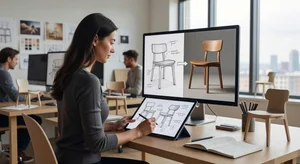
The gap between imagination and presentation has always been product design's greatest challenge. You sketch an idea that feels game changing in your notebook, but when it's time to show stakeholders, you're limited to rough drawings that require extensive explanation.
I've watched brilliant concepts get rejected not because the ideas were weak, but because hand sketches couldn't convey their full potential. That changed when I discovered sketch-to-reality workflows that bridge the gap between initial concept and photorealistic visualization.
This isn't about replacing design skills with automation. It's about accelerating the journey from idea to convincing presentation, allowing designers to iterate faster and communicate more effectively.
Why Visualization Speed Matters
Traditional product development moves slowly through distinct phases: sketch, refine, CAD model, render, prototype. Each transition takes days or weeks. By the time you see a photorealistic version of your concept, you've invested significant time and resources.
But what if the idea was flawed from the start? What if the proportions don't work in three dimensions? What if the concept that seemed innovative on paper looks generic when fully realized?
Early-stage visualization catches these issues when changes are still cheap and easy. Instead of discovering problems at the prototype stage, you identify them during initial sketching. That's a massive efficiency gain.
I've also found that visualization quality directly affects design feedback quality. Show someone a rough sketch, and they'll give you surface-level comments. Show them a photorealistic rendering, and they'll engage with the actual design decisions. materials, proportions, functionality.
The faster you can get to convincing visuals, the faster you can have meaningful conversations about design direction.
The Modern Sketch-to-Reality Workflow
Here's the workflow I've developed after testing various approaches and tools:
Start with hand sketching. I begin every project with pencil on paper or stylus on tablet. This phase is about exploration without constraints. Quick iterations. Multiple perspectives. Rough proportions. I'm not worried about perfection. I'm capturing ideas before they evaporate.
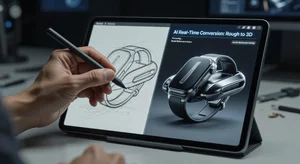
Refine the strongest concepts. From dozens of rough sketches, I identify the 2-3 most promising directions. These get more attention. Clean up lines. Add key details. Define proportions more precisely. The sketch doesn't need to be artwork, but it should clearly communicate the design intent.
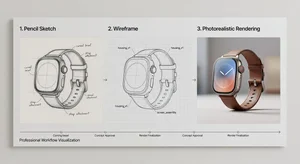
Convert to base 3D form. This is where the workflow gets interesting. Tools like sketch to image converters and AI sketch-to-image generators can now interpret hand-drawn concepts and generate three-dimensional representations.
The technology isn't perfect. it requires guidance and iteration. But it's transformative for speed. What used to take hours of manual 3D modeling now happens in minutes. You can test multiple variations quickly to find what works.
Add materials and context. Raw 3D forms aren't convincing yet. They need surface treatments, colors, textures, and environmental context. I use image-to-image tools to explore different material applications on the same base form. Wood grain versus brushed metal. Matte versus glossy. Each variation takes seconds to generate.
Refine through iteration. The first AI-generated result is never final. It's a starting point. I iterate, adjusting proportions, trying different angles, modifying details. The workflow supports rapid experimentation that would be prohibitively time-consuming with traditional methods.
Present with confidence. By the time I show designs to clients or stakeholders, I'm presenting photorealistic renderings that communicate intent clearly. The conversation shifts from "can you explain what this would look like" to "should we adjust this specific design element."
Handling Common Workflow Challenges
This process isn't automatic or foolproof. I've encountered specific challenges that require intentional solutions:
Sketch ambiguity. AI visualization tools interpret your sketches, which means ambiguous drawings produce unpredictable results. I've learned to be more explicit in my sketching. If a feature is critical, I draw it clearly from multiple angles. If proportions matter, I add dimension annotations.
Style consistency. When iterating on a design, maintaining visual consistency across variations is challenging. I've found that establishing a clear style reference early. whether a mood board or sample rendering. helps keep subsequent iterations aligned.
Technical feasibility disconnect. Photorealistic renderings can make impossible designs look plausible. I consciously evaluate technical feasibility separately from visual appeal. Just because something renders beautifully doesn't mean it can be manufactured affordably or function as intended.
Over-reliance on automation. There's a temptation to let AI tools drive design decisions. "The tool made it look this way, so let's go with that." I resist this. The tools serve design intent; they don't replace it. I stay actively engaged in directing the outcome.
Integration With Traditional CAD
Sketch-to-reality workflows excel at early-stage visualization, but production design still requires precise CAD models. How do these approaches integrate?
I use visualization as a bridge phase. Sketch explores possibilities. Visualization communicates concepts. CAD defines manufacturing specifications. Each phase has its role.
Once a concept direction is approved based on realistic renders, I transition to proper CAD modeling. The visualization becomes a reference guide. this is what we're trying to achieve; now model it with technical precision.
Some designers worry this creates extra work. In practice, it saves time. You avoid spending hours on CAD models for concepts that get rejected. You enter the CAD phase with clear direction and stakeholder alignment.
Client Presentation Strategy
How you present visualizations matters as much as the quality of the renders themselves. I've learned specific strategies that improve client conversations:
Show the process, not just results. When presenting designs, I include the evolution from sketch to final render. This helps clients understand the thinking behind design decisions and shows the exploration that led to the proposed solution.
Provide context. I don't show products floating in white space. I place them in realistic environments where they'd be used. A kitchen gadget in an actual kitchen. A tech device on a desk surrounded by relevant items. Context makes designs feel real and helps clients envision actual use.
Offer variations. Rather than presenting a single "perfect" option, I show 2-3 strong variations. Different color schemes. Alternative materials. Refined proportions. This invites productive discussion about preferences rather than binary accept/reject decisions.
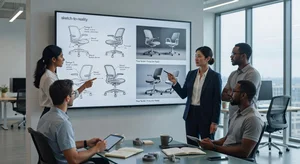
Be transparent about the process. I explain that these are visualizations, not photographs of physical products. Clients appreciate honesty. It sets appropriate expectations while still allowing the visual quality to drive meaningful feedback.
Tools That Actually Work
The sketch-to-reality workflow depends on capable tools. After extensive testing, here's what I actually use:
For initial concept exploration, AI image generators help rapidly test ideas that are still too rough for formal rendering. For converting sketches to more refined visuals, dedicated sketch-to-image converters handle the initial translation. For material exploration and stylistic iterations, image-to-image transformation allows quick variations.
I avoid tools that try to do everything. Specialized tools for each workflow phase give better results than all-in-one solutions that handle every step mediocrely.
The Efficiency Multiplier
Here's what this workflow has meant for my actual practice: I can now explore 10-15 design directions in the time it used to take to fully develop 2-3 concepts. That exploration breadth leads to better final designs because I'm not settling for the first decent idea. I'm pushing through to genuinely strong solutions.
Client revisions happen faster too. When feedback comes in, I can generate new variations within hours instead of days. That responsiveness keeps projects moving and builds client confidence.
And perhaps most valuably, I can test risky ideas without significant investment. That experimental concept that might be brilliant or might be terrible? I can visualize it quickly and find out. That freedom to experiment without penalty has made my design work noticeably more innovative.
Where Design Judgment Remains Essential
With all this technological assistance, what still requires pure design skill?
Everything important. Proportion. Balance. Functionality. User experience. Material appropriateness. Manufacturing feasibility. Aesthetic coherence.
The tools help you see your ideas clearly and quickly. They don't tell you which ideas are good. That judgment. knowing what works, what doesn't, and why. remains entirely human.
I think of sketch-to-reality workflows as amplifiers. They make your design abilities more effective by accelerating the iteration cycle and improving communication quality. But they can't replace taste, experience, or creative thinking.
Bad designers with great visualization tools still produce bad designs, just faster and prettier. Great designers with these tools produce more great designs in less time.
The Workflow Evolution
This approach will keep improving. AI visualization tools are advancing rapidly. The gap between sketch and photorealistic render continues shrinking. What takes minutes today might take seconds next year.
But the fundamental workflow structure. sketch, visualize, refine, present. will remain relevant because it matches how design thinking actually works. You start broad and exploratory, then progressively narrow and refine.
Technology that accelerates this natural process is genuinely valuable. Technology that tries to replace it tends to produce generic, soulless results.
As these tools evolve, the competitive advantage won't be access to the best software. It'll be the judgment to use them effectively in service of genuinely innovative design thinking.
That's where the future of product design is headed: human creativity amplified by intelligent tools, producing better solutions faster than either could achieve alone.