
Test Tattoos Virtually Before Permanent Ink: Smart Planning | Cliptics
Tattoos are permanent. Tattoo removal is expensive, painful, and doesn't always work perfectly.
So why do so many people commit to designs without really seeing them on their actual body first? You wouldn't buy a house without walking through it. But people get tattooed based on a drawing on paper and hope it looks good once it's on their skin forever.
Virtual tattoo try-on changes this completely. You can see any design on your actual body before the needle ever touches your skin. Test placement, adjust size, try different styles. All digitally, all reversible.
I almost got a forearm tattoo that would have looked terrible. The design was cool on paper. But when I previewed it virtually on my actual arm, it was way too big and didn't fit the space well. Adjusted the size and placement virtually until it looked right. Then got that version tattooed. No regrets.
Let me show you how to use virtual testing to avoid tattoo mistakes.
Why Testing Matters
Tattoo designs look different on paper than on skin.
Flat artwork doesn't show how a design wraps around body curves. A design that looks balanced on paper might look stretched or compressed on your actual arm, leg, or torso.
Size is almost impossible to judge without seeing it in place. What seems like a good size on a printout often translates to too big or too small on your body.
Placement makes or breaks a tattoo. An inch up, down, left, or right can dramatically change how a tattoo sits on your body and moves with you.
Without testing, you're essentially guessing. Maybe it works out. Maybe it doesn't. Virtual try-on removes the guesswork.
How Virtual Try-On Works
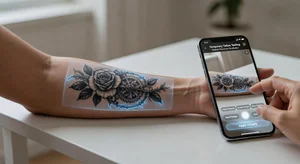
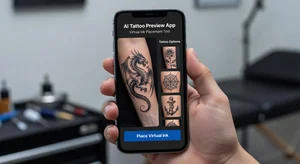
AI tattoo preview tools overlay designs onto photos or live video of your body.
You upload a design or choose from a library. The AI maps it onto your skin realistically, accounting for body contours and how the tattoo would actually sit.
You can adjust size with sliders. See the same design at different scales on your actual body part.
Move placement around. See how shifting the tattoo a few inches changes the whole look.
Some tools even simulate how tattoos look with movement. Turn your arm, and the virtual tattoo moves naturally with your skin.
The good tools also show aging simulation. See how the tattoo might look after years of sun exposure and skin changes.
Testing Placement
Where you put a tattoo matters as much as the design itself.
Upper arm tattoos hit differently than forearm tattoos. Centered versus off-center changes the whole vibe. High on the shoulder versus low near the elbow creates different effects.
Virtual try-on lets you test all these variations instantly. You don't have to imagine or use temporary tattoo paper that might not stick right. You see it realistically placed in different positions.
For larger pieces, placement determines how much is visible in different clothing. A back tattoo might peek out of some shirts but be fully hidden in others. Test placement with photos in different outfits to see what you're comfortable with.
Symmetry matters for certain placements. Ribcage tattoos, chest pieces, back tattoos. Virtual try-on helps you center designs properly or intentionally offset them for aesthetic effect.
Size Calibration
Most people misjudge tattoo size before getting inked.
You think you want a small delicate piece. Then you see it virtually on your body and realize it looks too tiny and details will be lost. Or you want a large dramatic piece and virtual testing shows it overwhelms your frame.
Size also affects detail visibility. Intricate designs need sufficient size for details to come through. Virtual preview shows you the minimum size where your design still looks good.
For text tattoos, size determines readability. Try your quote or name at different sizes. Too small and it becomes an illegible blur from any distance.
Body part size matters too. What's a medium tattoo on a bicep might be large on a wrist. Virtual try-on accounts for the proportions of different body areas.
Style Testing
Different tattoo styles suit different people and placements.
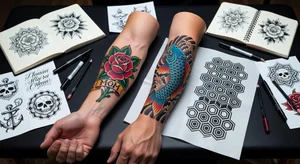
Traditional style, realism, watercolor, geometric, minimalist. These all have distinct aesthetics. What looks amazing in one style might not work in another.
Virtual try-on lets you see the same basic design concept in multiple styles. Maybe you want a rose tattoo. Try it in traditional bold lines, delicate line art, realistic shading, or watercolor effect. See which resonates.
Some styles age better than others in certain placements. Fine line tattoos in high-friction areas might blur over time. Bold traditional holds up everywhere. Virtual tools sometimes simulate aging in different styles to help you decide.
Your skin tone affects how different tattoo styles appear. Dark ink on darker skin versus lighter skin looks different. Virtual try-on can approximate these differences.
Color Versus Black and Gray
Color adds complexity and cost but can make designs pop.
Virtual testing with color versus black and gray versions of the same design shows you which you prefer. Some designs need color to work. Others look better in monochrome.
Color also introduces questions about skin tone compatibility. Certain colors show up better on different skin tones. Pale pinks might not appear well on very light skin. Bright colors can be stunning on darker skin in ways they aren't on light skin.
Color tattoos require more maintenance and touch-ups over time. Black and gray tends to age more gracefully. Virtual aging simulations can show these differences.
Cover-Up Planning
If you're covering an existing tattoo, virtual try-on is essential.
You need to see if the cover-up design actually hides the old tattoo. Artists can draw cover-ups, but seeing it virtually on your skin with the old tattoo underneath shows whether it'll work.
Size for cover-ups usually needs to be bigger than you think. Virtual testing helps you find the minimum size that fully conceals the original.
Placement might need adjustment based on the old tattoo's location. Virtual try-on helps you decide if you should center the cover-up over the old ink or offset it strategically.
Color intensity matters for cover-ups. Darker colors hide old tattoos better than light ones. Test different color options virtually to see coverage effectiveness.
Discussing With Your Artist
Virtual try-on gives you specific references for artist consultations.
Instead of describing what you want, show them exactly. Here's the design, at this size, in this placement. Remove all ambiguity.
Artists can look at your virtual mockup and tell you what's realistic. Maybe the fine line detail you want won't hold up in that placement. They can suggest modifications while you're both looking at the virtual version.
Some tattoo artists use similar tools for planning. Your virtual mockup might be a perfect starting point for their design process.
You can also show them multiple virtual versions to ask which they recommend. Get professional input based on concrete examples, not abstract descriptions.
Common Mistakes Virtual Testing Prevents
Going too small. Super common mistake that virtual try-on immediately reveals. You see the tiny delicate tattoo you imagined looks like a speck on your body.
Wrong placement. That shoulder tattoo you planned looks better on your upper arm when you actually see it there.
Overcomplicated design. Details that look cool in a drawing become a muddy mess when previewed at realistic size on skin.
Ignoring body contours. Geometric designs that work on flat paper but distort oddly over muscles, bones, or curves. Virtual try-on shows this immediately.
Text readability issues. Fonts that are legible on paper but blur together at tattoo size. Or quotes that wrap around your arm awkwardly.
Multiple Body Part Testing
Maybe you're not sure where you want your tattoo.
Virtual try-on lets you test the same design on different body parts. See it on your forearm, upper arm, shoulder, back, ribcage, thigh. Compare and decide where it works best.
Some designs suit certain body parts better than others. Vertical designs often work better on forearms or legs. Horizontal designs fit shoulders or upper back better. Virtual testing shows you these relationships.
Visibility is a factor too. Test in work-appropriate clothing to see how visible the tattoo would be in professional settings if that matters to you.
Long-Term Considerations
Think about how the tattoo fits into future plans.
If you want a sleeve eventually, test individual pieces in context of where the rest would go. See if spacing works for adding more later.
Body changes matter. Weight fluctuations, muscle gain or loss, pregnancy, aging. While you can't predict everything, virtual try-on can show how designs might stretch or compress with body changes.
Career considerations. Test tattoo visibility in professional clothing if you're in a field where visible tattoos could matter.
The Cost of Getting It Wrong
Tattoo removal is expensive. Laser removal runs hundreds to thousands of dollars for complete removal. And it's painful and time-consuming.
Cover-ups are an option but limit your design choices. You're constrained by needing to hide what's underneath.
Living with regret is worst case. A badly placed or sized tattoo you see every day.
Five to ten minutes of virtual testing can prevent all of these outcomes. The time investment is minimal compared to the permanence of the decision.
Actually Using Virtual Try-On
Start testing before you even book an appointment.
Play with designs, placements, and sizes. Narrow down what you actually want.
Share virtual mockups with friends or family whose opinions you value. Get feedback while it's still just digital.
Live with the virtual version for a while. Set it as your phone wallpaper or look at it daily. If you still love it after a couple weeks, that's a good sign.
Make final adjustments until it's perfect. Then take that exact virtual mockup to your tattoo artist as your reference.
Your tattoo is forever. Spend time getting it right digitally before it becomes permanent. Virtual try-on makes that possible in a way that wasn't accessible before.
Test, refine, confirm. Then commit. You'll be way more confident when that needle starts, knowing you've seen exactly what you're getting and you love it.