
Why UX-Friendly Images Improve SEO and Conversions | Cliptics

Images on a website do more work than most people think. They're not just decoration or visual breaks between paragraphs. They affect page load speed, search rankings, user experience, and ultimately whether someone stays long enough to convert. Getting images right is one of the more impactful improvements a web owner can make, and it's also one of the most consistently neglected.
Here's why images matter more than you might expect, and what UX-friendly image optimization actually involves in practice.
How Images Affect SEO Directly
Search engines care about images for a few distinct reasons.
Page speed is the most direct. Images are the heaviest elements on most pages, and page load time is a confirmed ranking factor. A page with five uncompressed images averaging 2MB each is loading 10MB of image data before anything else. That creates slow load times that hurt both rankings and user experience in one shot.
Google's Core Web Vitals include Largest Contentful Paint, which specifically measures when the largest visible element on the page loads. For most pages, that element is an image. An optimized featured image can meaningfully improve this metric, which directly affects search ranking.
Alt text is the other direct SEO factor. Search engines read alt text to understand what an image depicts, and accurate alt text contributes to how a page ranks for related image searches and reinforces the topical relevance of the surrounding content.
How Images Affect Conversions
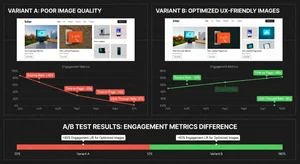
On e-commerce pages and landing pages, image quality and placement are major conversion drivers. Study after study shows that high-quality product images increase purchase likelihood, and that slow-loading or low-quality images increase bounce rates.
For product pages specifically, images need to be clear, consistent, and fast-loading. Blurry images signal low-quality products. Inconsistent styling across a product catalog undermines brand trust. Heavy files that take three seconds to load lose customers who expected to see the product instantly.
On content pages, images that actually illustrate the content keep readers scrolling longer. Relevant, high-quality images placed at logical points in an article improve time-on-page, which correlates with lower bounce rates and signals content quality to search engines.
What UX-Friendly Actually Means
UX-friendly image optimization is a combination of technical and design choices:
Correct file size. Compress every image before uploading. Cliptics' image compressor handles this efficiently without visible quality loss. Target under 100KB for standard content images and under 200KB for larger hero images.
Correct dimensions. Don't upload a 4000px wide image to display at 800px. Resize images to the actual display dimensions before uploading. Oversized images waste bandwidth and slow load times without improving visual quality.
Appropriate alt text. Write descriptive, natural alt text for every image. It should describe what's in the image in a way that's useful to someone who can't see it. Screen reader users benefit from this, and search engines use it to understand image content.
Cliptics' AI image editor and image upscaler help ensure your images are both the right quality and the right size before they go on the page.
The Format Question
JPG, PNG, and WebP each have appropriate use cases.
JPG works best for photographs and complex images with many colors. It compresses well and is universally supported.
PNG is better for images with transparent backgrounds, logos, or graphics with flat colors and text. It maintains sharp edges that JPG compression rounds off.
WebP delivers smaller file sizes than both at equivalent quality and is now supported across all major browsers. For new image uploads, WebP is often the best choice for web display.
The JPG compressor, PNG compressor, and other format-specific tools let you optimize whichever format you're working with.
Resize Images Before Using Them
One of the most overlooked image fixes is simply matching the image dimensions to where they'll be displayed. A full-resolution DSLR photo is often 3000 to 6000 pixels wide. Displayed on a webpage at 800 to 1200 pixels, that's two to six times the pixels you actually need, translating to file sizes two to six times larger than necessary.
Cliptics' image resizer makes it quick to get images to the right dimensions before compressing and uploading.

Building an Image Optimization Workflow
The goal is making this automatic, not something you remember to do occasionally.
Before any image goes onto your site: resize to appropriate dimensions, compress the file, rename it descriptively, and add alt text when you upload it in your CMS. For a single image, this takes two to three minutes total. For the compounding SEO and performance benefits, it's one of the highest-return investments of time you can make on your website.
Sites that consistently apply these practices typically see measurable Core Web Vitals improvements within weeks and gradual ranking improvements over months as the technical signals compound. The conversion impact is often visible faster, because faster-loading product pages and better-quality images directly affect purchase behavior.
Images done well are a competitive advantage. Most sites don't do this consistently. Those that do just perform better.