
AI Background Remover for Ecommerce: Meet Amazon, eBay & | Cliptics
If you sell products online, your photos are your storefront. Unlike a physical retail store where customers can handle products, examine them from different angles, and ask questions, your product photos have to do all of that work alone.
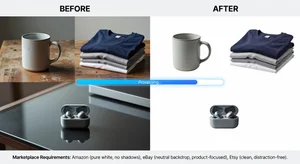
Each major marketplace has strict photo requirements. Amazon mandates pure white backgrounds (RGB 255, 255, 255) for main product images. eBay strongly recommends white or neutral backgrounds. Etsy's algorithm favors clean, professional images in search results. Meeting these requirements is not optional if you want your listings to perform.
The traditional solution involved expensive photography equipment, studio setups, or hiring professional photographers. AI background removal has made all of that unnecessary.
Why Marketplace Photo Requirements Exist
Amazon, eBay, and Etsy enforce photo standards for a consistent reason: customer experience. When all products appear on the same neutral background, customers can compare items fairly. The product speaks for itself without competing with background distractions. This consistency builds buyer confidence, reduces return rates (customers know exactly what they are getting), and creates the visual cohesion that makes the marketplace feel professional.
Sellers who do not meet these requirements face real consequences. Amazon can suppress listings with non-compliant images, meaning they do not appear in search results. eBay can reduce visibility. Etsy's algorithm deprioritizes listings with lower-quality images.
Getting this right matters commercially.
What Each Platform Requires
Amazon Main Image Requirements:
- Pure white background (RGB 255, 255, 255)
- Product must fill 85% or more of the image frame
- No text, logos, or watermarks added to the image
- No mannequins for apparel unless form-fitting to show shape
- Minimum 1,000 pixels on the longest side (for zoom functionality)
- JPEG, TIFF, or GIF format
eBay Photo Best Practices:
- White or light neutral background for main image
- At least 500 pixels on each side (1600 pixels recommended)
- No borders, watermarks, or decorative elements
- Product centered and clearly visible
- Minimum 12 photos allowed, use all slots for best visibility
Etsy Photo Requirements:
- No strict background requirement, but white or lifestyle backgrounds perform better
- At least 2,000 pixels on the shortest side for best quality
- First photo is the most critical for search click-through
- Multiple photos from different angles strongly recommended
How AI Background Removal Works for Product Photos
Modern AI background removal tools use semantic segmentation, a process where the AI identifies and separates the product from everything around it pixel by pixel. The results are significantly more precise than the old "magic wand" selection tools in traditional image editing software.
Cliptics Background Remover processes product photos and removes backgrounds in seconds. For most products on simple backgrounds, the results require zero manual cleanup.
After removal, you can add a pure white background using Cliptics Add White Background to meet Amazon's exact specifications.
For in-browser batch processing without software installation, Cliptics In-Browser Background Remover handles multiple images efficiently.
Step-by-Step Product Photo Workflow
1. Photograph your product
You do not need a studio. Photograph your product on any reasonably clean, contrasting surface. A plain light-colored table, a sheet of white foam board, or a plain fabric work well. The key requirement is good lighting. Natural light near a window is excellent. Avoid harsh shadows by diffusing direct sunlight with a white sheet of paper.
Take multiple angles: front, back, sides, detail shots. More input photos give you more options for your listing.
2. Remove the background
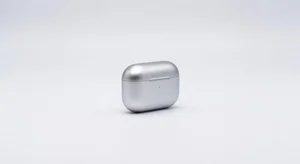
Upload your product photo to Cliptics Background Remover. The AI processes the image and isolates your product. For most straightforward product shots, the result is clean and ready to use.
For products with fine details (jewelry with thin chains, clothing with lace edges, transparent items), review the output carefully and use the manual cleanup tool if any edges need refinement.
3. Add your marketplace-compliant background
For Amazon listings: Use Cliptics Add White Background and select pure white (RGB 255, 255, 255). This meets Amazon's strict specification.
For eBay: Same process with pure white.
For Etsy: You have more flexibility. White works universally, but you can also use light grey, pale cream, or lifestyle backgrounds for secondary photos.
4. Check product fill percentage
Amazon requires the product to fill at least 85% of the frame. After removing the background, crop your image so the product fills most of the frame. Leave a small margin on each side but ensure the product dominates the image.
5. Optimize file size
Compress your images using Cliptics Image Compressor before uploading. Large file sizes slow down page loading, which hurts SEO on marketplace search results. Aim for under 1MB per image while maintaining visual quality.
6. Create a complete listing photo set
Use your multiple angles to create a full set of listing photos. Main image on white background for the primary listing photo. Additional angles showing product details. Size comparison photo (show the product next to a common object). Packaging photo if relevant to your product.
Common Background Removal Problems and Solutions
Problem: Product edges look jagged or rough Solution: Use the manual refinement tools to smooth edges. Zoom in to check critical areas like corners and curved edges.
Problem: Transparent or reflective products show background through them Solution: These require more careful processing. Transparent glass, bottles, and shiny surfaces are the most challenging category. Try photographing on a plain white surface first to minimize the complexity of what needs to be removed.
Problem: Product color looks slightly different on white background Solution: White backgrounds can make colors appear slightly different than on other surfaces. Adjust brightness slightly if needed, but avoid over-processing.
Problem: Fine hair-like details (jewelry chains, fringe fabric) look cut off Solution: Use a tool with hair-detail preservation. Check edges carefully and use manual refinement for these specific areas.
Beyond Compliance: Making Your Photos Convert
Meeting the minimum requirements gets your listing shown. But photo quality above the minimum standard is what drives conversions.
Studies on ecommerce conversion optimization consistently show that the number of photos in a listing correlates with conversion rate. Listings with 7 or more high-quality images outperform those with fewer photos.
Invest the time to photograph your products well and process every angle. The upfront effort in creating a complete, professional photo set pays returns for as long as your listing is active.
Your product photos are your most important sales tool. With AI background removal making professional-quality images accessible to every seller regardless of budget, there is no longer any reason to compete with substandard imagery.