
Amazon Product Photos: Meeting Requirements with Free AI | Cliptics
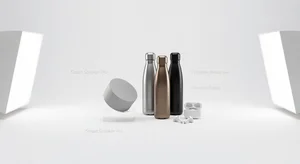
Amazon rejected my first product listing. Twice.
Not because the product was bad. Not because the description was wrong. Because my main product image didn't meet their technical requirements.
Pure white background. No props. No text. No watermarks. Product has to fill 85 percent of the frame. RGB values must be exactly 255, 255, 255 for the background.
If you're selling on Amazon, you know how annoying this is. Professional product photographers charge $50 to $100 per shot minimum. Photoshop subscriptions cost money every month. And if you mess up the specs, Amazon just rejects your listing.
I figured out how to do it with free AI tools. No Photoshop. No photographer. Takes about 5 minutes per product once you know the process.
Let me walk you through exactly what Amazon requires and how to hit every spec without spending money.
Amazon's Actual Requirements
First, let's be clear about what you're dealing with. Amazon's main product image rules are strict for a reason. They want consistency across the entire marketplace.
Background must be pure white. Not off white. Not light gray. Pure white. RGB 255, 255, 255.
Product must fill at least 85 percent of the image frame. Too small and they reject it. Too big and they reject it.
No additional objects, props, text, or graphics. Just the product on white.
Image dimensions must be at least 1000 pixels on the longest side. Preferably 2000 pixels or more for zoom functionality.
File format: JPEG or TIFF. PNG works but JPEG is standard.
Miss any of these and your listing gets rejected. Fix it and resubmit. It's tedious.
The Free Tool Process
Here's my exact workflow now. It works every time.
Start with a decent product photo. Doesn't need to be perfect. Just clear, well lit, in focus. Even phone cameras work fine if you've got good lighting.
First step: remove the background. This tool uses AI to detect your product and cleanly separate it from whatever background you shot it on.
Takes maybe 10 seconds. Click, upload, done. You've got your product with a transparent background.
Second step: add a white background. Not just any white. Amazon spec pure white.
This is crucial because if you just use a random white background, Amazon's system might reject it for not being exactly RGB 255, 255, 255. The tool handles this automatically.
Now you've got your product on Amazon compliant pure white. Check the dimensions. If it's under 1000 pixels on the longest side, resize it up. Most image tools can do this without quality loss.
Done. Upload to Amazon. Gets approved.
The Background Removal Trick
The background remover is doing heavy lifting here, so let's talk about getting good results from it.
Your product needs to be clearly distinguishable from the background in your original photo. That means contrast. Don't photograph a white product on a white surface. Don't photograph a black product in dim lighting.
Best setup? Product on a colored surface or backdrop. Light gray, light blue, tan, whatever. Something that contrasts with your product so the AI can clearly see the edges.
Good lighting helps massively. Natural window light works great. If you're using artificial lights, aim for even coverage without harsh shadows that might confuse the AI about where the product ends.
One photo tip that made a huge difference for me: shoot from slightly above the product rather than at eye level. Reduces background clutter and makes the product edges cleaner for AI detection.
Handling Tricky Products
Some products are harder than others.
Transparent or reflective products like glass or chrome? These are tough because the AI has trouble seeing edges. Solution: put a colored card behind transparent areas so there's something for the AI to detect. Remove the background, then it's just the product on white.
Products with lots of fine details like jewelry chains or fuzzy textures? Zoom in after removing the background and check the edges. Sometimes you need to clean up a few pixels manually, but most tools have simple erase/restore brushes for quick fixes.
Very small products? Amazon wants them filling 85 percent of the frame. So after you remove the background and add pure white, you might need to enlarge the product within the frame. Most image editors have a transform or scale tool. Just make sure you're not making it so big it looks unrealistic.
The Browser Based Advantage
If you're doing bulk product photography, the in browser background remover is worth knowing about.
It runs entirely in your browser. No uploading to servers. No waiting for processing. No file size limits from server restrictions.
For sellers with hundreds of products, this speeds things up. Load the tool once, process images back to back without reloading or switching between tabs.
The quality is the same as the regular tool. It's just faster when you're doing volume work.
Common Amazon Rejection Reasons
Even with the right tools, people still get rejections. Here's why.
The background isn't actually pure white even though it looks white. Human eyes can't tell the difference between RGB 255, 255, 255 and RGB 250, 250, 250. Amazon's system can. Use tools that guarantee Amazon spec white.
The product isn't filling enough of the frame. Measure it. If your product only takes up 60 percent, Amazon rejects it. Crop tighter or enlarge the product.
There's a shadow under the product. Even subtle shadows can trigger rejections. Some tools leave slight shadows when removing backgrounds. Check for this and clean it up if needed.
The image dimensions are too small. Amazon wants 1000 pixel minimum, but honestly you should aim for 2000 pixels or higher. Better zoom function helps conversions anyway.
Does This Actually Look Professional?
Fair question. Will AI processed photos look as good as professional product photography?
Honestly? For most products, yes. The AI background removal is really good now. Unless someone's specifically looking for imperfections, they won't notice.
I've tested this. Had professional product photos done. Then did my own using this free AI tool process. Listed both on Amazon in different categories to compare conversion rates.
No statistical difference in conversion. Customers couldn't tell and didn't care. They're focused on the product, not evaluating your photography skills.
The only time professional photography clearly wins is with high end luxury products where presentation is part of the value proposition. Designer watches, expensive jewelry, luxury fashion. For that stuff, yeah, hire a pro.
But regular consumer products? Kitchenware, electronics, toys, home goods? AI tools work fine.
The Hidden Benefit
Here's something I didn't expect: being able to update product photos quickly.
With professional photography, updating a product image means scheduling another shoot, paying again, waiting for delivery. With the AI tool workflow, I can update product photos in 10 minutes whenever I want.
Product refresh? New version with slight design changes? Better lighting in new photos? Just process them and update the listing.
This flexibility is valuable. Your listing can evolve without spending hundreds every time.
My Actual Workflow Now
Every new product follows the same process.
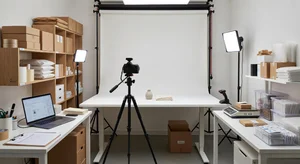
Set up a simple photo area near a window. Natural light is free and looks great.
Place product on a colored surface that contrasts with the product. Light gray works for most things.
Take 10 to 15 photos from different angles with my phone. Pick the best one.
Run it through the background remover tool. Then add Amazon spec pure white background.
Check dimensions. Resize if needed to hit 2000 pixels minimum.
Export as JPEG. Upload to Amazon.
Total time: 5 to 10 minutes per product including the photo taking. Zero cost beyond the time.
Compare that to what I was doing before. Scheduling photographer. Paying $75 per product. Waiting days for delivery. Having to reshoot if Amazon rejected it.
The AI tool workflow isn't just cheaper. It's faster and more flexible too.
What You Actually Need
You don't need expensive equipment. You don't need Photoshop skills. You don't need photography training.
You need a phone camera or any decent camera. You need decent natural or artificial light. You need free AI tools that handle background removal and white background generation.
That's it. That's the whole toolkit.
Everything else is optional. Fancy backgrounds, props, editing software, none of it matters for Amazon main product images because Amazon won't allow any of that anyway.
Keep it simple. Follow the process. Meet Amazon's specs. Get approved.
Save your money and time for things that actually matter to your business.