
Beginner's Guide to E-commerce SEO With Product Images | Cliptics

When most people think about SEO for their online store, they think about keywords in product descriptions and category pages. Images rarely come up in that conversation. But product images are one of the most significant and most overlooked factors in e-commerce search performance.
This guide is for store owners who are just getting started with SEO and want to understand how to treat their product images as a genuine search asset rather than just visual decoration.
Why Product Images Matter for E-commerce SEO
Search engines index images. They appear in Google Image Search, which drives significant traffic to e-commerce sites. They're embedded in product pages that rank in regular search results. And they contribute to the technical performance of those pages through their file sizes.
For a new online store trying to gain search visibility, image optimization is accessible in a way that link building and domain authority aren't. You can meaningfully improve your image SEO in a few hours and see measurable effects relatively quickly.
Getting Your File Names Right
Before you upload any product image, rename the file to something descriptive. Most phone photos and camera downloads have names like DSC_1482.jpg or IMG_3891.png. Search engines can't understand what those images depict from the filename.
Rename every product image before uploading. Use the product name, key attributes, and sometimes the category. For example: blue-ceramic-coffee-mug-12oz.jpg or womens-leather-ankle-boots-brown.jpg.
Use hyphens between words, not underscores. Keep it descriptive but not excessively long. This alone is an improvement most new store owners haven't made, and it gives search engines one more signal about what the image depicts.
Adding Alt Text to Every Image
Alt text is the written description of an image that search engines read when they encounter it. It's also what screen readers use to describe images to visually impaired users.
Every product image needs alt text. Write it as an accurate description of what's in the image, including key product attributes. For a product image showing a blue ceramic mug: "Blue 12oz ceramic coffee mug with handle on white background."
Don't stuff keywords. Don't repeat the exact same alt text for every image. Write naturally descriptive text for each image. Search engines have gotten very good at identifying alt text that was written for keyword stuffing rather than genuine description, and it doesn't help.
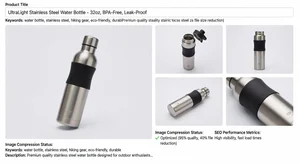
Compressing Every Image Before Upload
This is the step that has the most impact on technical performance and it's the one most beginner store owners skip.
Product images from cameras and phones are often 3 to 8MB. An online store with 50 products could be serving 150 to 400MB of image data if none of it is compressed. That creates very slow product pages, and slow pages rank lower.
Cliptics' image compressor reduces image file sizes by 60 to 80 percent with no visible quality loss. The process is simple: upload the image, download the compressed version, upload that to your store instead.
Make this a rule: every image gets compressed before it goes on the store. Not some images. Every image.
For JPG product photos specifically, the JPG compressor gives you targeted compression for that format.
Getting Clean Backgrounds With Background Removal
Most marketplace platforms and many well-converting e-commerce stores use white or transparent backgrounds for product images. They look clean, they're consistent across a product catalog, and they let the product itself be the focus.
If your product photos have busy backgrounds, a home environment behind them, or inconsistent settings, Cliptics' background remover handles this automatically. Upload the photo, the AI removes the background, and you download a clean product cutout that you can place on white or transparent.
For a beginner store owner, this is one of the fastest ways to make your products look more professional and consistent without hiring a photographer.
Using Multiple Product Images Effectively
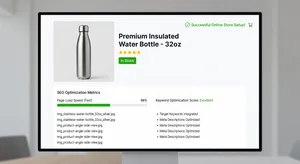
Most e-commerce platforms let you upload multiple images per product. Use them. Show the product from multiple angles, show it in use, show relevant details. Multiple images increase time on page (users browse through them) and give you multiple opportunities to appear in image search for different query variations.
Each image in that set needs its own filename and alt text, and each one should be compressed before upload. The naming should distinguish them clearly: blue-ceramic-mug-front-view.jpg, blue-ceramic-mug-side-view.jpg, blue-ceramic-mug-with-coffee.jpg.
Cliptics' AI image editor lets you make quick enhancements to each image in the set: color correction, brightness adjustment, object removal from backgrounds. It's faster than doing this in Photoshop and doesn't require design skill.
Adding White Backgrounds for Marketplace Compliance
Platforms like Amazon require white backgrounds for main product images. If you're selling on marketplaces as well as your own site, you need white-background versions for compliance.
Cliptics' white background tool adds a clean white background to your product cutout. Use the background remover first to get a clean cutout, then apply the white background. The result meets marketplace requirements and looks clean across any platform you're selling on.

A Simple Workflow for Every New Product
Here's the image optimization workflow to follow every time you add a product to your store:
Take or source your product photos. Aim for clean, well-lit shots even from a phone.
Remove the background if needed. Use the background remover for a clean cutout.
Apply white or appropriate background. Consistent with the rest of your store.
Compress every image. This is the step most people skip and it matters most for performance.
Rename files descriptively before uploading.
Add alt text to every image in your store dashboard.
That workflow takes 10 to 15 minutes per product. Over the life of your store, consistently applying it is the difference between a store that grows organically and one that stays invisible in search.
SEO for e-commerce doesn't have to be complicated. Most of the gains for a new store come from doing the basics consistently: good product photos, clean backgrounds, compressed files, descriptive names, and accurate alt text. Start there and the rest of the strategy follows.