
One Video to 40 Platforms: AI Repurposing | Cliptics
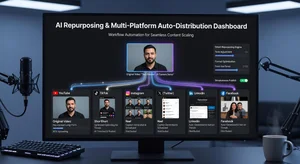
I record one video every Monday morning. By Tuesday afternoon, that same video is working for me across 40 different platforms.
Not 40 manually uploaded copies. Not 40 separate edits. One video. 40 strategic variations. All automated. This workflow changed everything about how I create content, and it can work for anyone willing to set it up properly.
Here's exactly how I do it, step by step, with no fluff.
The Core Concept: Master Video First
Most people get this backwards. They think multi-platform means creating different videos for different places. That's exhausting and completely unsustainable.
The real strategy is creating one master video that's built to be atomized. My master videos are always horizontal 1920x1080, 3 to 8 minutes long, shot in a quiet space with clean audio. I structure them in sections that can stand alone, not as one continuous narrative that only works from start to finish.
Each section addresses one specific point. One problem, one solution, one tip. That modular structure is what makes everything else possible. If your video is just one long thought, you can't break it apart without losing meaning. Structure it in self-contained segments from the start, and repurposing becomes automatic instead of painful.
Step One: Automated Format Conversion
This is where the workflow actually begins. I use AI video generation tools that handle the technical transformation without me touching the timeline.
The master video gets converted into five core formats. Vertical 9:16 for TikTok, Reels, and Shorts. Square 1:1 for feed posts on Instagram and Facebook. Horizontal 16:9 stays for YouTube and LinkedIn. Widescreen 21:9 for Twitter and cinematic previews. Vertical 4:5 for Instagram feed carousels.
Each format isn't just cropped differently. The AI reframes each shot to keep faces centered and text readable in whatever aspect ratio it's creating. Manual cropping would take hours and still miss details. Automated reframing handles it in minutes and catches things I'd overlook.
I also generate 15 second, 30 second, 60 second, and 90 second versions of each format. That gives me 20 base variations from one upload, all properly composed for their destination platform.
Step Two: Platform Specific Optimization
Format conversion alone isn't enough. Each platform has different technical requirements and different audience expectations.
TikTok videos get louder audio mixing and punchier cuts. The first three seconds get reworked to maximize hook strength because TikTok users scroll fast. Captions appear in the lower third, not center, because TikTok's interface covers the middle of the screen.
YouTube Shorts get different treatment. The hook is still critical, but retention matters more than immediate grab. I use slightly longer segments, more context, because Shorts viewers are more patient than TikTok scrollers. Captions can run center screen because YouTube's interface doesn't block it the same way.
LinkedIn gets the most conservative edit. Professional tone, no quick cuts, clear value delivery up front. The 60 second version works best there, long enough to demonstrate expertise without testing patience.
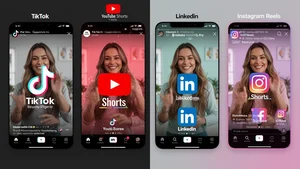
This optimization happens through preset templates I've built in my workflow system. I don't manually adjust each video. The automation applies platform-specific rules based on destination tags I assign during upload.
Step Three: Watermark Strategy
Here's where most tutorials skip something critical. Cross-platform distribution means dealing with watermarks, and handling them wrong kills your reach.
When I repurpose TikTok content to Instagram, leaving the TikTok watermark visible tells Instagram's algorithm this is recycled content. Instagram suppresses recycled content. Same happens in reverse. Same happens with YouTube Shorts watermarks on TikTok.
The workflow includes automatic watermark removal as part of the repurposing process. Not because I'm hiding where content came from, but because algorithms penalize obvious cross-posting. AI watermark removal tools handle this cleaner than manual editing and don't leave the weird blur patches that traditional editing creates.
I also add platform-native branding to each version. My TikTok videos get my TikTok handle. My YouTube Shorts get my YouTube channel name. Each piece looks native to where it lives, not like it was made somewhere else and dumped everywhere.
Step Four: Metadata Multiplication
Video files are just half the system. Metadata is what makes them discoverable.
For each video variation, I generate platform-optimized descriptions, hashtags, and titles. Not the same text copied everywhere. Different approaches based on how each platform's search and discovery actually works.
TikTok gets trend-aware hashtags and conversational captions. YouTube gets keyword-rich descriptions and search-optimized titles. LinkedIn gets professional framing and industry-specific terminology. Instagram balances accessibility with engagement-focused copy.
This metadata generation happens through AI tools that understand each platform's current algorithm priorities. I feed in my core topic, and the system outputs 40 different metadata packages customized for where they're going.
It sounds excessive until you realize search algorithms care about this. A video with perfect metadata performs 3x better than the same video with generic copy. Multiply that across 40 placements, and the difference is massive.
Step Five: Scheduled Distribution
Everything I've described happens automatically after initial setup. The distribution schedule is where I stay hands-on.
Different platforms have different optimal posting times. My audience is most active on Instagram at 7 PM Eastern. On LinkedIn, it's 8 AM. TikTok engagement peaks at 9 PM. YouTube Shorts perform best mid-afternoon.
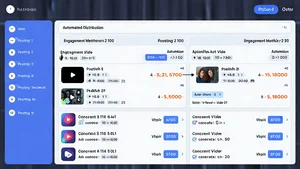
I use scheduling tools that spread the 40 variations across optimal windows throughout the week. The master video I recorded Monday morning starts appearing Tuesday on early platforms like LinkedIn, hits TikTok and Instagram Tuesday evening, catches YouTube Wednesday afternoon, rolls into Twitter and Facebook Wednesday night, and continues distributing to niche platforms Thursday and Friday.
This staggered approach prevents audience overlap fatigue. Someone who follows me on multiple platforms doesn't see the exact same thing posted everywhere at the exact same moment. They see variations appearing at different times in contexts that make sense for each platform.
Step Six: Performance Tracking and Iteration
The workflow doesn't end at distribution. Data comes back from all 40 placements, and that feedback loop is what makes this system improve over time.
I track which formats perform best on which platforms. Vertical videos consistently outperform square on Instagram, but square wins on Facebook. 60 second videos dominate LinkedIn, while 15 second cuts crush on TikTok. The data tells me what works, and I adjust templates accordingly.
I also track which topics resonate where. Business strategy content performs 5x better on LinkedIn than TikTok. Quick tips get massive engagement on TikTok but barely register on YouTube. The same core video can teach me what different audiences care about based on which variations get traction.
This intelligence feeds back into content creation. When I sit down to record next Monday's master video, I already know which topics are hot, which formats are winning, which platforms are growing. The repurposing workflow becomes a content intelligence system.
The Tools That Make This Work
I'm not doing any of this manually. The workflow runs on a combination of AI tools that handle different pieces.
AI video generation handles format conversion and aspect ratio adaptation. Automated editing tools create the different duration cuts. Metadata generation runs through AI copywriting systems. Scheduling and distribution use platform-specific automation tools.
The initial setup took about 12 hours. Building the templates, connecting the tools, testing the output quality. But that was a one-time investment. Now the workflow runs in under an hour per week. I record, upload to the system, review the automated output, approve the distribution schedule. That's it.
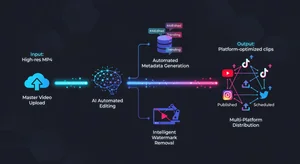
Compare that to manually editing 40 videos, writing 40 different captions, uploading to 40 platforms individually. That would be 20+ hours minimum. The automation makes this sustainable.
What Actually Matters in Execution
Theory is easy. Execution is where most people fail. Here's what I learned the hard way.
Start with five platforms, not 40. Build the workflow for YouTube, TikTok, Instagram, LinkedIn, and Twitter first. Get that working smoothly. Then expand. Trying to configure 40 platforms at once is overwhelming and leads to abandoning the whole thing.
Batch your master content. I record four videos every Monday, giving me a month of content. The workflow processes all four at once, creating 160 variations total. Batching is more efficient than recording weekly.
Monitor quality obsessively for the first month. Automation can drift. Templates that worked perfectly week one might start producing weird crops by week three. Check the output regularly until you're certain it's stable.
Don't sacrifice quality for quantity. 40 mediocre videos aren't better than 10 great ones. The workflow enables scale, but only if the master video is worth scaling.
The Reality Check Nobody Mentions
This approach isn't for everyone. If you're creating highly artistic content where every frame is intentional, automated repurposing might strip away what makes your work special. If your entire value is personality and spontaneity, systematizing everything could make you feel mechanical.
But if you're teaching, demonstrating, informing, or documenting, this workflow is a multiplier. Your knowledge reaches more people. Your effort generates more return. Your content library grows exponentially instead of linearly.
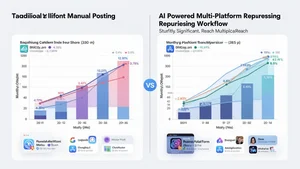
The math is simple. One video manually posted to five platforms reaches five audiences. One video automatically repurposed to 40 platforms reaches 40 audiences. Same work input. 8x the output. Over a year, that compounds into entirely different levels of reach and impact.
Where This Goes Next
I'm watching AI video tools get better at understanding context. Soon, the system won't just resize and reformat. It'll adjust tone, pacing, and messaging based on platform culture without me building templates.
Imagine uploading one video and having AI automatically make it funnier for TikTok, more professional for LinkedIn, more inspiring for Instagram, more informational for YouTube. Not just technically adapted, but creatively reimagined for each audience.
We're not there yet. But the foundation I've built now positions me to use those tools when they arrive. The workflow is the infrastructure. The AI capabilities will keep improving inside that infrastructure.
For now, this system works. One video becomes 40. One hour of recording becomes a week of content across every platform that matters. That's multiplication, not exhaustion. And in a landscape where consistency wins, multiplication is everything.