
Top 15 AI Photo Filters Trending on Instagram & TikTok | Cliptics
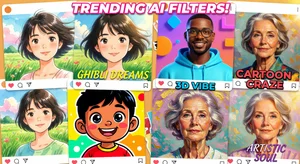
If you have spent any time on Instagram or TikTok in 2026, you have seen them. Portraits transformed into anime characters. People rendered in Pixar-style 3D. Photos given the dreamy aesthetic of a Studio Ghibli film. These AI photo filters have taken over social media feeds and the engagement numbers are genuinely striking.
The trend is not slowing down. If anything, the variety and quality of AI photo filters is expanding rapidly. Here is a complete guide to the 15 most popular styles and how to apply them to your own photos.
What Makes AI Photo Filters Different
Traditional photo filters (the kind that have been around since the early Instagram days) adjust color, contrast, and saturation. They work on the existing pixels in your photo.
AI photo filters do something fundamentally different. They analyze your photo and regenerate it in a completely different visual style. The output is not the same photo with adjusted colors. It is a new artistic interpretation of your photo in a different style. This is why the results are so dramatically different from anything a simple filter could produce.
Cliptics AI Photo Filters supports a wide range of styles that you can apply to your own photos directly in the browser.
The 15 Trending AI Filter Styles
1. Studio Ghibli
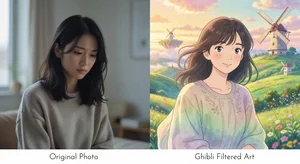
The Ghibli filter transforms photos into the soft, painterly aesthetic of Studio Ghibli films like Spirited Away and My Neighbor Totoro. Backgrounds become lush and impressionistic. Faces take on the characteristic simplified features of Ghibli characters. The color palette shifts toward warm, desaturated earth tones with pops of vivid color.
This filter works especially well for outdoor portrait photos with interesting backgrounds. Natural settings respond particularly beautifully.
2. Pixar 3D Avatar
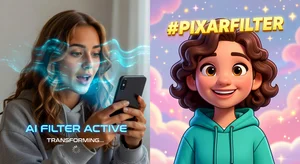
Possibly the most viral filter style of 2026. The Pixar 3D filter renders you as a character who could step right out of a Pixar animated film. Large expressive eyes, smooth skin textures that read as CGI, and the characteristic Pixar quality of light.
The results are convincing enough that many people use them as profile photos. They retain your recognizable features while clearly existing in an animated world.
3. Anime / Shonen Battle
Different from Ghibli, the anime filter leans into the hyper-detailed, action-oriented aesthetic of popular anime series. Sharper lines, more dramatic shading, saturated colors, and the distinctive eye style of contemporary anime.
Works best with confident, forward-facing poses. Popular with gaming and anime communities on TikTok.
4. Apple Memoji / 3D Cartoon
A more minimal, clean cartoon aesthetic similar to Apple's Memoji system. Softer than Pixar, more geometric than Ghibli. Creates a branded, modern look that reads as intentionally tech-forward.
5. Cyberpunk / Neon Futuristic
Dark backgrounds, neon color highlights, and a dystopian futuristic atmosphere. Adds dramatic lighting, holographic elements, and a color palette dominated by electric blue, purple, and pink.
Performs extremely well in tech-forward communities and for gaming content creators.
6. Classic Cartoon Character
The old-school cartoon aesthetic: bold outlines, flat color fills, limited shading. Think 1950s and 1960s American animation. Nostalgic and instantly recognizable.
7. Oil Painting / Impressionist
Transforms your photo into what appears to be a hand-painted oil portrait. Visible brushstrokes, rich color saturation, and the warm, timeless quality of classical portraiture.
Works best with close-up portrait photos in good lighting.
8. Pencil Sketch / Graphite Drawing
Converts your photo into a detailed pencil drawing. Hatching, shading, and the slight texture of paper. Works in both high-detail realistic style and loose, gestural sketch style.
9. Watercolor
The delicate, translucent aesthetic of watercolor paintings. Colors bleed slightly into each other. Edges are soft. The overall effect is dreamy and gentle.
10. Chibi / Cute Figurine
The chibi style renders subjects as small, adorably proportioned characters with oversized heads and simplified features. Extremely popular in East Asian social media communities and spreading globally.
11. Vintage Era / Retro
Places your photo in a specific historical decade. 1970s film grain. 1980s neon. 1990s faded color. The era-specific aesthetic creates instant nostalgia.
12. Fantasy Character
Transforms you into a fantasy genre character with elaborate costuming, pointed ears, dragon-scale textures, or other fantastical elements overlaid on your actual face.
13. Plush Toy
Renders you as a fabric plush toy, complete with stitching, soft textures, and the rounded forms of stuffed animals. Unexpectedly charming.
14. Superhero Costume
Places you in a superhero costume appropriate to your features, with dramatic lighting and a dynamic composition typical of comic book art.
15. Artistic Black and White Portrait
High-contrast monochrome rendering with cinematic quality. Not a simple desaturation filter, but a genuine stylistic transformation that enhances edges, adjusts tonal distribution, and produces a studio portrait quality.
How to Get the Best Results
The quality of your AI filter output depends significantly on your input photo.
Use well-lit, sharp photos. AI models perform better with clear, detailed input. Blurry or dark photos produce lower quality results.
Face forward or at a slight angle. Extreme profile shots or photos where the face is obscured produce less accurate results.
Simple backgrounds work better than cluttered ones. The AI can focus on the subject rather than trying to parse complex background details.
Higher resolution input produces higher resolution output. Use the best quality photo you have available.
Start with Cliptics AI Photo Filters to apply any of these styles directly in your browser without installing any software.
Using AI Filters Ethically
As a note of responsibility: AI filters are for creative expression and fun. The most popular, authentic creators on social media are transparent about using AI filters when they do. Labeling filtered content as AI-generated maintains trust with your audience and is increasingly becoming an expected practice.
The creative possibilities here are genuinely exciting. Try a few styles and see which aesthetic resonates with how you want to express your identity online.